HYBRID CONTROL SYSTEM DTC CHECK / CLEAR

-
CHECK FOR DTCS
-
Connect the Techstream to the DLC3.
-
Turn the power switch on (IG).
-
Turn the Techstream on.
-
Enter the following menus: Powertrain / Hybrid Control / Trouble Codes.
-
Check the DTCs and freeze frame data, and then write them down.
-
Check the details of the DTCs Click here.
-
-
CHECK FREEZE FRAME DATA AND INFORMATION
-
If a DTC is present, select it in order to display its freeze frame data.
-
Read the freeze frame data recorded when the DTC was set.
Note
A 3-digit information code (INF code) will be displayed as the value for one of the Information 1 to Information 5 lines.
-
Read the information for the information code.
-
Select the item from among Information 1 to Information 5 that has an information code and click the engine icon to view the additional information.
-
-
-
CHECK FOR DTCS (SYSTEMS OTHER THAN POWER MANAGEMENT CONTROL ECU)
Tech Tips
The power management control ECU maintains communication with other computers, including the ECM, skid control ECU and power steering ECU. Therefore, if the power management control ECU outputs a warning, it is necessary to check and record the DTCs of all systems.
-
If DTCs are present, check the relevant systems.
Tech Tips
If DTCs for the CAN communication system are present in addition to other DTCs, first troubleshoot and repair any malfunctions in the CAN communication system.
-
-
CLEAR DTCS
Note
Clearing the DTCs will also clear the freeze frame data, information Click here, and operation history data Click here.
-
Connect the Techstream to the DLC3.
-
Turn the power switch on (IG).
-
Turn the Techstream on.
-
Check that the shift lever in P.
-
Enter the following menus: Powertrain / Hybrid Control / Trouble Codes.
-
Clear DTCs and freeze frame data.
-
-
CLEAR PERMANENT DTC
Tech Tips
Even if the following procedure is not performed, permanent DTCs are cleared by obtaining a normal judgment during 3 consecutive driving cycles.
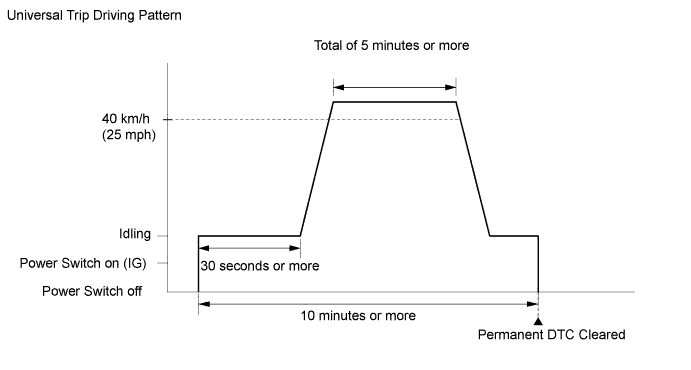
-
Connect the Techstream to the DLC3.
-
Turn the power switch on (IG).
-
Turn the Techstream on.
-
Enter the following menus: Powertrain / Hybrid Control / Trouble Codes.
-
Check if permanent DTCs are stored.
Tech Tips
If permanent DTCs are not output, it is not necessary to continue this procedure.
-
Clear the DTCs.
-
Perform the respective confirmation driving patterns in order to obtain a normal judgment for the output DTCs.
Tech Tips
-
Confirmation driving patterns do not need to be performed for misfire and fuel system DTCs.
-
For the confirmation driving pattern, refer to the procedures for the relevant DTC Click here.
-
-
Perform the universal trip.
Tech Tips
The driving pattern to obtain a normal judgment and the universal trip driving can be performed consecutively in the same driving cycle.
-
Put the engine in inspection mode Click here.
-
Idle the engine for 30 seconds or more.
-
Drive the vehicle at 40 km/h (25 mph) or more for a total of 5 minutes or more.
Tech Tips
It is possible to complete the drive pattern even if the vehicle decelerates to less than 40 km/h (25 mph) during the driving cycle provided that the vehicle is driven at 40 km/h (25 mph) or more for a total of 5 minutes.
-
Allow 10 minutes or more to elapse from the time the engine is started.
-
-
Enter the following menus: Powertrain / Hybrid Control / Trouble Codes.
-
Check that the permanent DTCs have been cleared.
Tech Tips
The permanent DTCs are cleared when the universal trip is completed.
-