SFI SYSTEM, Diagnostic DTC:P3193

| DTC Code | DTC Name |
|---|---|
| P3193 | Fuel Run Out |
DESCRIPTION
The ECM receives the fuel empty low level signal from the combination meter sub-assembly (meter ECU) to detect if the vehicle is running out of fuel.
| DTC No. | DTC Detection Condition | Trouble Area |
|---|---|---|
| P3193 | All of the following conditions are met (1 trip detection logic):
|
- (This DTC indicates that the vehicle ran out of fuel and does not indicate the malfunction of a part.) |
MONITOR DESCRIPTION
This DTC indicates that the vehicle ran out of fuel. If the ECM receives the fuel low level signal from the combination meter sub-assembly (meter ECU) and the DTC detection conditions of either DTC P3190 or P3191 are met while the power switch is on (IG) or the engine is operating, the ECM stores this DTC.
CONFIRMATION DRIVING PATTERN
Note
If the MIL or master warning light illuminates, stop the road test immediately. When DTC P3190, P3191 or P3193 is stored, the vehicle can be driven only a short distance as the engine operation is disabled and the HV battery is not being charged.
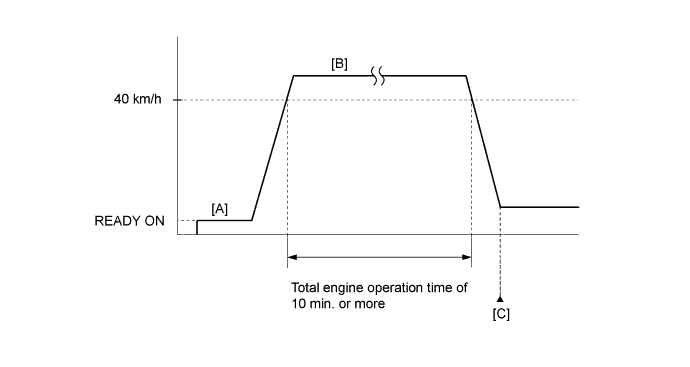
-
Apply the parking brake firmly.
-
Connect the Techstream to the DLC3.
-
Turn the power switch on (IG) and turn the Techstream on.
-
Clear the DTCs (even if no DTCs are stored, perform the clear DTC procedure).
-
Turn the power switch off and wait for at least 30 seconds.
-
Turn the power switch on (READY) and turn the Techstream on.
-
Fully depress the accelerator pedal for 10 seconds with the vehicle stopped, shift lever in P and the brake pedal depressed. [A]
Note
As soon as the engine starts, release the accelerator pedal.
-
Drive the vehicle at an average of approximately 40 km/h (25 mph) or more until the total engine operation time is 10 minutes or more. [B]
CAUTION:
When performing the confirmation driving pattern, obey all speed limits and traffic laws.
Tech Tips
It is not necessary to maintain the vehicle speed at 40 km/h (25 mph) throughout the road test.
-
Enter the following menus: Powertrain / Engine and ECT / Trouble Codes. [C]
-
Read the DTCs (include pending DTCs).
Tech Tips
-
If a pending DTC is output, the system is malfunctioning.
-
If a pending DTC is not output, perform the following procedure.
-
-
Enter the following menus: Powertrain / Engine and ECT / Utility / All Readiness.
-
Input the DTC: P3193.
-
Check the DTC judgment result.
Techstream Display Description NORMAL
-
DTC judgment completed
-
System normal
ABNORMAL
-
DTC judgment completed
-
System abnormal
INCOMPLETE
-
DTC judgment not completed
-
Perform driving pattern after confirming DTC enabling conditions
N/A
-
Unable to perform DTC judgment
-
Number of DTCs which do not fulfill DTC preconditions has reached ECU memory limit
Tech Tips
-
If the judgment result shows NORMAL, the system is normal.
-
If the judgment result shows ABNORMAL, the system has a malfunction.
-
If the judgment result shows INCOMPLETE or N/A, idle the engine for 10 seconds or more and check the DTC judgment result again.
-
-
If no pending DTC is output, perform a universal trip and check for permanent DTCs Click here.
Tech Tips
-
If a permanent DTC is output, the system is malfunctioning.
-
If no permanent DTC is output, the system is normal.
-
INSPECTION PROCEDURE
Tech Tips
-
When DTC P3190, P3191 or P3193 is stored, engine operation is disabled. In this case, add fuel or perform a repair, then clear the DTCs and turn the power switch off to allow the operation to return to normal.
-
When DTC P3190, P3191 or P3193 is stored, the HV battery is not charged as the vehicle operates using only the motor. If the vehicle is driven in this condition, the SOC will drop and the HV battery will be depleted, preventing the system from entering the READY-on state.
PROCEDURE
-
CHECK SHORTAGE OF FUEL
-
Check the amount of fuel remaining.
OK There is enough fuel. Tech Tips
-
DTCs P3190, P3191 and/or P3193 may be output if the vehicle ran out of fuel in the past.
-
If not enough fuel is added, DTC P3190, P3191 or P3193 may be output again. If the engine cannot be started because the vehicle is out of fuel, add fuel until the fuel level warning light turns off.
Result Result Proceed to NG A OK B -
B 
CHECK WHETHER DTC OUTPUT RECURS (DTC P3193) Click here
A 
-
-
REFILL FUEL
-
Add fuel until the fuel level warning light turns off.
NEXT
-
-
CHECK WHETHER DTC OUTPUT RECURS (DTC P3193)
-
Connect the Techstream to the DLC3.
-
Turn the power switch on (IG).
-
Turn the Techstream on.
-
Clear the DTCs Click here.
-
Turn the power switch off and wait for at least 30 seconds.
-
Turn the power switch on (READY).
-
Turn the Techstream on.
-
Drive the vehicle in accordance with the driving pattern described in the Confirmation Driving Pattern.
-
Enter the following menus: Powertrain / Engine and ECT / Trouble Codes / Pending.
-
Read the pending DTCs.
Result Result Proceed to DTC is not output A DTC P3190 or P3191 is output B DTC P3190 or P3191 and other DTCs are output C
B 
GO TO DTC P3190, P3191 Click here
C
GO TO DTC CHART Click here
A 
END
-