BLACK OUT TAPE (for Front Door) INSTALLATION

-
REPAIR INSTRUCTION
-
Clean the vehicle body surface.
-
Using a heat light, heat the vehicle body surface.
Heating Temperature Item Temperature Vehicle Body 40 to 60°C (104 to 140°F) Note
Do not heat the vehicle body excessively.
-
Wipe off any tape adhesive residue with cleaner.
-
-
Installation temperature
-
When the ambient temperature is below 15°C (59°F), perform the installation procedure after warming the vehicle body surface (installation surface of the door frame) and tape up to between 20 and 30°C (68 and 86°F) using a heat light. When the ambient temperature is above 35°C (95°F), cool the vehicle body surface (installation surface of the door frame) and tape down to between 20 and 30°C (68 and 86°F) prior to installation.
Tech Tips
-
The most appropriate temperature for installing the tape is 25°C (77°F).
-
When the temperature is low, the tape turns stiff and comes off easily. When the temperature is high, the tape looses elasticity.
-
-
-
Before installation
-
Remove any coating roughness or dirt on and around the vehicle body surface where the tape will be installed (installation surface of the door frame). If any roughness or dirt remains when pressing the tape onto the surface, air will be trapped under the tape and result in a poor appearance.
Tech Tips
Spray water on the shop floor to settle any dust.
-
-
Key points for handling the tape
-
The tape bends and rolls up easily. Store the tape between flat pieces of cardboard or other similar objects and keep it dry and level.
Note
Do not bend the tape or leave it in high temperature places.
-
-
Key points for installation of the tape (how to use a squeegee and installation procedure for flat surfaces)
Note
-
Position the tape accurately to achieve a neat finish and to avoid peeling.
-
The tape cannot be reused because it deforms and will not fit any more after being removed.
-
To avoid air bubbles, slightly raise the part of the tape that is going to be applied so that its adhesive surface does not touch the vehicle body while applying the tape. Tilt the squeegee at 40 to 50° (pressing forward) or 30 to 45° (pulling) to the vehicle body surface and press the tape onto the vehicle body surface with a force of 20 to 30 N (2 to 3 kgf) at a constant slow speed of 3 to 7 cm (1.18 to 2.76 in.) per second.
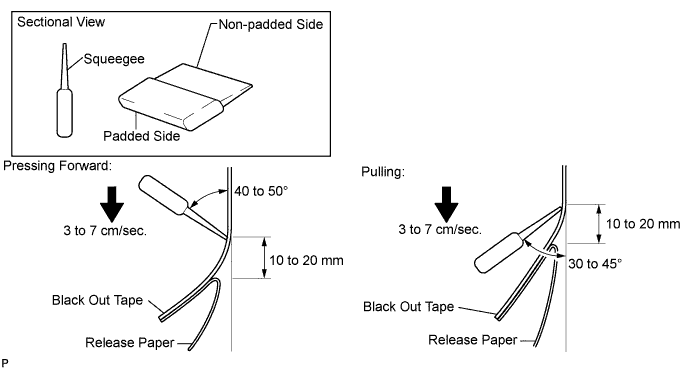
Note
Be sure to observe the specified pressing speed, force, and angle of the squeegee to avoid wrinkles or air bubbles.
Tech Tips
-
Either angle of the squeegee (pressing forward or pulling) is acceptable.
-
Be sure to apply the tape while removing the release paper 10 to 20 mm (0.394 to 0.787 in.) from the edge of the squeegee.
-
-
-
Key points for installation of the tape (how to use a squeegee and installation procedure for hemmed surfaces)
-
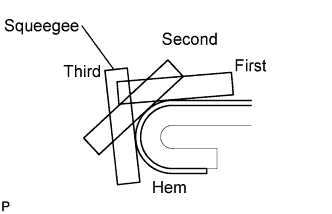
If it is difficult to apply the tape, install it in several steps as shown in the illustration. Use your fingers or the padded surface of a squeegee to slowly apply the tape to the hem of the vehicle, especially for a small hem.
Tech Tips
When applying tape to the backside of a hem, remove the release paper and use your fingers or the padded surface of a squeegee.
-
-
Key points for installation of the tape (how to use a squeegee and installation procedure for corners)
-
Remove the release paper and apply the tape carefully with your fingers.
-
Before applying the tape to each corner, heat the tape using a heat light and gradually apply it, avoiding wrinkles on the tape to achieve a neat finish.
-
-
Check after installation
-
After completing the application, check if the tape is applied neatly. If the tape is not applied neatly, reapply using new tape.
Note
Do not reuse the tape.
-
-
-
INSTALL NO. 1 BLACK OUT TAPE
-
Refer to the illustration to position the No. 1 black out tape.
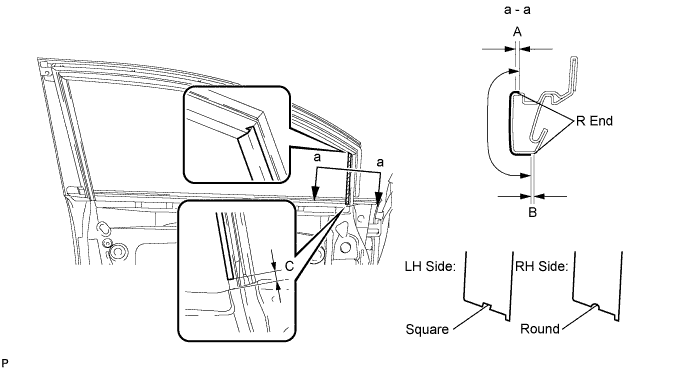
Standard Measurement Dimension Measurement A +1.5 mm (+0.0591 in.) B -1.0 mm (-0.0394 in.) C 7.0 mm (0.276 in.) -
Remove the release paper and apply the tape.
-
-
INSTALL FRONT DOOR LOWER OUTSIDE STRIPE
-
Refer to the illustration to position the front door lower outside stripe.
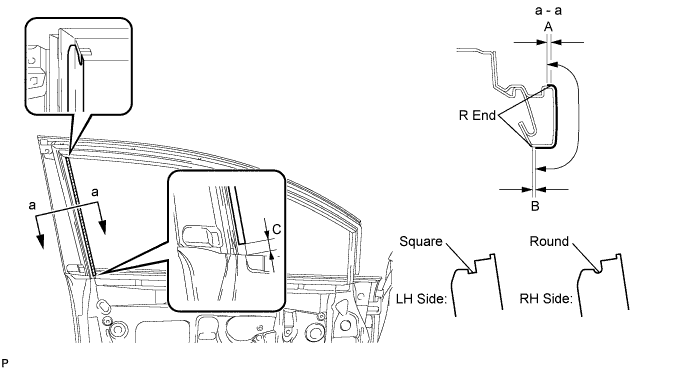
Standard Measurement Dimension Measurement A +1.5 mm (+0.0591 in.) B -1.0 mm (-0.0394 in.) C 7.5 mm (0.295 in.) -
Remove the release paper and apply the stripe.
-
-
INSTALL FRONT DOOR STRIPE
-
Refer to the illustration to position the front door stripe.
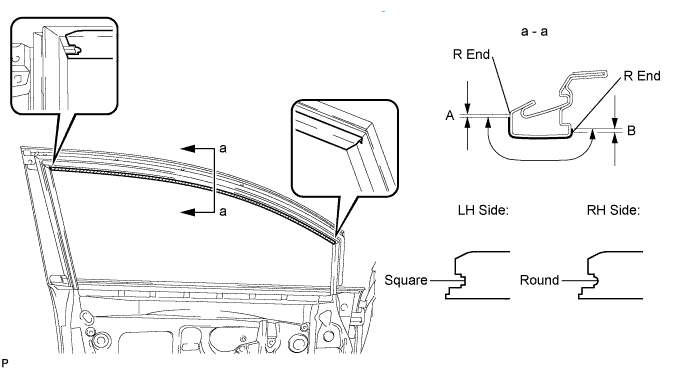
Standard Measurement Dimension Measurement A +1.5 mm (+0.0591 in.) B -1.0 mm (-0.0394 in.) -
Remove the release paper and apply the stripe.
-
-
CONNECT FRONT DOOR WEATHERSTRIP
-
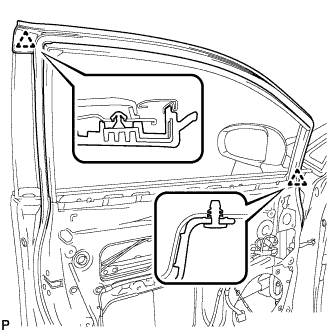
Engage the 2 clips and connect the front door weatherstrip.
-
-
INSTALL FRONT DOOR GLASS RUN
-
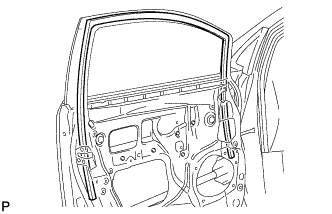
Install the front door glass run.
-
-
INSTALL FRONT DOOR GLASS SUB-ASSEMBLY
-
Connect the cable to the negative (-) battery terminal.
-
Connect the power window regulator master switch assembly and move the front door glass sub-assembly so that the door glass bolts can be seen.
-
Disconnect the cable from the negative (-) battery terminal and power window regulator master switch assembly.
-
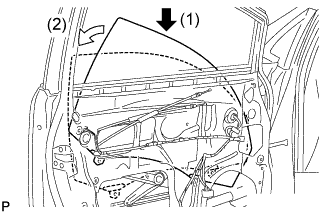
Insert the front door glass sub-assembly into the front door panel along the front door glass run as indicated by the arrows, in the order shown in the illustration.
-
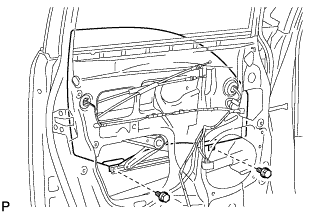
Install the front door glass sub-assembly with the 2 bolts.
- Torque:
- 8.0 N*m { 82 kgf*cm, 71 in.*lbf }
-
-
INSTALL FRONT DOOR SERVICE HOLE COVER
-
Apply butyl tape to the front door panel.
-
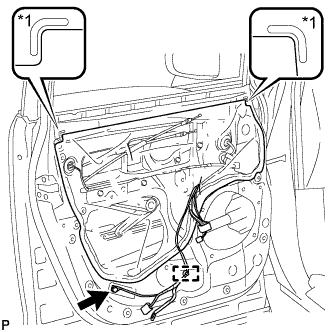
Text in Illustration *1 Reference Point Pass the front door lock remote control cable assembly and front door inside locking cable assembly through a new front door service hole cover.
-
Attach the front door service hole cover according to the reference points on the front door panel.
Note
Securely install the front door service hole cover preventing wrinkles and air bubbles.
-
Engage the clamp.
-
Install the bolt.
- Torque:
- 8.0 N*m { 82 kgf*cm, 71 in.*lbf }
-
-
INSTALL FRONT NO. 1 SPEAKER ASSEMBLY
-
Install the front No. 1 speaker assembly with the 4 bolts.
-
Connect the connector.
-
-
INSTALL DOOR SIDE AIRBAG SENSOR
-
Check that the ignition switch is off.
-
Check that the cable is disconnected from the negative (-) battery terminal.
CAUTION:
Wait at least 90 seconds after disconnecting the cable from the negative (-) battery terminal to disable the SRS system.
-
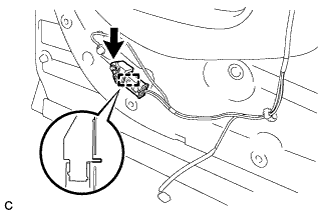
Insert the pin (stopper) into the door hole and install the door side airbag sensor to the vehicle with the bolt.
- Torque:
- 9.0 N*m { 92 kgf*cm, 80 in.*lbf }
Note
-
If the door side airbag sensor has been dropped, or there are any cracks, dents or other defects in the case or connector, replace it with a new one.
-
When installing the door side airbag sensor, be careful that the SRS wiring does not interfere with or is not pinched between other parts.
-
Make sure that the pin (stopper) is securely inserted into the door hole.
-
Tighten the bolt while holding the door side airbag sensor because the door side airbag sensor pin (stopper) is easily damaged.
-
Connect the connector to the door side airbag sensor.
Note
When connecting the airbag connector, take care not to damage the airbag wire harness.
-
Before connecting the connector, check that the position of the white housing lock is correct as shown in the illustration.
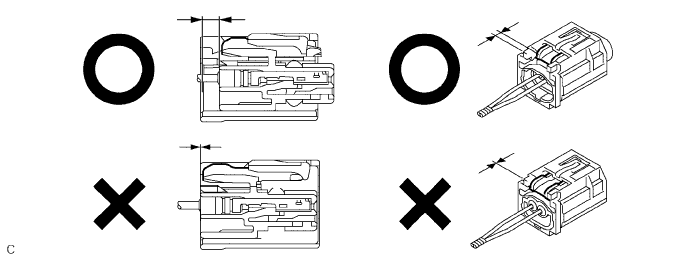
-
Be sure to engage the connectors until they are locked (When locking, make sure that a click sound can be heard).
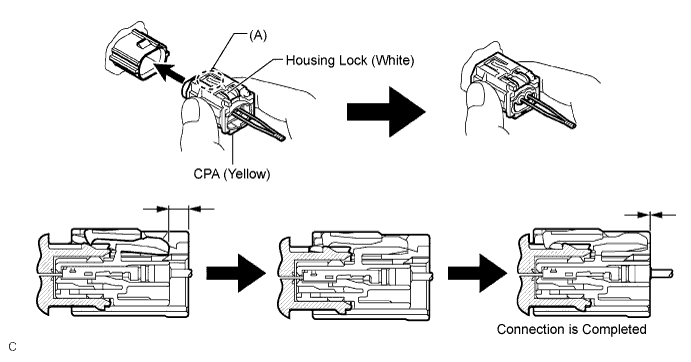
Tech Tips
When engaged, the white housing lock will slide. Be sure not to hold the white housing lock and part (A), as it may result in an insecure fit.
-
-
Check that there is no looseness in the installation parts of the door side airbag sensor.
-
-
INSTALL DOOR FRAME GARNISH
-
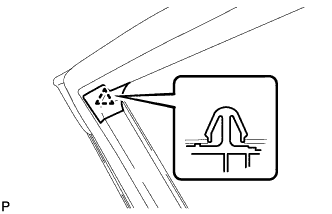
Engage the clip to install a new door frame garnish.
-
-
INSTALL FRONT DOOR INSIDE HANDLE SUB-ASSEMBLY
-
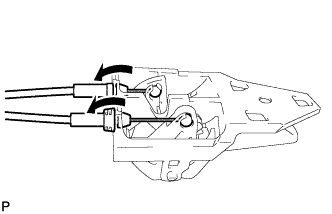
Connect the front door lock remote control cable assembly and front door inside locking cable assembly to the front door inside handle.
-
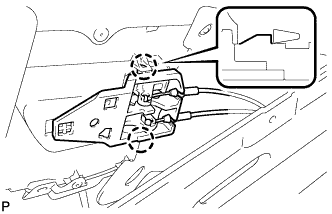
Engage the 2 claws and install the front door inside handle sub-assembly to the rear door trim board sub-assembly.
-
-
INSTALL FRONT DOOR TRIM BOARD SUB-ASSEMBLY
-
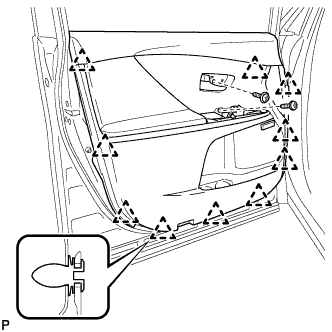
Engage the 10 clips and install the front door trim board sub-assembly.
-
Install the 2 screws.
-
-
INSTALL COURTESY LIGHT ASSEMBLY
-
Connect the connector.
-
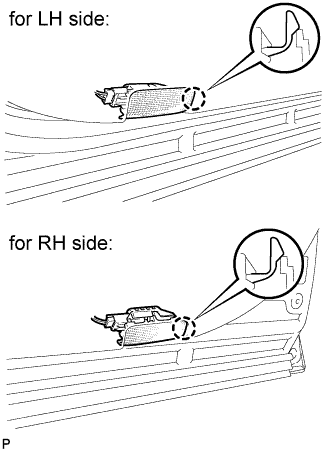
Engage the claw to install the courtesy light assembly.
-
-
INSTALL POWER WINDOW REGULATOR MASTER SWITCH ASSEMBLY WITH FRONT DOOR ARMREST BASE PANEL (for Driver Side)
-
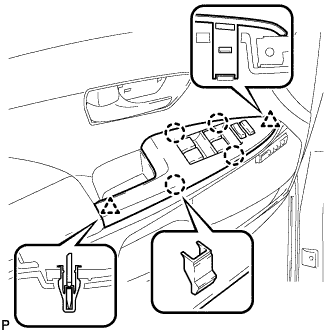
Connect the connector.
-
Engage the 2 clips and 4 claws, and install the power window regulator master switch assembly with front door armrest base panel.
-
-
INSTALL POWER WINDOW REGULATOR SWITCH ASSEMBLY WITH FRONT DOOR ARMREST BASE PANEL (for Front Passenger Side)
-
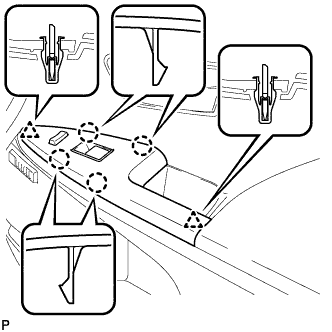
Connect the connector.
-
Engage the 2 clips and 4 claws, and install the power window regulator switch assembly with front door armrest base panel.
-
-
INSTALL FRONT DOOR INSIDE HANDLE BEZEL PLUG
-
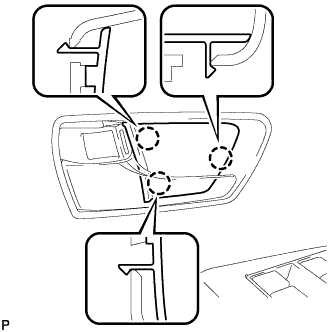
Engage the 3 claws and install the front door inside handle bezel plug.
-
-
CONNECT CABLE TO NEGATIVE BATTERY TERMINAL
Note
When disconnecting the cable, some systems need to be initialized after the cable is reconnected Click here.
-
INSPECT SRS WARNING LIGHT
-
INITIALIZE POWER WINDOW CONTROL SYSTEM