QUARTER WINDOW GLASS REMOVAL

Tech Tips
-
The front side fix window assembly can be reused. When installing the window, if any of the clips on the quarter window glass are broken, butyl tape can be used to support the glass until the applied adhesive hardens.
-
When using butyl tape to temporarily secure the window, make sure that the butyl tape is not applied exactly at the original clip location. If the butyl tape is applied exactly at the clip location, it will cause the window to protrude
-
Use the same procedure for the RH side and LH side.
-
The procedure listed below is for the LH side.
-
REMOVE REAR DOOR SCUFF PLATE
-
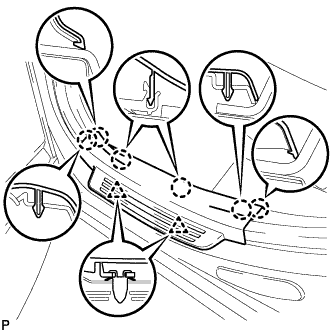
Disengage the 2 clips and 6 claws, and remove the rear door scuff plate LH.
-
-
DISCONNECT REAR DOOR OPENING TRIM WEATHERSTRIP
-
Disconnect the rear door opening trim weatherstrip.
-
-
REMOVE TONNEAU COVER ASSEMBLY
-
Remove the tonneau cover assembly.
-
-
REMOVE DECK BOARD ASSEMBLY
-
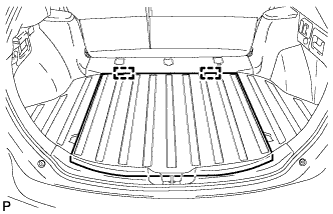
Disengage the 2 guides and remove the deck board assembly.
-
-
REMOVE NO. 3 DECK BOARD SUB-ASSEMBLY
-
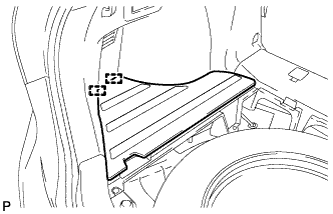
Disengage the 2 guides and remove the No. 3 deck board sub-assembly.
-
-
REMOVE DECK SIDE TRIM BOX LH
-
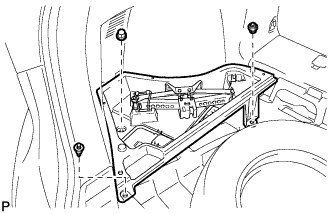
Remove the 3 clips and remove the deck side trim box LH.
-
-
REMOVE NO. 2 DECK BOARD SUB-ASSEMBLY
-
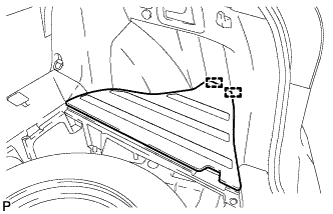
Disengage the 2 guides and remove the No. 2 deck board sub-assembly.
-
-
REMOVE DECK SIDE TRIM BOX RH
-
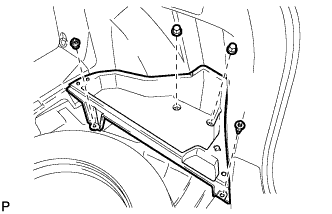
Remove the 4 clips and remove the deck side trim box RH.
-
-
REMOVE NO. 1 DECK BOARD
-
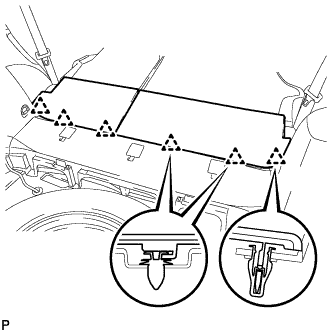
Disengage the 6 clips and remove the No. 1 deck board.
-
-
REMOVE REAR SEAT SUB FLOOR PANEL ASSEMBLY
-
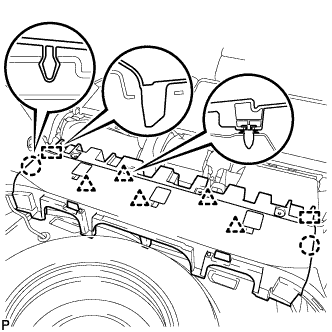
Disengage the 2 claws, 2 guides and 5 clips, and remove the rear seat sub floor panel assembly.
-
-
REMOVE REAR FLOOR FINISH PLATE
-
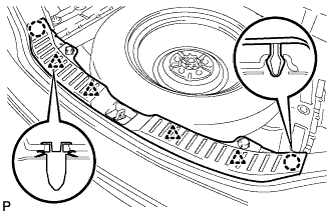
Disengage the 2 claws and 4 clips, and remove the rear floor finish plate.
-
-
REMOVE REAR SEAT ASSEMBLY LH (for LH Side)
-
REMOVE REAR SEAT ASSEMBLY RH (for RH Side)
-
REMOVE RECLINING REMOTE CONTROL BEZEL
-
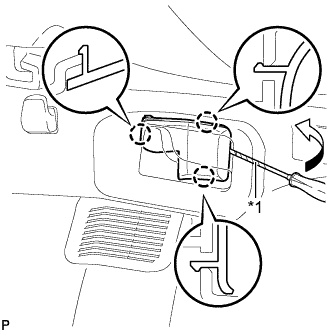
Text in Illustration *1 Protective Tape Using a screwdriver, disengage the 3 claws and remove the reclining remote control bezel LH.
Tech Tips
Tape the screwdriver tip before use.
-
-
REMOVE LUGGAGE HOLD BELT STRIKER ASSEMBLY
-
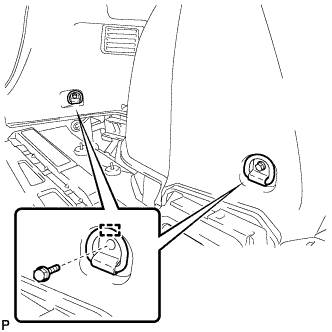
Remove the 2 bolts.
-
Disengage the 2 guides and remove the 2 luggage hold belt striker assemblies.
-
-
DISCONNECT REAR SEAT OUTER BELT ASSEMBLY
-
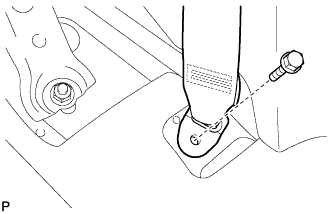
Remove the bolt and disconnect the floor end of the rear seat outer belt assembly.
-
-
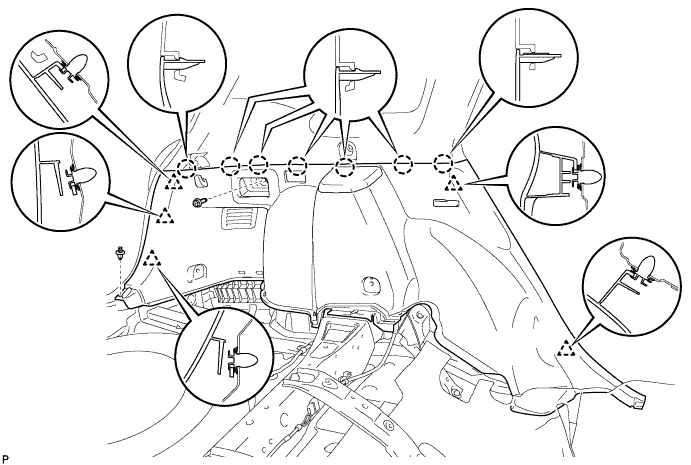
REMOVE DECK TRIM SIDE PANEL ASSEMBLY LH (for LH Side)
-
Remove the bolt and clip.
-
Disengage the 7 claws and 5 clips.
-
Disconnect the connector and remove the deck trim side panel assembly LH.
-
-
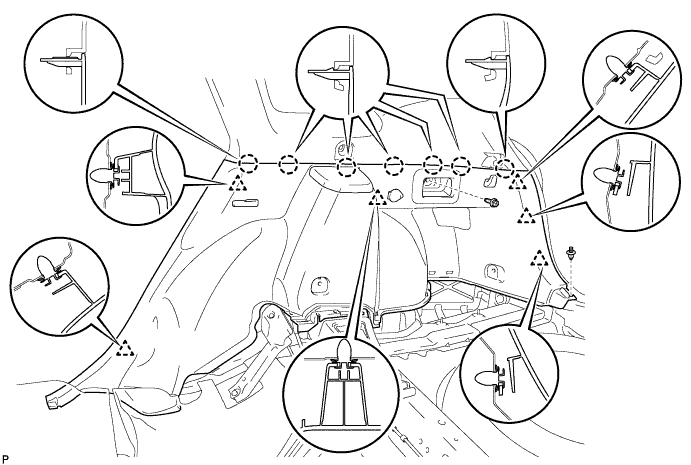
REMOVE DECK TRIM SIDE PANEL ASSEMBLY RH (for RH Side)
-
Remove the bolt and clip.
-
Disengage the 7 claws and 6 clips.
-
Disconnect each connector and remove the deck trim side panel assembly RH.
-
-
REMOVE ROOF SIDE INNER GARNISH ASSEMBLY
-
w/ Rear Speaker:
-
Disconnect the connector.
-
-
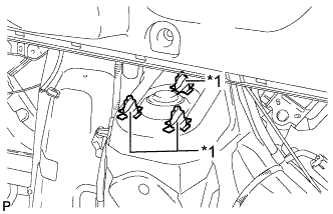
Text in Illustration *1 Protective Tape Put protective tape around the 3 stud bolts.
-
Remove the bolt and disengage the 10 clips.
-
Lift the lower edge of the roof side inner garnish assembly LH up and pull it out over the 3 stud bolts while ensuring ample clearance.
Note
Do not damage the roof headlining assembly or roof side inner garnish assembly.
-
Pass the floor anchor of the rear seat outer belt assembly LH through the roof side inner garnish assembly LH and remove the roof side inner garnish assembly LH.
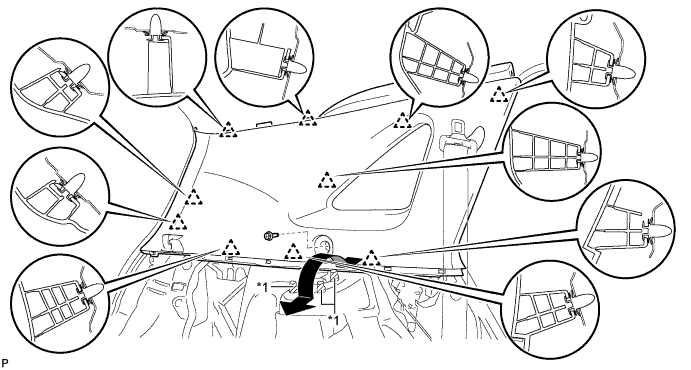
Text in Illustration *1 Stud Bolt - -
-
-
REMOVE QUARTER WINDOW ASSEMBLY
-
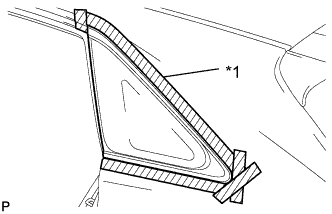
Text in Illustration *1 Protective Tape Apply protective tape to the outer surface of the vehicle body to prevent scratches.
-
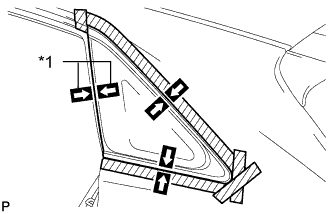
Text in Illustration *1 Matchmark Place matchmarks on the quarter window assembly and vehicle body on the locations indicated in the illustration.
Tech Tips
Do not allow the piano wire to interfere with the clips.
-
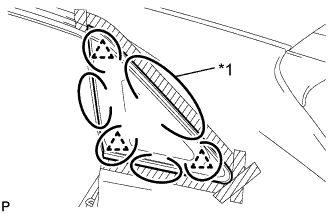
Text in Illustration *1 Piano Wire Pass a piano wire between the vehicle body and glass from the interior as shown in the illustration.
Tech Tips
Ensure not to interfere with the clips when passing the piano wire.
-
Tie both wire ends to wooden blocks or similar objects that can serve as handles.
Note
When separating the quarter window assembly from the vehicle, be careful not to damage the paint or interior and exterior ornaments.
-
Cut off the adhesive by pulling the piano wire around the quarter window assembly.
Note
Leave as much adhesive on the vehicle body as possible when cutting through the adhesive.
-
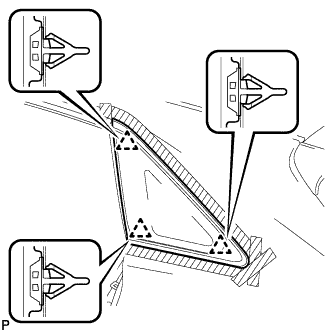
Disengage the 3 clips.
-
Using suction cups, remove the glass.
Note
Be careful not to drop the glass.
-
-
CLEAN VEHICLE BODY
-
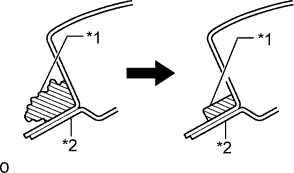
Text in Illustration *1 Adhesive *2 Vehicle Body Clean and shape the contact surfaces of the vehicle body.
-
Using a knife, cut away excess adhesive on the contact surfaces of the vehicle body as shown in the illustration.
Note
Be careful not to damage the vehicle body.
Tech Tips
Leave as much adhesive on the vehicle body as possible.
-
-
Clean the contact surfaces of the vehicle body with a piece of cloth saturated with cleaner.
Tech Tips
Even if all the adhesive has been removed, clean the vehicle body.
-