CONSOLE BOX LIGHT REMOVAL

-
REMOVE UPPER CONSOLE PANEL SUB-ASSEMBLY
-
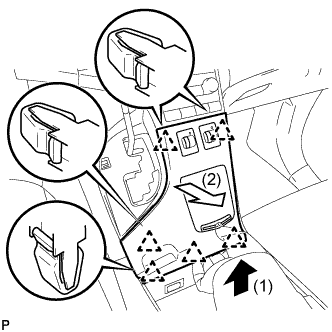
Pull the upper console panel sub-assembly in the direction indicated by the arrow to disengage the 6 clips.
-
Disconnect the connectors and remove the upper console panel sub-assembly.
-
-
REMOVE NO. 2 CONSOLE BOX CARPET
-
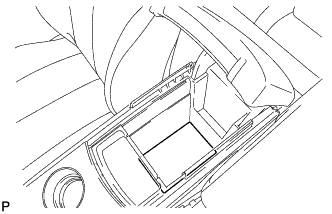
Remove the No. 2 console box carpet.
-
-
REMOVE CONSOLE BOX ASSEMBLY
-
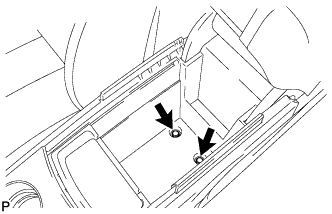
Remove the 2 bolts.
-
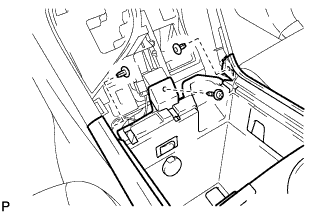
Remove the screw and 2 clips.
-
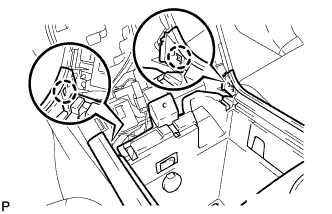
Disengage the 2 claws.
-
Disconnect the connectors and remove the console box assembly.
-
-
REMOVE CONSOLE MOUNTING RETAINER ASSEMBLY
-
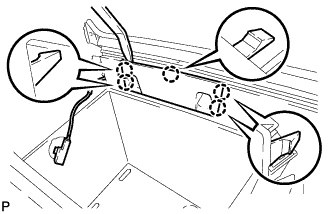
Using a moulding remover, disengage the 5 claws and remove the console mounting retainer assembly.
-
-
REMOVE CONSOLE BOX WIRE
-
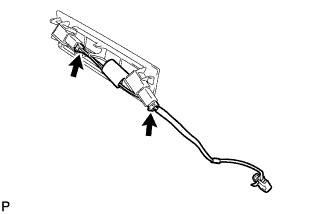
Disconnect the connectors to remove the console box wire.
-
-
REMOVE CONSOLE BOX ILLUMINATION LIGHT ASSEMBLY
-
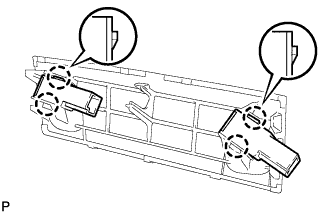
Disengage the 4 claws and remove the 2 console box illumination light assemblies.
-