ELECTRICAL KEY OSCILLATOR (for Front Floor) REMOVAL

-
REMOVE UPPER CONSOLE PANEL SUB-ASSEMBLY
-
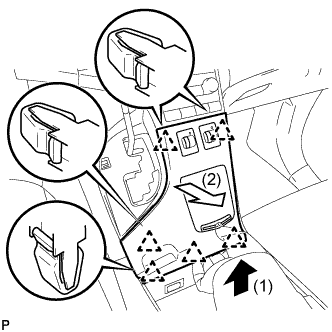
Pull the upper console panel sub-assembly in the direction indicated by the arrow to disengage the 6 clips.
-
Disconnect the connectors and remove the upper console panel sub-assembly.
-
-
REMOVE NO. 2 CONSOLE BOX CARPET
-
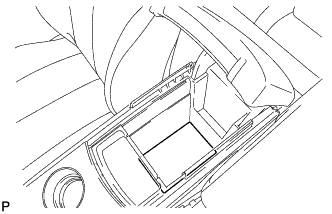
Remove the No. 2 console box carpet.
-
-
REMOVE CONSOLE BOX ASSEMBLY
-
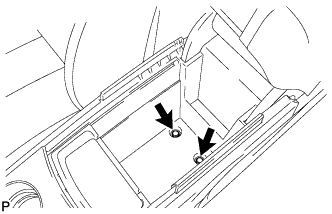
Remove the 2 bolts.
-
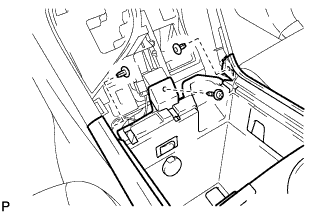
Remove the screw and 2 clips.
-
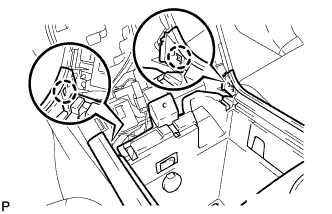
Disengage the 2 claws.
-
Disconnect the connectors and remove the console box assembly.
-
-
REMOVE ELECTRICAL KEY OSCILLATOR
-
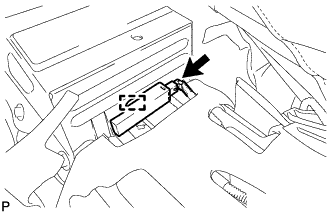
Disconnect the connector.
-
Disengage the clamp and remove the electrical key oscillator.
Note
Be careful when removing the electrical key oscillator. If the oscillator is dropped, replace it with a new one.
-