TRANSMITTER BATTERY (w/o Smart Entry and Start System) REPLACEMENT

-
REMOVE TRANSMITTER HOUSING COVER
-
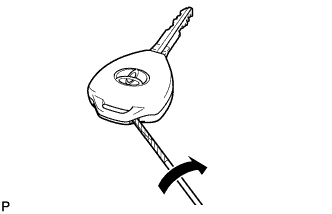
Using a precision screwdriver with its tip wrapped in protective tape, pry open the transmitter housing cover.
Note
Do not forcibly pry the cover.
Tech Tips
Tape the screwdriver tip before use.
-
-
REMOVE DOOR CONTROL TRANSMITTER MODULE
-
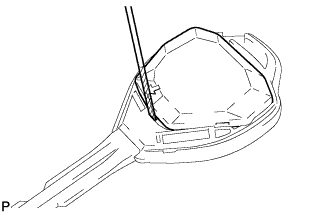
Using a precision screwdriver with its tip wrapped in protective tape, remove the door control transmitter module from the transmitter housing case.
Note
Handle each part with care as they are delicate electrical parts.
Tech Tips
Tape the screwdriver tip before use.
-
-
REMOVE TRANSMITTER BATTERY
-
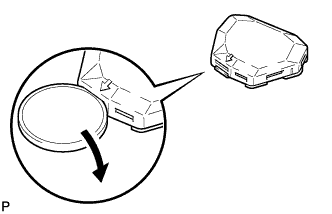
Twist the coin in the direction of the arrow in the illustration, and remove the transmitter battery cover.
-
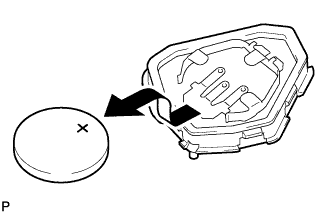
Remove the battery.
Note
-
Do not push the terminals with your finger.
-
Do not forcibly pry up the battery. The terminals may be damaged.
-
Do not touch the battery with wet hands. Water may cause rust.
-
Do not touch or move any components inside the transmitter. It may interfere with proper operation.
-
-
-
INSTALL TRANSMITTER BATTERY
-
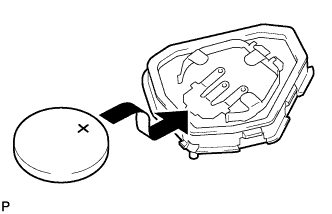
Install a battery with the positive (+) side facing upward, as shown in the illustration.
Note
-
Be careful not to bend the transmitter battery electrode during insertion.
-
Keep the transmitter cover interior free of dust and oil.
-
-
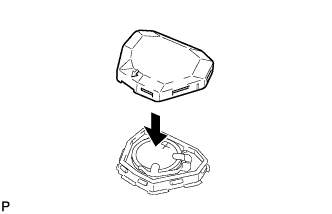
Install the cover.
-
-
INSTALL DOOR CONTROL TRANSMITTER MODULE
-
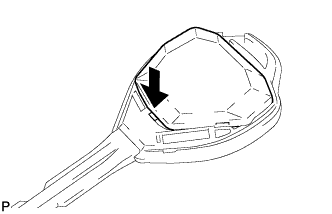
Install the door control transmitter module into the transmitter housing case.
-
-
INSTALL TRANSMITTER HOUSING COVER
-
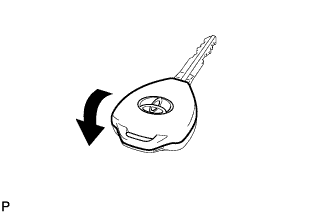
Install the transmitter housing cover to the transmitter housing case.
-
Check that the transmitter LED illuminates when the switch is pressed.
OK Transmitter LED illuminates when switch is pressed.
-