WIRELESS DOOR LOCK CONTROL SYSTEM (w/o Smart Entry and Start System) DTC CHECK / CLEAR

-
DTC CHECK/CLEAR (USING GTS)
-
CHECK DTC
-
Connect the GTS to the DLC3.
-
Turn the ignition switch on (IG).
-
Read the DTC by following the prompts on the GTS screen.
Tech Tips
Refer to the GTS operator's manual for further details.
-
-
CLEAR DTC
-
Connect the GTS to the DLC3.
-
Turn the ignition switch on (IG).
-
Clear the DTC by following the directions on the GTS screen.
Tech Tips
The GTS has a SNAPSHOT function which records the monitored data.
Refer to the GTS operator's manual for further details.
-
-
-
SELF-DIAGNOSTIC MODE (OPERATING IGNITION KEY CYLINDER)
-
Switch to self-diagnostic mode.
-
Insert the key into the ignition key cylinder and remove it.
-
Within 5 seconds after the key is removed, insert it into the ignition key cylinder and then turn the ignition switch to ON then off once. (End in off)
-
Within 30 seconds after turning the ignition switch off, perform the following 9 times: Turn the ignition switch to ON then off. (End in off)
Tech Tips
Turning the ignition switch to ON after the procedure above has been completed will end the self-diagnostic mode.
Note
If the system fails to enter self-diagnostic mode, the system will return to normal mode.
-
-
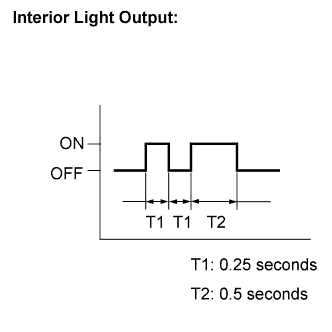
Check that the system has switched to self-diagnostic mode by checking the interior light output pattern.
-
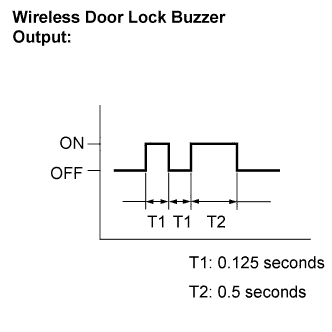
Check that the system has switched to self-diagnostic mode by checking the wireless door lock buzzer output pattern.
-
Check the diagnostic outputs when the door control transmitter switch is held down. The diagnostic outputs can be checked by the interior light and wireless door lock buzzer patterns.
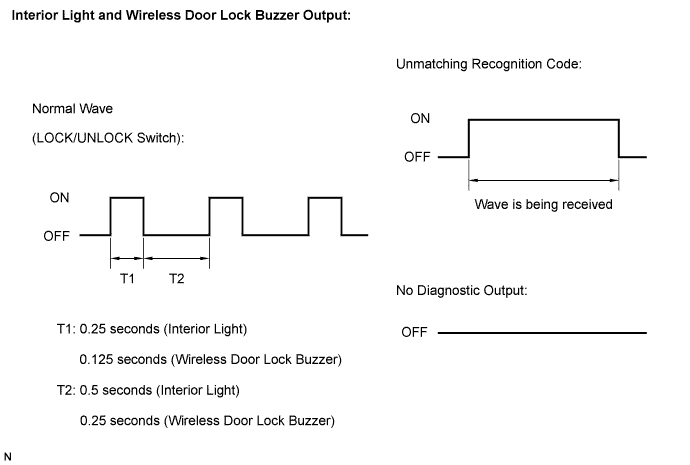
-
-
SELF-DIAGNOSTIC MODE (USING GTS)
-
Switch to self-diagnostic mode.
-
Connect the GTS to the DLC3.
-
Turn the ignition switch to ON and turn the GTS main switch on.
Tech Tips
Refer to the GTS operator's manual for further details.
-
-