G-BOOK SYSTEM SYSTEM DESCRIPTION

-
G-BOOK SYSTEM OUTLINE
-
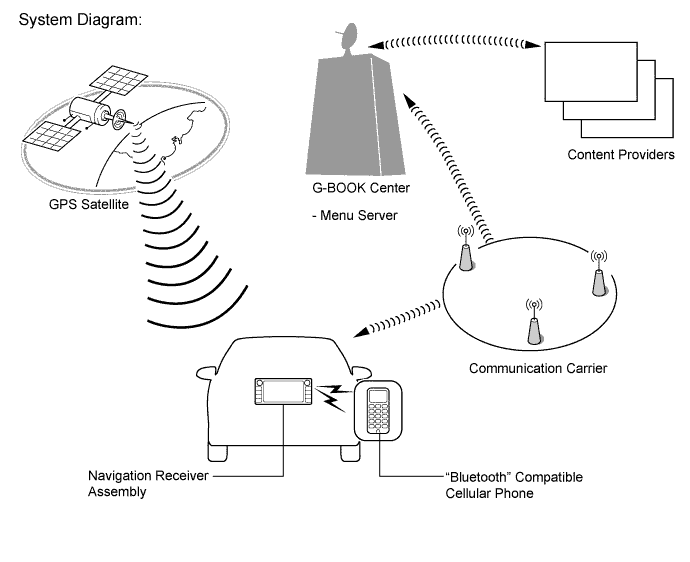
The G-BOOK system is a telematics service that links the vehicle and G-BOOK network (provides information from the G-BOOK center or content providers).
-
To use the G-BOOK system, it is necessary to connect a "Bluetooth" compatible cellular phone to the navigation receiver assembly.
-
The user needs to follow the instructions on the navigation receiver assembly to start using the G-BOOK system service after applying for the service at a dealership.
-
-
FUNCTION OF MAIN COMPONENTS
Component Function Inner Rear View Mirror Assembly
-
Telephone Microphone Assembly
When the operator service is used: Sends the microphone voice signal to the navigation receiver assembly. Navigation Antenna Assembly Receives GPS radio waves and sends them to the navigation receiver assembly. Navigation Receiver Assembly
-
Uses a "Bluetooth" compatible cellular phone to send and receive the data and voice signals used for the G-BOOK service through a communication network.
-
Sends and receives the data used for the G-BOOK service to and from a "Bluetooth" compatible cellular phone using a cellular phone data signal.
-
When the operator service is used: Sends the "sent voice signal" from the telephone microphone assembly to a "Bluetooth" compatible cellular phone.
-
When the operator service is used: Sends the "received voice signal" from the "Bluetooth" compatible cellular phone to the vehicle speakers.
"Bluetooth" Compatible Cellular Phone Has "Bluetooth" connection function and internet connection function to send and receive data and voice signals. -
-
DEVICE USED FOR G-BOOK SYSTEM COMMUNICATION
-
The navigation receiver assembly is used for data communication or operator service telephone calls.
-
Perform the following if the device used for G-BOOK system communication is replaced.
Tech Tips
If the navigation receiver assembly is replaced on vehicles that do not have a contract for the G-BOOK service, perform vehicle contract setting.
-
-
G-BOOK ID OUTLINE
-
On this model, the navigation receiver assembly functions as the G-BOOK device.
-
The navigation receiver assembly has a serial number (G-BOOK ID) which can be used to determine the individual device when servicing.
-
-
G-BOOK SUPPORT CENTER OUTLINE
-
The G-BOOK support center provides members with opportunities to ask questions and information necessary for troubleshooting.
G-BOOK Support Center Main Service Outline Answering questions about the G-BOOK system Answering questions from customers about the G-BOOK system Contracting or canceling the G-BOOK online service Performing procedures to make or cancel a contract for customers Confirming server or communication conditions Confirming the G-BOOK center condition Re-registering a G-BOOK device Performing procedures for re-registration when the G-BOOK device is replaced
-
-
DIAGNOSIS DISPLAY DETAILED DESCRIPTION
Tech Tips
This section contains a detailed description of displays in diagnostic mode.
-
Enter diagnostic mode Click here.
-
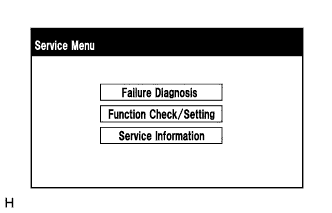
Select "Service Information" on the "Service Menu" screen.
-
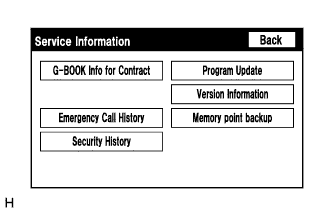
"Service Information" Screen.
Screen Description Display Content G-BOOK Info for Contract The G-BOOK ID, flag information, etc. are displayed. Emergency Call History - Security History - -
Select "G-BOOK Info for Contract" on the "Service Information" screen.
-
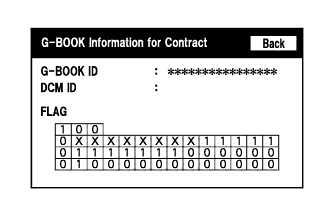
"G-BOOK Information for Contract" Screen.
Screen Description Display Content G-BOOK ID The G-BOOK ID of the navigation receiver assembly is displayed. DCM ID - FLAG The G-BOOK contract flag or service flag of the navigation receiver assembly is displayed.
-