AUDIO AND VISUAL SYSTEM The Other Caller's Voice cannot be Heard, is too Quiet, or Distorted
INSPECTION PROCEDURE
PROCEDURE
-
CHECK CELLULAR PHONE
-
Check if the other caller's voice can be heard properly.
OK The other caller's voice can be heard properly. Tech Tips
The purpose of this step is to inspect the cellular phone when it is not connected to the vehicle.
NG 
REPAIR OR REPLACE CELLULAR PHONE
OK 
-
-
CHECK VOICE GUIDANCE FUNCTION
-
Check that voice guidance sounds can be heard from a front speaker.
OK Sound from the audio system can be heard.
NG
GO TO "VOICE GUIDANCE DOES NOT FUNCTION" IN PROBLEM SYMPTOMS TABLE Click here
OK
-
-
CHECK SETTINGS
-
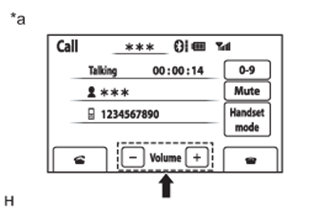
Text in Illustration *a Example Display the "Call" screen.
-
Check that the volume level is not set to low.
OK The level is not set to low.
NG
SET VOLUME TO HIGH
OK 
PROCEED TO NEXT SUSPECTED AREA SHOWN IN PROBLEM SYMPTOMS TABLE Click here
-