ACTIVE TORQUE CONTROL 4WD SYSTEM DTC CHECK / CLEAR

-
CHECK DTC (When Using GTS)
-
Check the DTCs.
-
Connect the GTS to the DLC3.
-
Turn the ignition switch to ON.
-
Turn the GTS on.
-
Read the DTCs following the prompts on the GTS screen. Enter the following menus: Chassis / 4WD / Trouble Codes.
-
Check the details of the DTCs Click here.
-
-
-
CLEAR DTC (When Using GTS)
-
Clear the DTCs.
-
Connect the GTS to the DLC3.
-
Turn the ignition switch to ON.
-
Turn the GTS on.
-
Operate the GTS to clear the DTCs. Enter the following menus: Chassis / 4WD / Trouble Codes.
-
According to the display on the GTS, select the trouble code data display with the clear button.
-
-
-
CHECK DTC (When not Using GTS)
-
Check the DTCs.
-
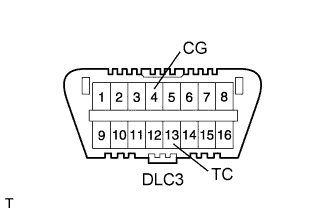
Using SST, connect terminals TC (13) and CG (4) of the DLC3.
- SST
- 09843-18040
-
Turn the ignition switch to ON.
-
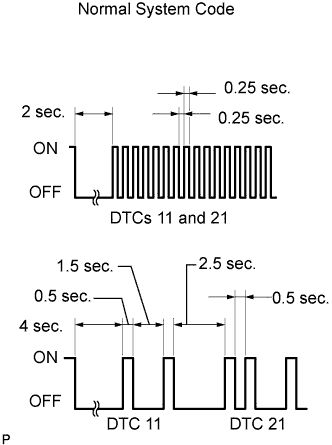
Read DTCs from the AWD warning light on the combination meter.
Tech Tips
-
If the AWD warning light does not blink, perform relevant troubleshooting procedures. The relevant troubleshooting procedures are in the sections listed in the table below.
-
If more than 1 DTC is detected at the same time, the DTCs will be displayed in numerical order.
-
As an example, the blinking patterns of the normal system code and DTCs 11 and 21 are shown below.
-
DTCs are explained in Diagnostic Trouble Code Chart Click here.
Section Title See Procedure AWD warning light does not Come ON TC and CG Terminal Circuit -
-
-
-
CLEAR DTC (When not Using GTS)
-
Using SST, connect terminals 13 (TC) and 4 (CG) of the DLC3.
- SST
- 09843-18040
-
Turn the ignition switch to ON.
-
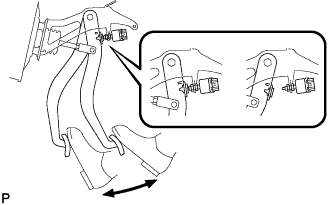
Clear the DTCs stored in the AWD control ECU by depressing the brake pedal 8 times or more within 5 seconds.
-
Check that the warning light blinks in the normal system code pattern.
-
Remove SST from the terminals of the DLC3.
-
Turn the ignition switch off.
Tech Tips
DTCs cannot be cleared by disconnecting the cable from the negative (-) battery terminal or removing the ECU-IG1 fuse.
-