SFI SYSTEM, Diagnostic DTC:P0504

| DTC Code | DTC Name |
|---|---|
| P0504 | Brake Switch "A" / "B" Correlation |
DESCRIPTION
The stop light switch is a duplex system that transmits two signals: STP and ST1-. These two signals are used by the ECM to monitor whether or not the brake system is working properly. If signals which indicate the brake pedal is being depressed and released are detected simultaneously, the ECM interprets this as a malfunction in the stop light switch assembly and stores the DTC.
Tech Tips
The normal signal conditions are as shown in the table below.
| Signal (ECM Terminal) | Brake Pedal Released | In Transition | Brake Pedal Depressed |
|---|---|---|---|
| STP | OFF | ON | ON |
| ST1- | ON | ON | OFF |
-
[OFF] denotes ground potential.
-
[ON] denotes battery potential (+B).
-
On the GTS, both the Data List items Stop Light Switch and ST1 are ON when the brake pedal is depressed because the ST1 indication characteristic is opposite to the Stop Light Switch indication.
| DTC No. | DTC Detection Condition | Trouble Area |
|---|---|---|
| P0504 | All of the following conditions continue for 0.5 seconds or more (1 trip detection logic): (a) The ignition switch is ON. (b) The STP signal is OFF when the ST1- signal is OFF. |
|
WIRING DIAGRAM
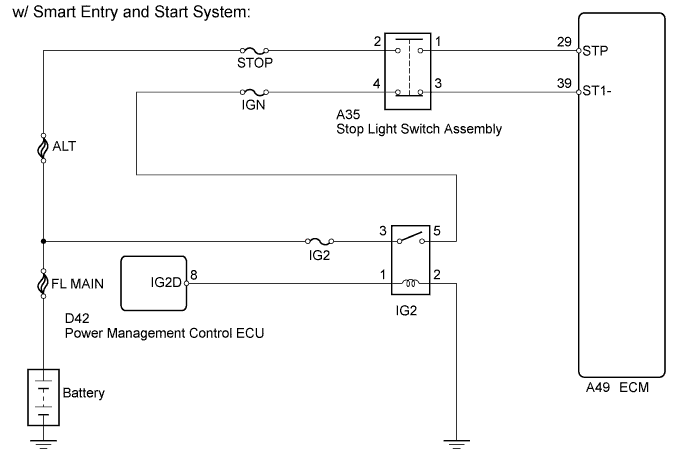
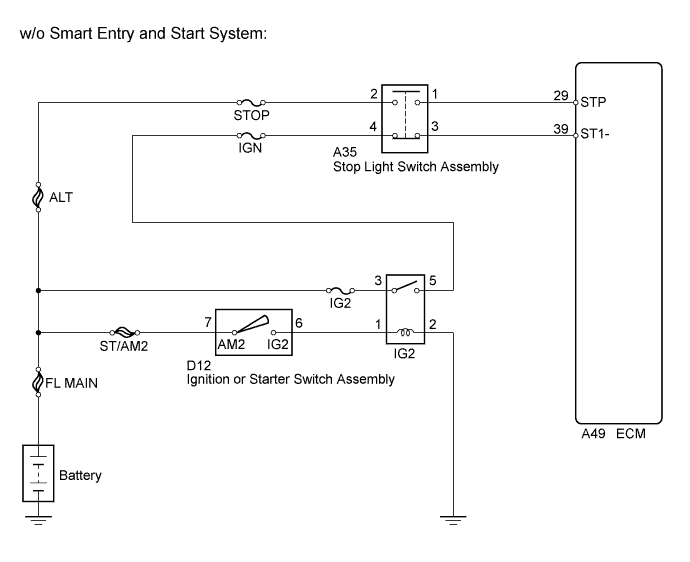
INSPECTION PROCEDURE
Note
Inspect the fuses for circuits related to this system before performing the following inspection procedure.
Tech Tips
-
Read freeze frame data using the GTS. The ECM records vehicle and driving condition information as freeze frame data the moment a DTC is stored. When troubleshooting, freeze frame data can help determine if the vehicle was moving or stationary, if the engine was warmed up or not, if the air fuel ratio was lean or rich, and other data from the time the malfunction occurred.
-
Stop light switch assembly conditions can be checked using the GTS.
-
Connect the GTS to the DLC3.
-
Turn the ignition switch to ON.
-
Turn the GTS on.
-
Enter the following menus: Powertrain / Engine / Data List / All Data / Stop Light Switch and ST1.
-
Check the Data List indication when the brake pedal is depressed and released.
| Brake Pedal Operation | Stop Light Switch | ST1 |
|---|---|---|
| Depressed | ON | ON |
| Released | OFF | OFF |
PROCEDURE
-
INSPECT STOP LIGHT SWITCH ASSEMBLY (TERMINAL VOLTAGE)
-
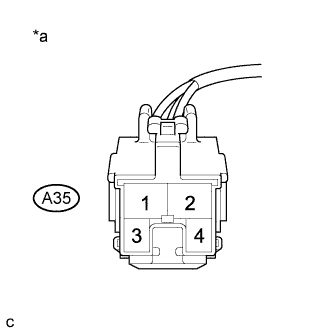
Text in Illustration *a Front view of wire harness connector
(to Stop Light Switch Assembly)
Disconnect the stop light switch assembly connector.
-
Measure the voltage according to the value(s) in the table below.
Standard Voltage Tester Connection Condition Specified Condition A35-2 - Body ground Always 11 to 14 V A35-4 - Body ground Ignition switch ON 11 to 14 V
NG 
REPAIR OR REPLACE HARNESS OR CONNECTOR
OK 
-
-
INSPECT STOP LIGHT SWITCH ASSEMBLY
-
Inspect the stop light switch assembly Click here.
NG
REPLACE STOP LIGHT SWITCH ASSEMBLY Click here
OK
-
-
INSPECT ECM (STP AND ST1- VOLTAGE)
-
Disconnect the ECM connector.
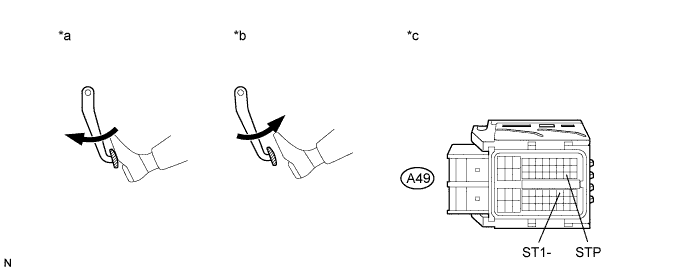
-
Turn the ignition switch to ON.
-
Measure the voltage according to the value(s) in the table below.
Standard Voltage Tester Connection Condition Specified Condition A49-39 (ST1-) - Body ground Brake pedal released 7.5 to 14 V Brake pedal depressed Below 1.5 V A49-29 (STP) - Body ground Brake pedal released Below 1.5 V Brake pedal depressed 7.5 to 14 V Text in Illustration *a Brake pedal depressed *b Brake pedal released *c Front view of wire harness connector
(to ECM)
- -
NG
REPAIR OR REPLACE HARNESS OR CONNECTOR (STOP LIGHT SWITCH ASSEMBLY - ECM)
OK 
REPLACE ECM Click here
-