| DTC Code | DTC Name |
|---|---|
| P0012 | Camshaft Position "A" - Timing Over-Retarded (Bank 1) |
| P0022 | Camshaft Position "A" - Timing Over-Retarded (Bank 2) |
DESCRIPTION
Refer to DTC P0010 (Click here).
| DTC No. | DTC Detection Condition | Trouble Area |
|---|---|---|
| P0012 | Valve timing on bank 1 intake side remains in retarded position, and there is difference target and actual valve timing for approx. 5 minutes or more (2 trip detection logic) |
|
| P0022 | Valve timing on bank 2 intake side remains in retarded position, and there is difference target and actual valve timing for approx. 5 minutes or more (2 trip detection logic) |
|
MONITOR DESCRIPTION
This DTC is output when a valve timing stuck condition is detected. With the engine speed at 4000 rpm or less in the retard angle position, if the valve timing does not vary, or a large difference in the target and actual valve timing occurs continuously for 5 seconds, it is determined that a malfunction has occurred. If this condition is detected while driving, a DTC is output (2 trip detection logic).
After the engine is warmed up, a DTC is output if the following occurs: 1) the vehicle is driven in an urban area for 5 minutes, and then the engine switch is turned off; and 2) the engine is started and the vehicle is driven in an urban area for 5 minutes.
INSPECTION PROCEDURE
Intelligent tester only:
By using the Active Test's Control the VVT-iE Linear (Bank 1) or Control the VVT-iE Linear (Bank 2) function, it can be determined if the VVT-iE system is malfunctioning.
-
Connect the intelligent tester to the DLC3.
-
Turn the engine switch on (IG) and turn the tester ON.
-
Clear the DTC (Click here).
-
Start the engine and warm it up.
-
Enter the following menus: Powertrain / Engine / Active Test / Control the VVT-iE Linear (Bank 1) or Control the VVT-iE Linear (Bank 2) / All Data / VVT-iE Aim Angle #1 and VVT Change Angle #1 or VVT-iE Aim Angle #2 and VVT Change Angle #2.
-
Perform the "Control the VVT-iE Linear (Bank 1) or Control the VVT-iE Linear (Bank 2)" operation with the engine speed at 1500 rpm.
OK Active Test Movement Order Difference between "VVT-iE Aim Angle" and "VVT Change Angle" 0 deg → 10 deg → 20 deg → 40 deg → 10 deg → 0 deg → 10 deg → END Within 4 DegFR
Read freeze frame data using the intelligent tester. Freeze frame data records the engine conditions when malfunctions are detected. When troubleshooting, freeze frame data can help determine if the vehicle was moving or stationary, if the engine was warmed up or not, if the air-fuel ratio was lean or rich, and other data from the time the malfunction occurred.
PROCEDURE
- Click here
CHECK ANY OTHER DTCS OUTPUT (IN ADDITION TO DTC P0012 OR P0022)
-
Connect the intelligent tester to the DLC3.
-
Turn the engine switch on (IG).
-
Turn the tester ON.
-
Enter the following menus: Powertrain / Engine / DTC.
-
Read DTCs.
Result Display (DTC Output) Proceed to P0012 or P0022 A P0012 or P0022 and other DTCs B
- OKClick here
- NGClick here
-
- Click here
INSPECT CAMSHAFT TIMING GEAR ASSEMBLY (BANK 1 OR BANK 2)
-
Turn the engine switch off.
-
Remove the camshaft timing control motor (Click here).
-
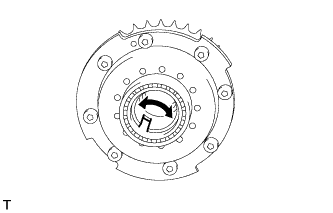
Check if the camshaft timing gear assembly's eccentric shaft rotates smoothly.
OK Rotates smoothly
- OKClick here
- NGClick here
-
- Click here
REPLACE CAMSHAFT TIMING CONTROL MOTOR (BANK 1 OR BANK 2)
-
Replace the camshaft timing control motor (Click here).
- NEXTClick here
-
- Click here
CONFIRM WHETHER MALFUNCTION HAS BEEN SUCCESSFULLY REPAIRED
-
Connect the intelligent tester to the DLC3.
-
Turn the engine switch on (IG) and turn the tester ON.
-
Clear the DTC (Click here).
-
Start the engine and warm it up.
-
Enter the following menus: Utility / Check Mode.
-
Switch the ECM from normal mode to check mode.
-
Drive the vehicle in an urban area for approximately 5 minutes.
-
Enter the following menus: DTC INFO / CURRENT CODE.
-
Read DTC.
Result Display (DTC Output) Proceed to No output A Output DTCs B
-
- Click here
GO TO DTC CHARTClick here
- Click here
REPLACE CAMSHAFT TIMING GEAR ASSEMBLY (BANK 1 OR BANK 2)Click here
- Click here
GO TO DTC CHARTClick here
- Click here
END