REAR SUNSHADE ASSEMBLY REMOVAL

-
REMOVE LUGGAGE COMPARTMENT MAT SUB-ASSEMBLY (w/ Spare Tire)
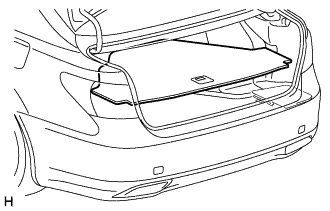
-
REMOVE DECK BOARD ASSEMBLY (w/o Spare Tire)
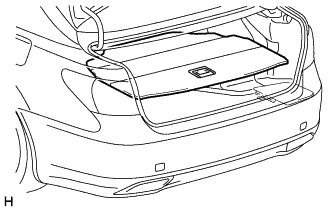
-
REMOVE DECK TRIM SIDE BOARD LH (w/o Spare Tire)
-
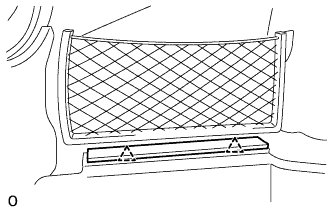
Detach the 2 clips and remove the deck trim side board LH.
-
-
REMOVE BATTERY SERVICE HOLE COVER LH
-
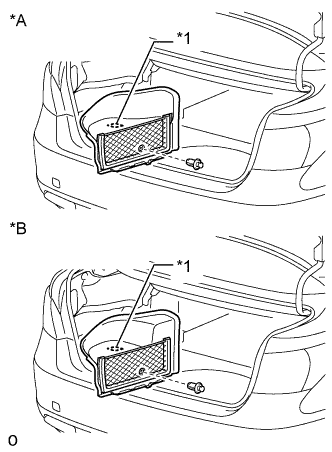
Text in Illustration *A for Standard *B for Ottoman *1 Fastening Tape Detach the clip, fastening tape and remove the battery service hole cover LH.
-
-
PRECAUTION
Note
After turning the power switch off, waiting time may be required before disconnecting the cable from the auxiliary battery negative (-) terminal. Therefore, make sure to read the disconnecting the cable from the auxiliary battery negative (-) terminal notices before proceeding with work Click here.
-
DISCONNECT CABLE FROM AUXILIARY BATTERY NEGATIVE TERMINAL
CAUTION:
Wait at least 90 seconds after disconnecting the cable from the auxiliary battery negative (-) terminal to disable the SRS system.
Note
When disconnecting the cable, some systems need to be initialized after the cable is) reconnected Click here.
-
REMOVE REAR SEAT ASSEMBLY (for Fixed Seat Type)
-
REMOVE REAR SEAT ASSEMBLY (for Power Seat)
-
REMOVE REAR SEAT ASSEMBLY (for 5-Passenger with Ottoman)
-
REMOVE REAR SEAT ASSEMBLY (for 4-Passenger with Ottoman)
-
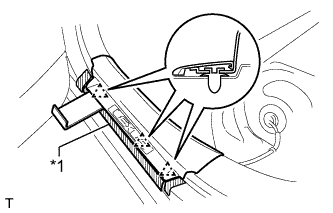
REMOVE REAR DOOR SCUFF PLATE LH (for Standard Body)
-
Put protective tape around the rear door scuff plate LH.
Text in Illustration *1 Protective Tape -
Using moulding remover D, detach the 3 clips.
-
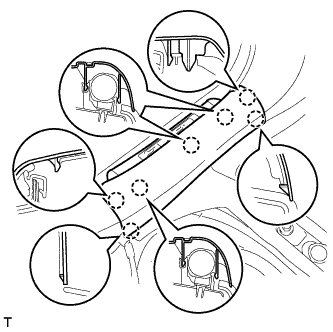
Detach the 7 claws and remove the rear door scuff plate LH.
-
-
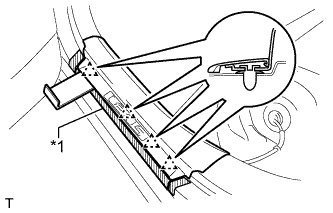
REMOVE REAR DOOR SCUFF PLATE LH (for Long Body)
-
Put protective tape around the rear door scuff plate LH.
Text in Illustration *1 Protective Tape -
Using moulding remover D, detach the 4 clips.
-
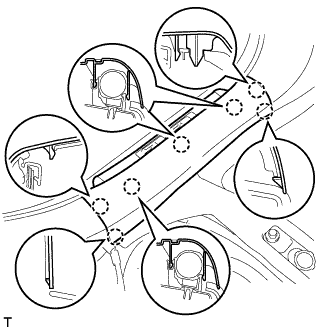
Detach the 7 claws and remove the rear door scuff plate LH.
-
-
REMOVE REAR DOOR SCUFF PLATE RH (for Standard Body)
Tech Tips
Use the same procedure described for the LH side.
-
REMOVE REAR DOOR SCUFF PLATE RH (for Long Body)
Tech Tips
Use the same procedure described for the LH side.
-
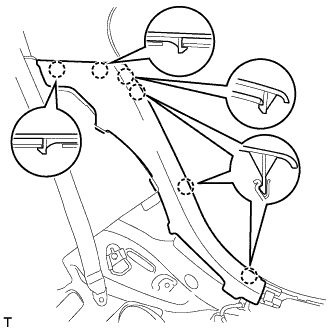
REMOVE REAR SEAT SIDE GARNISH LH
-
Detach the 6 claws and remove the rear seat side garnish LH.
-
-
REMOVE REAR SEAT SIDE GARNISH RH
Tech Tips
Use the same procedure described for the LH side.
-
REMOVE INNER ROOF SIDE GARNISH LH
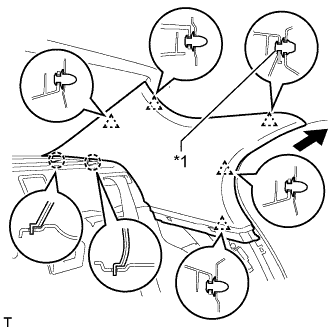
Text in Illustration *1 Clip A
-
Pull the inner roof side garnish LH away from the body to detach the 4 clips (do not detach clip A).
-
Detach the 2 claws of the guide, and pull the inner roof side garnish LH in the direction of the arrow to remove it.
Tech Tips
Clip A remains attached to the body.
-
Remove clip A from the vehicle body.
-
-
REMOVE INNER ROOF SIDE GARNISH RH
Tech Tips
Use the same procedure described for the LH side.
-
REMOVE PACKAGE TRAY TRIM PANEL ASSEMBLY
-
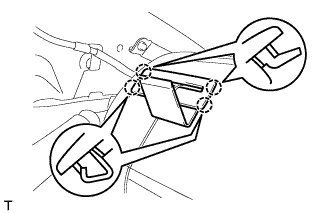
except 4-Passenger with Ottoman:
Using a moulding remover D, detach the 4 claws and remove the 3 belt guides.
-
for 4-Passenger with Ottoman:
Using a moulding remover D, detach the 4 claws and remove the 2 belt guides.
-
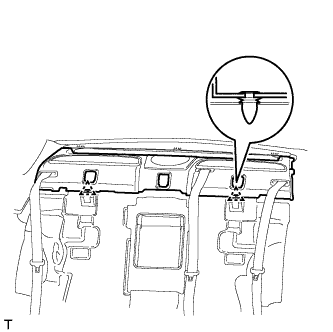
except 4-Passenger with Ottoman:
Detach the 2 clips of the package tray trim panel assembly. Then pass the 3 rear seat belt floor anchors through the package tray trim panel assembly.
-
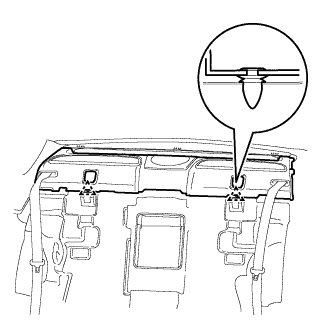
for 4-Passenger with Ottoman:
Detach the 2 clips of the package tray trim panel assembly. Then pass the 2 rear seat belt floor anchors through the package tray trim panel assembly.
-
Disconnect the solar sensor connector and remove the package tray trim panel.
-
-
REMOVE NO. 2 ROOF SIDE AIR DUCT LH (w/ Rear Cooler)
-
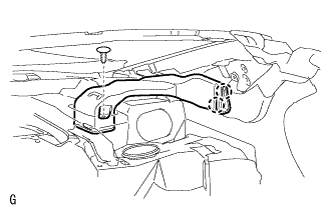
Remove the clip.
-
Detach the 2 claws and remove the No. 2 roof side air duct LH.
-
-
REMOVE NO. 2 ROOF SIDE AIR DUCT RH (w/ Rear Cooler)
-
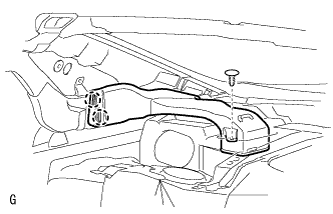
Remove the clip.
-
Detach the 2 claws and remove the No. 2 roof side air duct RH.
-
-
REMOVE REAR NO. 4 AIR DUCT (w/ Rear Cooler)
-
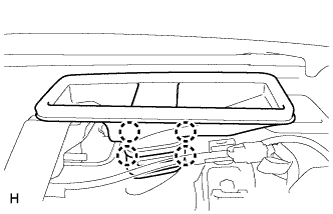
Detach the 4 claws and remove the rear No. 4 air duct.
-
-
REMOVE REAR NO. 5 AIR DUCT (w/ Rear Cooler)
-
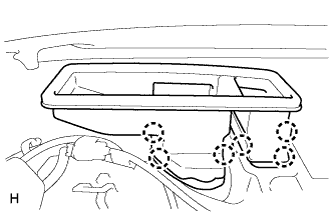
Detach the 6 claws and remove the rear No. 5 air duct.
-
-
REMOVE STEREO COMPONENT SPEAKER ASSEMBLY
Note
Do not touch the cone of the speaker.
-
Disconnect the connector.
-
Remove the 4 bolts and stereo component speaker assembly.
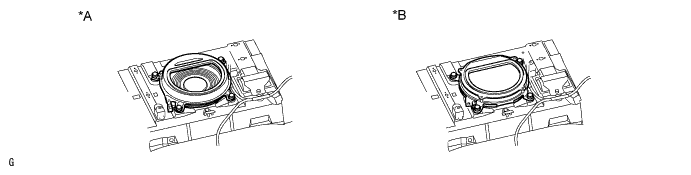
Text in Illustration *A for Standard *B for 19 Speakers
-
-
REMOVE NO. 2 PACKAGE TRAY TRIM PANEL ASSEMBLY
-
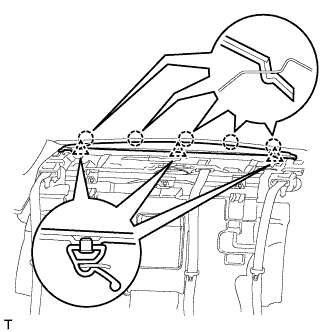
Detach the 5 claws and 3 clips, and remove the No. 2 package tray trim panel assembly.
-
-
REMOVE REAR SUNSHADE ASSEMBLY
-
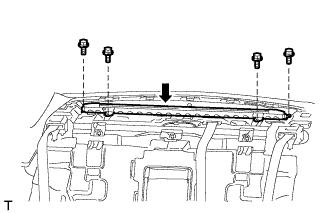
Remove the 4 bolts.
-
Loosen the bolt labeled A and remove the rear sunshade assembly.
Text in Illustration 
Bolt A Note
Do not remove the bolt labeled A from the rear sunshade assembly.
-