REAR BUMPER REASSEMBLY

Tech Tips
A bolt without a torque specification is shown in the standard bolt chart Click here.
-
INSTALL REAR BUMPER PROTECTOR
Tech Tips
-
Use the same procedure for both rear bumper protectors.
-
When installing the rear bumper protector, heat the rear bumper cover using a heat light.
Standard Item Temperature Rear Bumper Cover 20 to 30°C (68 to 86°F)
Note
Do not heat the rear bumper cover excessively.
-
When using a new rear bumper cover:
-
Clean the surface of a new rear bumper cover.
-
Using a heat light, heat the rear bumper cover surface.
-
-
When reusing the rear bumper cover:
-
Using a heat light, heat the rear bumper cover surface.
-
Remove the double-sided tape from the rear bumper cover.
-
Wipe off any tape adhesive residue with cleaner.
-
-
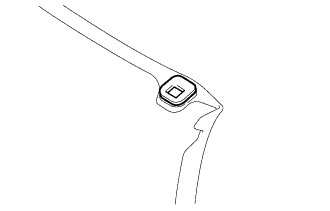
Install a new rear bumper protector.
-
Using a heat light, heat the rear bumper cover.
-
Remove the peeling paper from the face of the rear bumper protector.
Tech Tips
After removing the peeling paper, keep the exposed adhesive free from foreign matter.
-
Install the rear bumper protector.
Tech Tips
Press the rear bumper protector firmly to install it.
-
-
-
INSTALL REFLEX REFLECTOR ASSEMBLY LH
-
Attach the claw to install the reflex reflector assembly LH.
-
Install the screw.
-
-
INSTALL REFLEX REFLECTOR ASSEMBLY RH
Tech Tips
Use the same procedure described for the LH side.
-
INSTALL REAR BUMPER PLATE LH
-
Attach the 2 claws to install the rear bumper plate LH.
-
-
INSTALL REAR BUMPER PLATE RH
Tech Tips
Use the same procedure described for the LH side.
-
INSTALL REAR BUMPER MOULDING (for Sport Package)
-
Attach the 2 claws to install the rear bumper moulding.
-
Install the 3 bolts.
-
-
INSTALL LOWER REAR BUMPER COVER
-
Install the lower rear bumper cover with the 8 retainers.
-
-
INSTALL REAR BUMPER EXTENSION LH
-
Install the rear bumper extension LH with the clip.
-
Install the 3 bolts.
-
-
INSTALL REAR BUMPER EXTENSION RH
Tech Tips
Use the same procedure described for the LH side.
-
INSTALL REAR BUMPER SIDE RETAINER LH
-
Install the rear bumper side retainer LH with the 2 screws.
-
-
INSTALL REAR BUMPER SIDE RETAINER RH
Tech Tips
Use the same procedure described for the LH side.
-
INSTALL NO. 1 ULTRASONIC SENSOR RETAINER
-
Clean the bumper cover.
Note
-
When there is any dirt such as oil, dust and tape residue on the bumper cover, wipe it off using cloth, gauze, etc., that is soaked with non-residue solvent.
-
Wipe the cover in one direction.
-
-
Determine the center of the sensor installation position.
-
Wrap the rubber part of the sensor tip with masking tape 3 or 4 times.
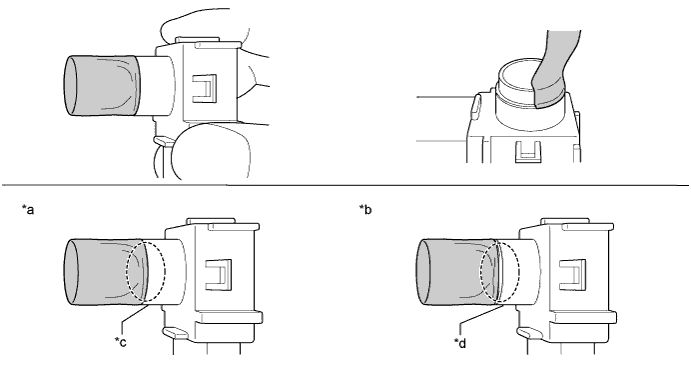
Text in Illustration *a CORRECT *b INCORRECT *c There is No Clearance *d There is Clearance Note
-
Wrap masking tape so that there is no clearance between the sensor and tape as shown in the illustration.
-
Wrap the tape so that it has no wrinkles.
Tech Tips
To make the tape application easier, lightly fold the tape so that it is roughly the shape of the sensor.
-
-
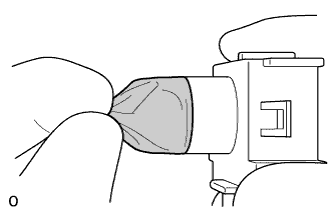
Pinch the tip of the tape to make it easier to insert it into the sensor installation hole of the bumper cover.
-
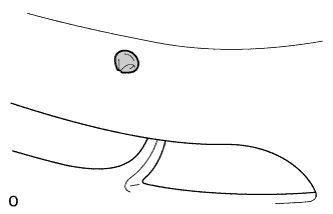
Check if there is clearance between the sensor tape and sensor installation hole.
Tech Tips
If there is no clearance, adjust it by decreasing the number of times the tape is wrapped. If there is excessive clearance, adjust it by increasing the number of times the tape is wrapped.
-
-
Apply primer.
-
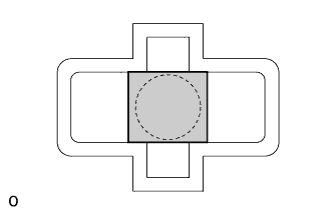
Cover the sensor installation hole with protective tape cut to a square with a length/ width of 25 mm (0.98 in.).
-
Using a brush or felt, apply primer or equivalent to the retainer installation area.
Note
-
Use a clean brush or felt.
-
Do not allow primer to contact the front surface of the bumper cover.
-
-
Do not touch the bumper cover until the primer has dried.
Recommended drying time 10 minutes or more {23°C (73°F)} -
Confirm that the primer has completely dried by touching the bumper cover. Then remove the protective tape.
-
-
Install the 4 No. 1 ultrasonic sensor retainers.
-
Remove the peeling paper from the retainer.
-
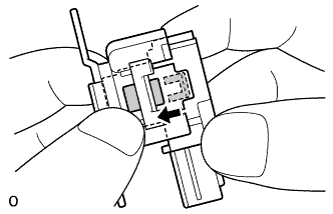
Insert the sensor tip into the retainer hole area until the claws are attached.
Note
-
Do not touch the adhesive part of the double-sided tape.
-
Do not allow foreign matter to contact the adhesive part of the double-sided tape.
-
-
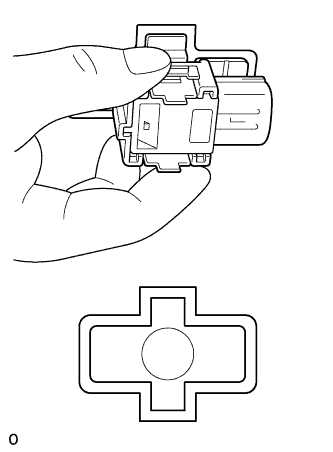
Confirm the direction of the connector's connection position. Then insert the tape on the sensor into the sensor installation hole of the bumper cover, and set the retainer on the bumper cover.
Note
Do not completely install the retainer at this time.
-
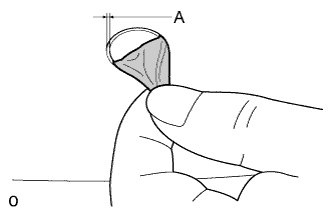
Remove the tape on the sensor from the front surface of the bumper cover.
-
Check if the clearance between the sensor tip and sensor installation hole of the bumper cover is as shown in the illustration. (Check the entire circumference of the sensor tip.)
Tech Tips
If the clearance is not as specified, adjust the sensor position by moving it vertically and horizontally.
A 0.3 mm (0.0118 in.) -
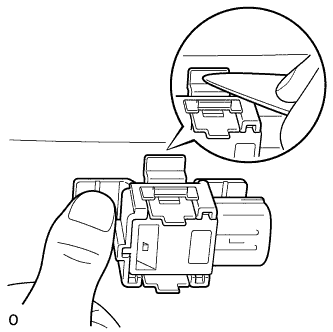
Firmly press the retainer with your hands.
Tech Tips
When it is difficult to press with your hands, use a resin spatula to press it.
Note
-
When it is difficult to press with your hands, use a resin spatula to press it.
-
The retainer's double-sided tape cannot be reused. If the retainer is not installed properly, remove the retainer and perform the installation procedures from the beginning again.
-
-
-
-
INSTALL NO. 1 ULTRASONIC SENSOR
-
INSTALL ULTRASONIC SENSOR RETAINER
Tech Tips
When installing the ultrasonic sensor retainer, heat the rear bumper cover using a heat light.
Standard Item Temperature Rear Bumper Cover 20 to 30°C (68 to 86°F) Note
Do not heat the rear bumper cover excessively.
-
When using a new rear bumper cover:
-
Clean the surface of a new rear bumper cover.
-
Using a heat light, heat the rear bumper cover surface.
-
-
When reusing the rear bumper cover:
-
Using a heat light, heat the rear bumper cover surface.
-
Remove the double-sided tape from the rear bumper cover.
-
Wipe off any tape adhesive residue with cleaner.
-
-
Install a new ultrasonic sensor retainer.
-
Using a heat light, heat the rear bumper cover.
-
Remove the peeling paper from the face of the rear bumper protector.
Tech Tips
After removing the peeling paper, keep the exposed adhesive free from foreign matter.
-
-
Install the 2 ultrasonic sensor retainers.
Tech Tips
Press the ultrasonic sensor retainer firmly to install it.
-
-
INSTALL NO. 3 LUGGAGE ROOM WIRE
-
Attach the 2 claws to install the ultrasonic sensor clip.
Tech Tips
Use the same procedure to install the ultrasonic sensor clip on the other side.
-
Attach the 4 clamps to install the No. 3 luggage room wire.
-
Connect the 4 connectors.
-