LUGGAGE COMPARTMENT DOOR OPENER OUTER SWITCH REMOVAL

-
PRECAUTION
Note
After turning the power switch off, waiting time may be required before disconnecting the cable from the auxiliary battery terminal. Therefore, make sure to read the disconnecting the cable from the auxiliary battery terminal notice before proceeding with work Click here.
-
REMOVE LUGGAGE COMPARTMENT MAT SUB-ASSEMBLY (w/ Spare Tire)
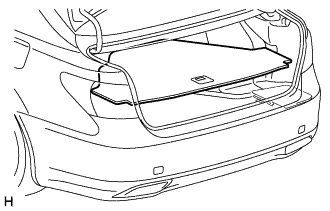
-
REMOVE DECK BOARD ASSEMBLY (w/o Spare Tire)
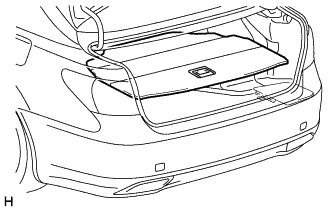
-
REMOVE DECK TRIM SIDE BOARD LH (w/o Spare Tire)
-
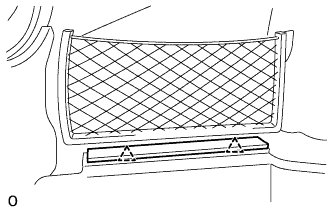
Detach the 2 clips and remove the deck trim side board LH.
-
-
REMOVE BATTERY SERVICE HOLE COVER LH
-
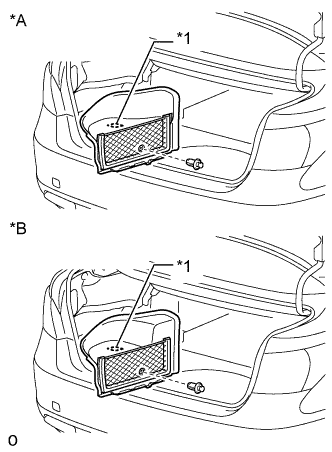
Text in Illustration *A for Standard *B for Ottoman *1 Fastening Tape Detach the clip, fastening tape and remove the battery service hole cover LH.
-
-
DISCONNECT CABLE FROM AUXILIARY BATTERY NEGATIVE TERMINAL
Note
When disconnecting the cable, some systems need to be initialized after the cable is reconnected Click here.
-
REMOVE LUGGAGE COMPARTMENT DOOR ASSIST GRIP
-
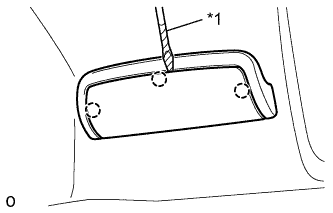
Text in Illustration *1 Protective Tape Using a screwdriver, detach the 3 claws.
Tech Tips
Tape the screwdriver tip before use.
-
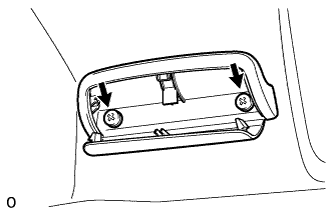
Remove the 2 screws and luggage compartment door assist grip.
-
-
REMOVE SWITCH BEZEL
-
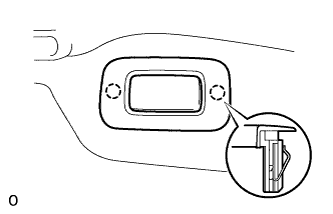
Using a screwdriver, detach the 2 claws and remove the switch bezel.
Tech Tips
Tape the screwdriver tip before use.
-
-
REMOVE NO. 2 COURTESY LIGHT ASSEMBLY
-
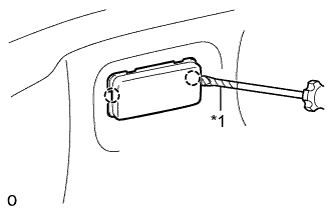
Text in Illustration *1 Protective Tape Using a screwdriver, detach the 2 claws and remove the No. 2 courtesy light assembly.
Tech Tips
Tape the screwdriver tip before use.
-
-
REMOVE REAR COMBINATION LIGHT SERVICE COVER LH
-
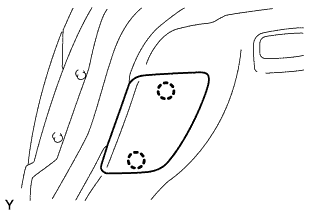
Detach the 2 claws and remove the rear combination light service cover LH.
-
-
REMOVE REAR COMBINATION LIGHT SERVICE COVER RH
Tech Tips
Use the same procedure described for the LH side.
-
REMOVE LUGGAGE COMPARTMENT DOOR HINGE COVER LH
-
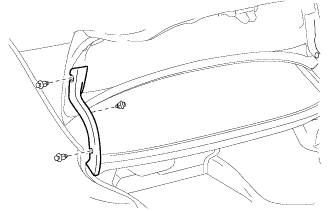
Using a clip remover, remove the 3 clips and luggage compartment door hinge cover LH.
-
-
REMOVE LUGGAGE COMPARTMENT DOOR HINGE COVER RH
Tech Tips
Use the same procedure described for the LH side.
-
REMOVE BACK DOOR TRIM COVER
-
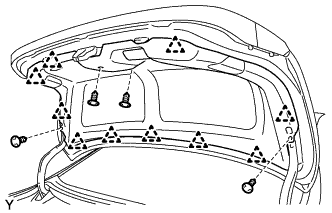
Using a clip remover, remove the 4 clips.
-
Detach the 10 clips and back door trim cover.
-
-
REMOVE REAR LIGHT ASSEMBLY LH
-
w/o Rear Fog Light:
-
Put protective tape around the rear light assembly LH.
-
Disconnect the connector.
-
Remove the 2 nuts and 2 cap nuts and remove the rear light assembly LH.
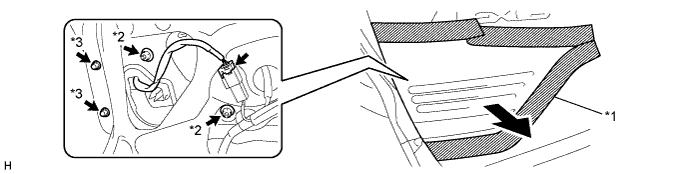
Text in Illustration *1 Protective Tape *2 Nut *3 Cap Nut - -
-
-
w/ Rear Fog Light:
-
Put protective tape around the rear light assembly LH.
-
Disconnect the connector.
-
Remove the 2 nuts and 2 cap nuts and remove the rear light assembly LH.
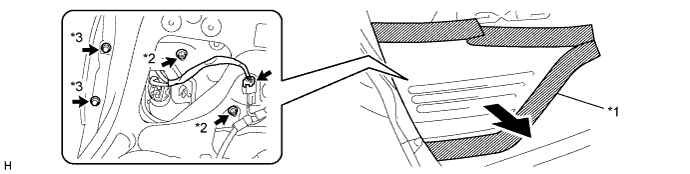
Text in Illustration *1 Protective Tape *2 Nut *3 Cap Nut - -
-
-
-
REMOVE REAR LIGHT ASSEMBLY RH
Tech Tips
Use the same procedure described for the LH side.
-
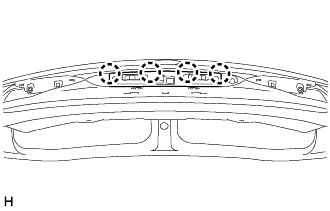
REMOVE NO. 3 LUGGAGE COMPARTMENT DOOR OUTSIDE GARNISH
-
Detach the 4 claws and remove the No. 3 luggage compartment door outside garnish.
-
-
REMOVE LUGGAGE COMPARTMENT DOOR OUTSIDE GARNISH SUB-ASSEMBLY
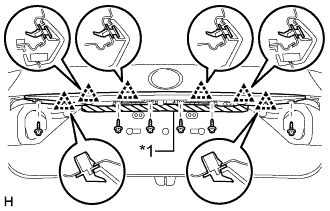
Text in Illustration *1 Protective Tape
-
Remove the 6 screws.
-
Put protective tape around the luggage compartment door outside garnish.
-
Detach the 4 clips and remove the luggage compartment door outside garnish.
-
-
REMOVE LUGGAGE ELECTRICAL KEY SWITCH
-
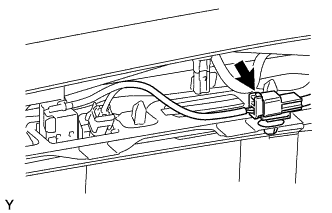
Disconnect the sub-wire harness connector.
-
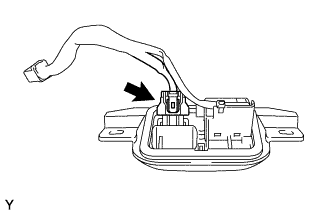
Disconnect the connector.
-
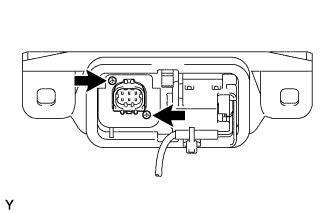
Remove the 2 screws and television camera assembly from the luggage electrical key switch.
-