WINDOW DEFOGGER SYSTEM Rear Window Defogger System does not Operate
DESCRIPTION
When the rear window defogger switch turns on, a rear defogger activation request signal from the air conditioning amplifier is sent via the CAN line to the multiplex network front light ECU (front controller). Then the multiplex network front light ECU (front controller) operates the rear window defogger.
WIRING DIAGRAM
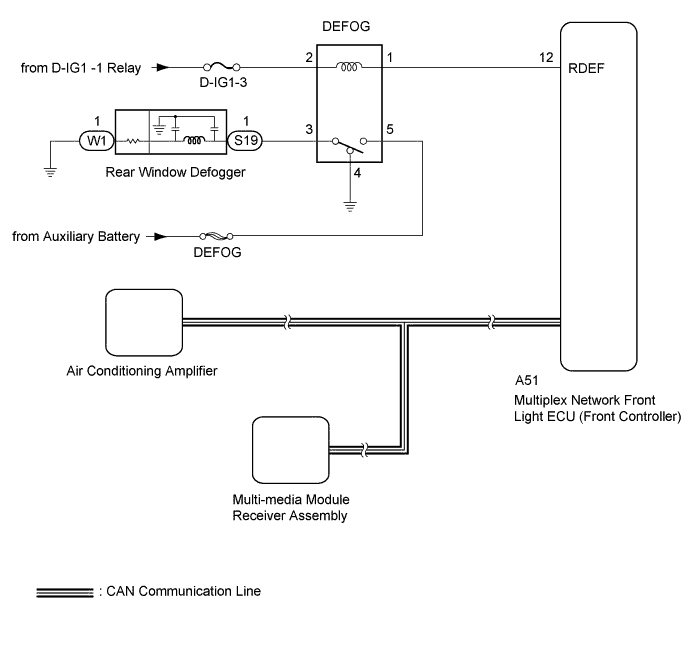
INSPECTION PROCEDURE
Note
Inspect the fuses for circuits related to this system before performing the following inspection procedure.
Tech Tips
This circuit uses the CAN communication line. Before performing the inspection, check that the CAN communication system is functioning normally.
PROCEDURE
-
PERFORM ACTIVE TEST USING GTS (DEFOGGER RELAY [REAR])
-
Select the Active Test, using the GTS to generate a control command, and then check that the rear window defogger operates Click here.
Air Conditioner Tester Display Test Part Control Range Diagnostic Note Defogger Relay (Rear) DEFOG relay operation OFF / ON - OK Rear window defogger operates normally
NG 
INSPECT DEFOG RELAY Click here
OK 
-
-
CHECK AIR CONDITIONING AMPLIFIER
-
Temporarily replace the air conditioning amplifier with a new or normally functioning one Click here.
-
Check that the malfunction disappears.
OK Malfunction disappears.
NG
CHECK MULTIPLEX NETWORK FRONT LIGHT ECU Click here
OK 
END (AIR CONDITIONING AMPLIFIER IS DEFECTIVE)
-
-
CHECK MULTIPLEX NETWORK FRONT LIGHT ECU
-
Temporarily replace the multiplex network front light ECU (front controller) with a new or normally functioning one.
-
Check that the malfunction disappears.
OK Malfunction disappears.
NG 
REPLACE MULTI-MEDIA MODULE RECEIVER ASSEMBLY Click here
OK
END (MULTIPLEX NETWORK FRONT LIGHT ECU [FRONT CONTROLLER] IS DEFECTIVE)
-
-
INSPECT DEFOG RELAY
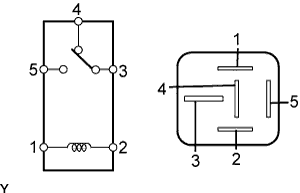
-
Remove the DEFOG relay from the relay block No. 3.
-
Measure the resistance according to the value(s) in the table below.
Standard resistance Tester Connection Condition Specified Condition 3 - 4 When battery voltage is not applied between terminals Below 1 Ω 3 - 5 When battery voltage is not applied between terminals 10 kΩ or higher 3 - 4 When battery voltage is applied to terminals 1 and 2 10 kΩ or higher 3 - 5 When battery voltage is applied to terminals 1 and 2 Below 1 Ω
NG
REPLACE DEFOG RELAY
OK
-
-
CHECK HARNESS AND CONNECTOR (DEFOG RELAY - MULTIPLEX NETWORK FRONT LIGHT ECU [FRONT CONTROLLER] AND BATTERY)
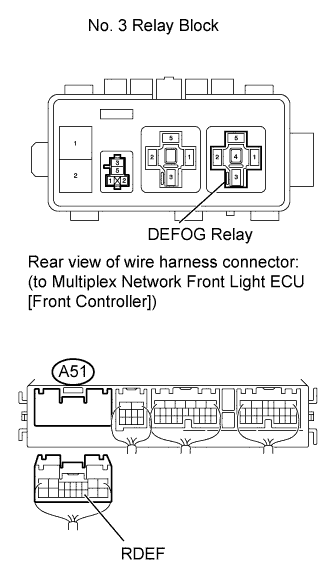
-
Remove the DEFOG relay from the No. 3 relay block.
-
Disconnect the A51 multiplex network front light ECU (front controller) connector.
-
Measure the voltage according to the value(s) in the table below.
Standard voltage Tester Connection Condition Specified Condition DEFOG relay terminal 2 - Body ground Power switch on (IG) 11 to 14 V DEFOG relay terminal 5 - Body ground Always 11 to 14 V -
Measure the resistance according to the value(s) in the table below.
Standard resistance Tester Connection Condition Specified Condition DEFOG relay terminal 1 - A51-12 (RDEF) Always Below 1 Ω DEFOG relay terminal 1 - Body ground Always 10 kΩ or higher
NG
REPAIR OR REPLACE HARNESS OR CONNECTOR
OK
-
-
CHECK HARNESS AND CONNECTOR (BACK WINDOW GLASS - DEFOG RELAY AND BODY GROUND)
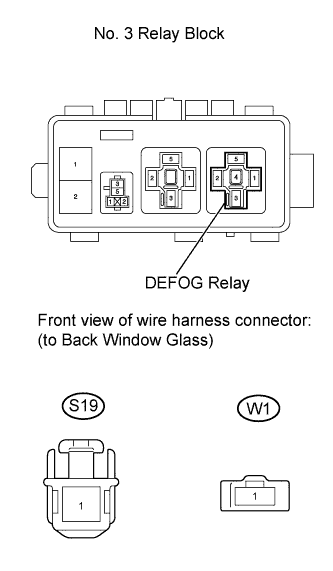
-
Disconnect the S19 and W1 back window glass connectors.
-
Disconnect the DEFOG relay from the No. 3 relay block.
-
Measure the resistance according to the value(s) in the table below.
Standard resistance Tester Connection Condition Specified Condition S19-1 - DEFOG relay terminal 3 Always Below 1 Ω W1-1 - Body ground Always Below 1 Ω DEFOG relay terminal 4 - Body ground Always Below 1 Ω S19-1 - Body ground Always 10 kΩ or higher
NG
REPAIR OR REPLACE HARNESS OR CONNECTOR
OK
-
-
INSPECT BACK WINDOW GLASS
-
Inspect the back window glass Click here.
Result Result Proceed to Rear window defogger is broken A Rear window defogger is not broken B
B
CHECK MULTIPLEX NETWORK FRONT LIGHT ECU (FRONT CONTROLLER) Click here
A
REPAIR OR REPLACE BACK WINDOW GLASS Click here
-
-
CHECK MULTIPLEX NETWORK FRONT LIGHT ECU (FRONT CONTROLLER)
-
Temporarily replace the multiplex network front light ECU (front controller) with a new or normally functioning one.
-
Check that the malfunction disappears.
OK Malfunction disappears.
NG
REPLACE AIR CONDITIONING AMPLIFIER Click here
OK
END (MULTIPLEX NETWORK FRONT LIGHT ECU [FRONT CONTROLLER] IS DEFECTIVE)
-