NIGHT VIEW SYSTEM Multi-display does not Change to Night View Screen
DESCRIPTION
When the No. 1 night view ECU receives the switch signal from the trip switch (night view switch), the ECU outputs a night view display request signal to the multi-media module receiver assembly.
WIRING DIAGRAM
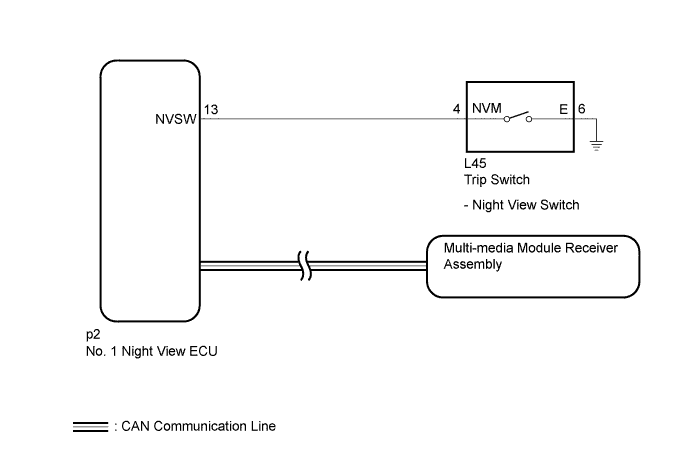
INSPECTION PROCEDURE
Note
When the No. 1 night view ECU is replaced, perform object recognition camera (night view camera) adjustment Click here.
PROCEDURE
-
CHECK CAN COMMUNICATION SYSTEM
-
Use the GTS to check if the CAN communication system is functioning normally.
-
for LHD: Click here.
-
for RHD: Click here.
OK CAN communication system DTCs are not output. Result Result Proceed to OK A NG (for LHD) B NG (for RHD) C -
B 
GO TO CAN COMMUNICATION SYSTEM Click here
C
GO TO CAN COMMUNICATION SYSTEM Click here
A 
-
-
READ VALUE USING GTS (NIGHT VIEW MAIN SWITCH)
-
Using the GTS, read the Data List Click here.
Night View Tester Display Measurement Item/Range Normal Condition Diagnostic Note Night View Main Switch Status of trip switch (night view switch) / ON or OFF ON: Trip switch (night view switch) on
OFF: Trip switch (night view switch) off
"ON" is output while the trip switch (night view switch) is being pressed. OK The display is as specified in the normal condition column.
NG 
CHECK HARNESS AND CONNECTOR (TRIP SWITCH - NO. 1 NIGHT VIEW ECU AND BODY GROUND) Click here
OK
-
-
REPLACE NO. 1 NIGHT VIEW ECU
-
Temporarily replace the No. 1 night view ECU with a new or normally functioning one Click here.
NEXT
-
-
ADJUST OBJECT RECOGNITION CAMERA (NIGHT VIEW CAMERA)
-
Perform object recognition camera (night view camera) adjustment Click here.
NEXT
-
-
CHECK SYMPTOMS
-
Confirm that the "Multi-display does not Change to Night View Screen" problem symptom is not present.
OK Symptom is not present.
NG
GO TO AUDIO AND VISUAL SYSTEM Click here
OK 
END (NO. 1 NIGHT VIEW ECU IS DEFECTIVE)
-
-
CHECK HARNESS AND CONNECTOR (TRIP SWITCH - NO. 1 NIGHT VIEW ECU AND BODY GROUND)
-
Disconnect the L45 trip switch connector.
-
Disconnect the p2 No. 1 night view ECU connector.
-
Measure the resistance according to the value(s) in the table below.
Standard Resistance Tester Connection Condition Specified Condition L45-4 (NVM) - p2-13 (NVSW) Always Below 1 Ω L45-6 (E) - Body ground Always Below 1 Ω L45-4 (NVM) - Body ground Always 10 kΩ or higher
NG
REPAIR OR REPLACE HARNESS OR CONNECTOR
OK
-
-
INSPECT TRIP SWITCH (NIGHT VIEW SWITCH)
-
Remove the trip switch (night view switch) Click here.
-
Inspect the trip switch (night view switch) Click here.
NG
REPLACE TRIP SWITCH (NIGHT VIEW SWITCH) Click here
OK
REPLACE NO. 1 NIGHT VIEW ECU Click here
-