G-BOOK SYSTEM "NRES" is Displayed in "DCM" on the System Check Mode Screen
DESCRIPTION
If the telematics transceiver does not receive any of the following from the multi-media module receiver assembly within the specified time, "NRES" will be displayed.
-
System inspection request signal
-
System inspection result request signal
-
Diagnosis memory request signal
WIRING DIAGRAM
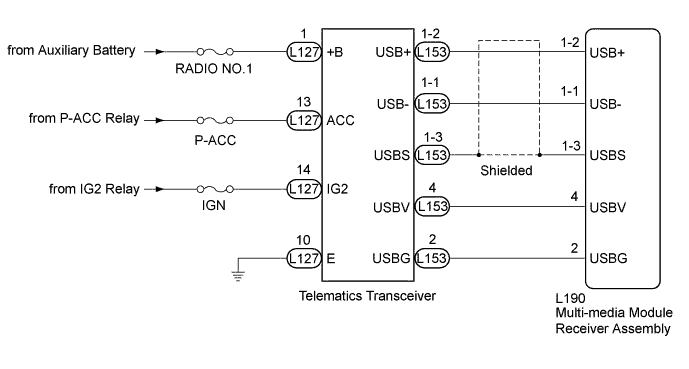
INSPECTION PROCEDURE
Note
Inspect the fuses for circuits related to this system before performing the following inspection procedure.
Tech Tips
When replacing the multi-media module receiver assembly or the telematics transceiver, perform the vehicle contract setting Click here.
PROCEDURE
-
INSPECTION USING "SYSTEM CHECK MODE" SCREEN
-
Perform inspections indicated on the System Check Mode screen to confirm the DCM inspection result Click here.
Result Result Proceed to "OK" is displayed in "DCM" on the System Check Mode screen. A "NRES" is displayed in "DCM" on the System Check Mode screen. B
B 
A 
USE SIMULATION METHOD TO CHECK Click here
-
-
CHECK HARNESS AND CONNECTOR (TELEMATICS TRANSCEIVER - AUXILIARY BATTERY AND BODY GROUND)
-
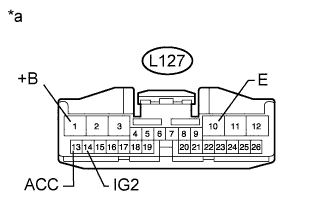
Text in Illustration *a Front view of wire harness connector
(to Telematics Transceiver)
Disconnect the telematics transceiver connector.
-
Measure the resistance according to the value(s) in the table below.
Standard Resistance Tester Connection Condition Specified Condition L127-10 (E) - Body ground Always Below 1 Ω -
Measure the voltage according to the value(s) in the table below.
Standard Voltage Tester Connection Condition Specified Condition L127-1 (+B) - Body ground Always 11 to 14 V L127-14 (IG2) - Body ground Power switch on (IG) 11 to 14 V L127-13 (ACC) - Body ground Power switch on (ACC) 11 to 14 V
NG 
REPAIR OR REPLACE HARNESS OR CONNECTOR
OK 
-
-
CHECK MULTI-MEDIA MODULE RECEIVER ASSEMBLY (USBV, USBG)
-
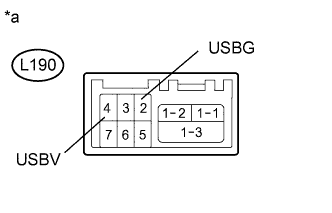
Text in Illustration *a Component without harness connected
(Multi-media Module Receiver Assembly)
Disconnect the multi-media module receiver assembly connector.
-
Measure the resistance according to the value(s) in the table below.
Standard Resistance Tester Connection Condition Specified Condition L190-2 (USBG) - Body ground Always Below 1 Ω -
Measure the voltage according to the value(s) in the table below.
Standard Voltage Tester Connection Switch Condition Specified Condition L190-4 (USBV) - L190-2 (USBG) Power switch on (ACC) 4.75 to 5.25 V
NG
REPLACE MULTI-MEDIA MODULE RECEIVER ASSEMBLY Click here
OK
-
-
CHECK HARNESS AND CONNECTOR (MULTI-MEDIA MODULE RECEIVER ASSEMBLY - TELEMATICS TRANSCEIVER)
-
Check the installation condition.
-
Check the USB communication cable (digital communication cable) between the multi-media module receiver assembly and the telematics transceiver for any installation or connection problems.
-
-
Disconnect the L190 multi-media module receiver assembly connector.
-
Disconnect the L153 telematics transceiver connector.
-
Measure the resistance according to the value(s) in the table below.
Standard Resistance Tester Connection Condition Specified Condition L190-1-2 (USB+) - L153-1-2 (USB+) Always Below 1 Ω L190-1-1 (USB-) - L153-1-1 (USB-) Always Below 1 Ω L190-1-3 (USBS) - L153-1-3 (USBS) Always Below 1 Ω L190-2 (USBG) - L153-2 (USBG) Always Below 1 Ω L190-4 (USBV) - L153-4 (USBV) Always Below 1 Ω L190-1-2 (USB+) - Body ground Always 10 kΩ or higher L190-1-1 (USB-) - Body ground Always 10 kΩ or higher L190-1-3 (USBS) - Body ground Always 10 kΩ or higher L190-2 (USBG) - Body ground Always 10 kΩ or higher L190-4 (USBV) - Body ground Always 10 kΩ or higher
NG
REPAIR OR REPLACE HARNESS OR CONNECTOR
OK
-
-
REPLACE TELEMATICS TRANSCEIVER
-
Replace the telematics transceiver with a known good one and check if the same problem occurs again Click here.
-
Perform inspections indicated on the System Check Mode screen to confirm the DCM inspection result Click here.
Result Result Proceed to "OK" is displayed in "DCM" on the System Check Mode screen. A "NRES" is displayed in "DCM" on the System Check Mode screen. B
-
B
REPLACE MULTI-MEDIA MODULE RECEIVER ASSEMBLY Click here
A
END (TELEMATICS TRANSCEIVER IS DEFECTIVE)
-