NAVIGATION SYSTEM No Feedback Force Provided by Knob of Remote Touch
DESCRIPTION
When the remote touch switch knob is operated, the built-in 2-axis motors are controlled. The motors are used to provide feedback force for the knob according to the pointer operation displayed on the multi-display.
INSPECTION PROCEDURE
PROCEDURE
-
REMOTE TOUCH SELF CHECK (REMOTE TOUCH SWITCH KNOB FEEDBACK FORCE GENERATION CHECK)
-
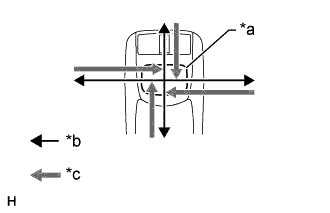
Text in Illustration *a Switch Knob *b Control Direction *c Feedback Force Check the remote touch switch knob feedback force generated.
-
Move the remote touch switch knob up, down, right and left to check that feedback force is generated.
OK Feedback force is generated. Tech Tips
When the power switch is turned on (ACC), feedback force is generated. When the power switch is turned off, feedback force is not generated, and the remote touch switch knob will move freely.
-
NG 
REPLACE REMOTE TOUCH (REMOTE OPERATION BOARD) Click here
OK 
-
-
REMOTE TOUCH SELF CHECK (FEEDBACK FORCE FUNCTION)
-
Check feedback force function
-
Move the pointer on the screen by operating the remote touch switch knob and check that the feedback force of the knob changes according to the screen being displayed and the pointer position.
Tech Tips
Refer to Remote Touch Outline for further information on remote touch switch knob feedback force generated according to the screen being displayed and the pointer position Click here.
Result Result Proceed to Feedback force of the remote touch switch knob does not change according to the screen being displayed and the pointer position. A Feedback force of the remote touch switch knob changes according to the screen being displayed and the pointer position. B
-
B
USE SIMULATION METHOD TO CHECK Click here
A 
REPLACE MULTI-MEDIA MODULE RECEIVER ASSEMBLY Click here
-