DESCRIPTION
This DTC is stored when the MOST network cannot be established after the master unit is activated.
-
If a short occurs in a speaker circuit, the sound from the corresponding speaker will be low or almost impossible to hear. If the volume is turned up in this situation, to prevent excessive current flow due to the short circuit, the stereo component amplifier assembly stops operating when its output exceeds a certain level. When the operation of the stereo component amplifier assembly stops, the navigation system will not function normally. This is because MOST communication will stop due to the shutdown of the amplifier causing an error in the MOST network. The stereo component amplifier assembly will start operating again when the power switch is turned off and back on (ACC) again. However, the amplifier will stop operating again if its output exceeds a certain level.
-
When the stereo component amplifier assembly stops operating and a malfunction occurs in the navigation system due to a short in a speaker circuit, this DTC will be stored.
| DTC Code | DTC Detection Condition | Trouble Area |
|---|---|---|
| B15D0 | MOST network cannot be established. |
|
-
For the MOST network, the multi-media module receiver assembly is the master unit.
-
Errors may occur in MOST communication between devices due to problems such as electrical noise.
INSPECTION PROCEDURE
Depending on the parts that are replaced during vehicle inspection or maintenance, performing initialization, registration or calibration may be needed. Refer to Precaution for Navigation System (Click here).
PROCEDURE
- Click here
CHECK OPTIONAL COMPONENTS (INCLUDING ASSOCIATED WIRING)
-
Check that optional components (including associated wiring) which generate radio waves are not installed.
Table 1. Result Result Proceed to Optional components (including associated wiring) are installed. A Optional components (including associated wiring) are installed.
DTCs are not output.
B Tip:
-
Electrical noise from radio waves generated by optional components or the wiring for those components may affect MOST communication.
-
This DTC may be stored when a MOST communication error occurs due to electrical noise.
-
-
- Click here
CONFIRM SYMPTOMS
-
Turn the power switch off.
-
Turn the power switch on (ACC) and check if the audio system activates and if the speakers operate.
Tip:
-
Choose a source such as radio so that sound can be output from the speakers.
-
If sound from the speakers is low, turn up the volume.
Table 2. Result Result Proceed to Even after the power switch is turned on (ACC), the navigation system does not activate and sound is not output from the speakers. (w/o Rear Seat Entertainment System) A Even after the power switch is turned on (ACC), the navigation system does not activate and sound is not output from the speakers. (w/ Rear Seat Entertainment System) B The audio system activates when the power switch is turned on (ACC) but the sound stops being output when the amplifier output exceeds a certain level. C Tip:
-
If a short occurs in a speaker circuit, the sound from the corresponding speaker will be low or almost impossible to hear. If the volume is turned up in this situation, to prevent excessive current flow due to the short circuit, the stereo component amplifier assembly stops operating when its output exceeds a certain level. When the operation of the stereo component amplifier assembly stops, the navigation system will not function normally. This is because MOST communication will stop due to the shutdown of the amplifier causing an error in the MOST network. The stereo component amplifier assembly will start operating again when the power switch is turned off and back on (ACC) again. However, the amplifier will stop operating again if its output exceeds a certain level.
-
When the stereo component amplifier assembly stops operating and a malfunction occurs in the navigation system due to a short in a speaker circuit, this DTC will be stored. In this case, check each speaker circuit and repair or replace malfunctioning parts, and then recheck for DTCs.
-
-
- Click here
CHECK MOST COMMUNICATION CONNECTORS
-
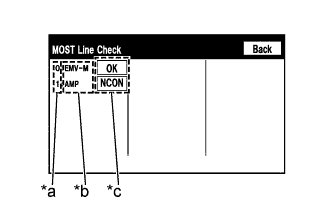
Display the "MOST Line Check" screen (Click here).
Table 3. Text in Illustration *a Node position number for devices that use MOST communication *b Device name *c Result -
Check the result on the "MOST Line Check" screen.
Table 4. Result Result Proceed to "NCON" is displayed for "AMP". A "OK" is displayed for all items. B
-
When "NCON" is displayed for more than 1 item, proceed to the step for the device that has the smallest node position number.
-
The "MOST Line Check" screen can be displayed only when DTC B15D0 is stored.
-
-
- Click here
CONFIRM SYMPTOMS
-
Check the MOST communication line connectors.
-
Check if the MOST communication line connector between the multi-media module receiver assembly and stereo component amplifier assembly has any connection problems (Click here).
-
-
Display the "MOST Line Check" screen and check the result (Click here).
Table 5. Result Result Proceed to "NCON" is displayed for "AMP". A The screen cannot be changed to the "MOST Line Check" screen. B Tip:When the malfunction in the MOST network is repaired, the screen cannot be changed to the "MOST Line Check" screen.
-
- Click here
CHECK HARNESS AND CONNECTOR (STEREO COMPONENT AMPLIFIER ASSEMBLY WAKE UP LINE)
-
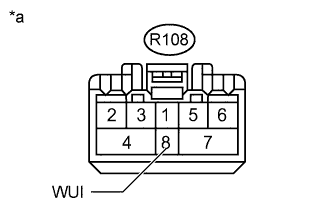
Disconnect the stereo component amplifier assembly connector.
-
Measure the voltage according to the value(s) in the table below.
Standard Voltage Tester Connection Switch Condition Specified Condition R108-8 (WUI) - Body ground Power switch on (ACC) 4.5 V or higher Table 6. Text in Illustration *a Front view of wire harness connector
(to Stereo Component Amplifier Assembly)
- OKClick here
- NGClick here
-
- Click here
CHECK HARNESS AND CONNECTOR (MULTI-MEDIA MODULE RECEIVER ASSEMBLY - STEREO COMPONENT AMPLIFIER ASSEMBLY)
-
Disconnect the L174 multi-media module receiver assembly connector.
-
Disconnect the R108 stereo component amplifier assembly connector.
-
Measure the resistance according to the value(s) in the table below.
Standard Resistance Tester Connection Condition Specified Condition L174-1 (WUO) - R108-8 (WUI) Always Below 1 Ω L174-1 (WUO) - Body ground Always 10 kΩ or higher
- OKClick here
- NGClick here
-
- Click here
CHECK HARNESS AND CONNECTOR (MULTI-MEDIA MODULE RECEIVER ASSEMBLY - STEREO COMPONENT AMPLIFIER ASSEMBLY)
-
Disconnect the L174 multi-media module receiver assembly connector.
-
Disconnect the R108 stereo component amplifier assembly connector.
-
Measure the resistance according to the value(s) in the table below.
Standard Resistance Tester Connection Condition Specified Condition L174-2 (MI+) - R108-5 (MO+) Always Below 1 Ω L174-3 (MI-) - R108-6 (MO-) Always Below 1 Ω L174-4 (SLDI) - R108-7 (SLDO) Always Below 1 Ω L174-5 (MO+) - R108-2 (MI+) Always Below 1 Ω L174-6 (MO-) - R108-3 (MI-) Always Below 1 Ω L174-7 (SLDO) - R108-4 (SLDI) Always Below 1 Ω L174-2 (MI+) - Body ground Always 10 kΩ or higher L174-3 (MI-) - Body ground Always 10 kΩ or higher L174-4 (SLDI) - Body ground Always 10 kΩ or higher L174-5 (MO+) - Body ground Always 10 kΩ or higher L174-6 (MO-) - Body ground Always 10 kΩ or higher L174-7 (SLDO) - Body ground Always 10 kΩ or higher
- OKClick here
- NGClick here
-
- Click here
CHECK STEREO COMPONENT AMPLIFIER ASSEMBLY
-
Replace the stereo component amplifier assembly with a new or normally functioning one (Click here).
- NEXTClick here
-
- Click here
CLEAR DTC
-
Clear the DTCs (Click here).
- NEXTClick here
-
- Click here
CHECK DTC
-
Recheck for DTCs and check if the same DTC is output again (Click here).
OK No DTCs are output
- OKClick here
- NGClick here
-
- Click here
CHECK MOST COMMUNICATION CONNECTORS
-
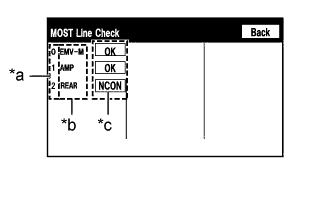
Display the "MOST Line Check" screen (Click here).
Table 7. Text in Illustration *a Node position number for devices that use MOST communication *b Device name *c Result -
Check the result on the "MOST Line Check" screen.
Table 8. Result Result Proceed to "NCON" is displayed for "AMP". A "NCON" is displayed for "REAR". B "OK" is displayed for all items. C
-
When "NCON" is displayed for more than 1 item, proceed to the step for the device that has the smallest node position number.
-
The "MOST Line Check" screen can be displayed only when DTC B15D0 is stored.
-
-
- Click here
CONFIRM SYMPTOMS
-
Check the MOST communication line connectors.
-
Check if the MOST communication line connector between the multi-media module receiver assembly and stereo component amplifier assembly has any connection problems (Click here).
-
-
Display the "MOST Line Check" screen and check the result (Click here).
Table 9. Result Result Proceed to "NCON" is displayed for "AMP". A The screen cannot be changed to the "MOST Line Check" screen. B Tip:When the malfunction in the MOST network is repaired, the screen cannot be changed to the "MOST Line Check" screen.
-
- Click here
CHECK HARNESS AND CONNECTOR (STEREO COMPONENT AMPLIFIER ASSEMBLY WAKE UP LINE)
-
Disconnect the stereo component amplifier assembly connector.
-
Measure the voltage according to the value(s) in the table below.
Standard Voltage Tester Connection Switch Condition Specified Condition R108-8 (WUI) - Body ground Power switch on (ACC) 4.5 V or higher Table 10. Text in Illustration *a Front view of wire harness connector
(to Stereo Component Amplifier Assembly)
- OKClick here
- NGClick here
-
- Click here
CHECK HARNESS AND CONNECTOR (MULTI-MEDIA MODULE RECEIVER ASSEMBLY - STEREO COMPONENT AMPLIFIER ASSEMBLY)
-
Disconnect the L174 multi-media module receiver assembly connector.
-
Disconnect the R108 stereo component amplifier assembly connector.
-
Measure the resistance according to the value(s) in the table below.
Standard Resistance Tester Connection Condition Specified Condition L174-1 (WUO) - R108-8 (WUI) Always Below 1 Ω L174-1 (WUO) - Body ground Always 10 kΩ or higher
- OKClick here
- NGClick here
-
- Click here
CONFIRM SYMPTOMS
-
Check the MOST communication line connectors.
-
Check if the MOST communication line connector between the multi-media module receiver assembly and stereo component amplifier assembly has any connection problems (Click here).
-
-
Display the "MOST Line Check" screen and check the result (Click here).
Table 11. Result Result Proceed to "NCON" is displayed for "REAR". A The screen cannot be changed to the "MOST Line Check" screen. B Tip:When the malfunction in the MOST network is repaired, the screen cannot be changed to the "MOST Line Check" screen.
-
- Click here
CHECK HARNESS AND CONNECTOR (TELEVISION DISPLAY ASSEMBLY Wake Up LINE)
-
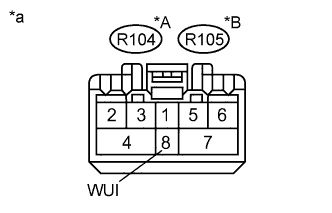
Disconnect the television display assembly connector.
-
Measure the voltage according to the value(s) in the table below.
Standard Voltage for 4-passenger with Ottoman Tester Connection Switch Condition Specified Condition R104-8 (WUI) - Body ground Power switch on (ACC) 4.5 V or higher for 5-passenger with Ottoman Tester Connection Switch Condition Specified Condition R105-8 (WUI) - Body ground Power switch on (ACC) 4.5 V or higher Table 12. Text in Illustration *A for 4-passenger with Ottoman *B for 5-passenger with Ottoman *a Front view of wire harness connector
(to Television Display Assembly)
Table 13. Result Result Proceed to OK (for 4-passenger with Ottoman) A OK (for 5-passenger with Ottoman) B NG C
-
- Click here
CHECK HARNESS AND CONNECTOR (STEREO COMPONENT AMPLIFIER ASSEMBLY - TELEVISION DISPLAY ASSEMBLY)
-
Disconnect the R108 stereo component amplifier assembly connector.
-
Disconnect the R104*1 or R105*2 television display assembly connector.
-
*1: for 4-passenger with Ottoman
-
*2: for 5-passenger with Ottoman
-
-
Measure the resistance according to the value(s) in the table below.
Standard Resistance for 4-passenger with Ottoman Tester Connection Condition Specified Condition R108-1 (WUO) - R104-8 (WUI) Always Below 1 Ω R108-1 (WUO) - Body ground Always 10 kΩ or higher for 5-passenger with Ottoman Tester Connection Condition Specified Condition R108-1 (WUO) - R105-8 (WUI) Always Below 1 Ω R108-1 (WUO) - Body ground Always 10 kΩ or higher
- OKClick here
- NGClick here
-
- Click here
CHECK HARNESS AND CONNECTOR (MULTI-MEDIA MODULE RECEIVER ASSEMBLY - STEREO COMPONENT AMPLIFIER ASSEMBLY)
-
Disconnect the L174 multi-media module receiver assembly connector.
-
Disconnect the R108 stereo component amplifier assembly connector.
-
Measure the resistance according to the value(s) in the table below.
Standard Resistance Tester Connection Condition Specified Condition L174-5 (MO+) - R108-2 (MI+) Always Below 1 Ω L174-6 (MO-) - R108-3 (MI-) Always Below 1 Ω L174-7 (SLDO) - R108-4 (SLDI) Always Below 1 Ω L174-5 (MO+) - Body ground Always 10 kΩ or higher L174-6 (MO-) - Body ground Always 10 kΩ or higher L174-7 (SLDO) - Body ground Always 10 kΩ or higher
- OKClick here
- NGClick here
-
- Click here
CHECK HARNESS AND CONNECTOR (STEREO COMPONENT AMPLIFIER ASSEMBLY - TELEVISION DISPLAY ASSEMBLY)
-
Disconnect the R108 stereo component amplifier assembly connector.
-
Disconnect the R104*1 or R105*2 television display assembly connector.
-
*1: for 4-passenger with Ottoman
-
*2: for 5-passenger with Ottoman
-
-
Measure the resistance according to the value(s) in the table below.
Standard Resistance for 4-passenger with Ottoman Tester Connection Condition Specified Condition R108-5 (MO+) - R104-2 (MI+) Always Below 1 Ω R108-6 (MO-) - R104-3 (MI-) Always Below 1 Ω R108-7 (SLDO) - R104-4 (SLDI) Always Below 1 Ω R108-5 (MO+) - Body ground Always 10 kΩ or higher R108-6 (MO-) - Body ground Always 10 kΩ or higher R108-7 (SLDO) - Body ground Always 10 kΩ or higher for 5-passenger with Ottoman Tester Connection Condition Specified Condition R108-5 (MO+) - R105-2 (MI+) Always Below 1 Ω R108-6 (MO-) - R105-3 (MI-) Always Below 1 Ω R108-7 (SLDO) - R105-4 (SLDI) Always Below 1 Ω R108-5 (MO+) - Body ground Always 10 kΩ or higher R108-6 (MO-) - Body ground Always 10 kΩ or higher R108-7 (SLDO) - Body ground Always 10 kΩ or higher
- OKClick here
- NGClick here
-
- Click here
CHECK HARNESS AND CONNECTOR (MULTI-MEDIA MODULE RECEIVER ASSEMBLY - TELEVISION DISPLAY ASSEMBLY)
-
Disconnect the L174 multi-media module receiver assembly connector.
-
Disconnect the R104*1 or R105*2 television display assembly connector.
-
*1: for 4-passenger with Ottoman
-
*2: for 5-passenger with Ottoman
-
-
Measure the resistance according to the value(s) in the table below.
Standard Resistance for 4-passenger with Ottoman Tester Connection Condition Specified Condition L174-2 (MI+) - R104-5 (MO+) Always Below 1 Ω L174-3 (MI-) - R104-6 (MO-) Always Below 1 Ω L174-4 (SLDI) - R104-7 (SLDO) Always Below 1 Ω L174-2 (MI+) - Body ground Always 10 kΩ or higher L174-3 (MI-) - Body ground Always 10 kΩ or higher L174-4 (SLDI) - Body ground Always 10 kΩ or higher for 5-passenger with Ottoman Tester Connection Condition Specified Condition L174-2 (MI+) - R105-5 (MO+) Always Below 1 Ω L174-3 (MI-) - R105-6 (MO-) Always Below 1 Ω L174-4 (SLDI) - R105-7 (SLDO) Always Below 1 Ω L174-2 (MI+) - Body ground Always 10 kΩ or higher L174-3 (MI-) - Body ground Always 10 kΩ or higher L174-4 (SLDI) - Body ground Always 10 kΩ or higher
- OKClick here
- NGClick here
-
- Click here
CHECK TELEVISION DISPLAY ASSEMBLY
-
Replace the television display assembly with a new or normally functioning one.
-
for 4-passenger with Ottoman:Click here
-
for 5-passenger with Ottoman:Click here
-
- NEXTClick here
-
- Click here
CLEAR DTC
-
Clear the DTCs (Click here).
- NEXTClick here
-
- Click here
CHECK DTC
-
Recheck for DTCs and check if the same DTC is output again (Click here).
OK No DTCs are output.
- OKClick here
- NGClick here
-
- Click here
GO TO AUDIO AND VISUAL SYSTEMClick here
- Click here
USE SIMULATION METHOD TO CHECKClick here
- Click here
REPLACE MULTI-MEDIA MODULE RECEIVER ASSEMBLYClick here
- Click here
REPAIR OR REPLACE HARNESS OR CONNECTOR
- Click here
END (STEREO COMPONENT AMPLIFIER ASSEMBLY IS DEFECTIVE)
- Click here
USE SIMULATION METHOD TO CHECKClick here
- Click here
REPAIR OR REPLACE HARNESS OR CONNECTOR
- Click here
REPLACE STEREO COMPONENT AMPLIFIER ASSEMBLYClick here
- Click here
USE SIMULATION METHOD TO CHECKClick here
- Click here
REPLACE TELEVISION DISPLAY ASSEMBLYClick here
- Click here
END (TELEVISION DISPLAY ASSEMBLY IS DEFECTIVE)
- Click here
REPLACE TELEVISION DISPLAY ASSEMBLYClick here