VIDEO TERMINAL (except Ottoman) REMOVAL

-
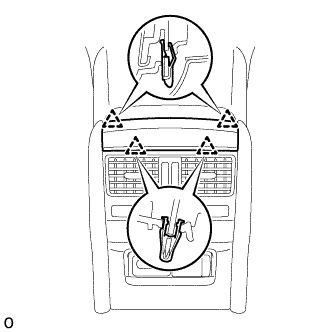
REMOVE UPPER NO. 1 CONSOLE PANEL GARNISH
-
Detach the 4 clips and remove the upper No. 1 console panel garnish.
-
-
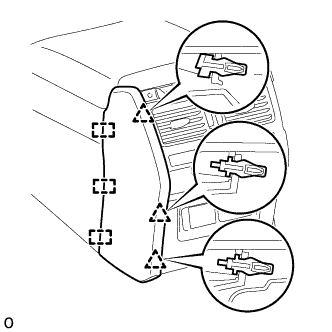
REMOVE REAR NO. 1 CONSOLE END PANEL GARNISH
-
Detach the 3 clips and 3 guides and remove the rear No. 1 console end panel garnish.
-
-
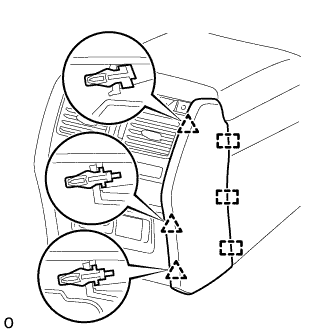
REMOVE REAR NO. 2 CONSOLE END PANEL GARNISH
-
Detach the 3 clips and 3 guides and remove the rear No. 2 console end panel garnish.
-
-
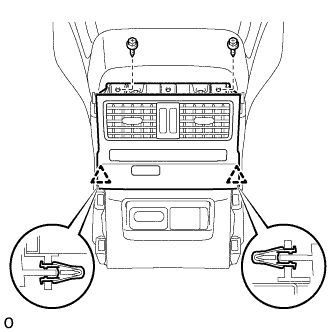
REMOVE REAR CONSOLE END PANEL SUB-ASSEMBLY
-
Remove the 2 screws.
-
Detach the 2 clips and remove the rear console end panel sub-assembly.
-
-
REMOVE REAR CONSOLE END PANEL
-
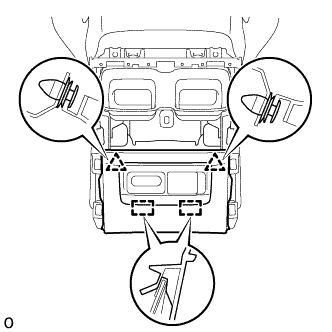
Detach the 2 clips and 2 hooks and remove the rear console end panel.
-
Disconnect each connector and detach the wire harness clamp.
-
-
REMOVE VIDEO (VIDEO ADAPTER) TERMINAL
-
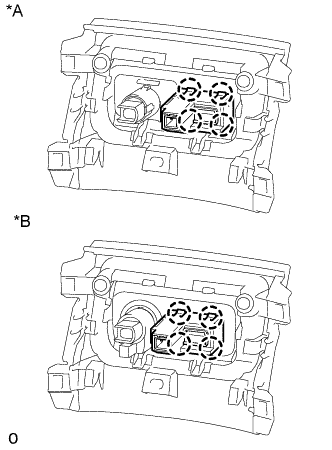
Text in Illustration *A w/ Power Outlet Socket *B w/ Cigarette Lighter Detach the 4 claws and remove the video (video adapter) terminal.
-