TELEVISION DISPLAY (for Center Console Side) INSTALLATION

-
INSTALL TELEVISION DISPLAY ASSEMBLY
-
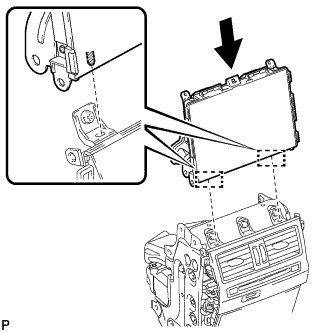
Align the 2 guides with the console box and install the television display assembly to the console box.
-
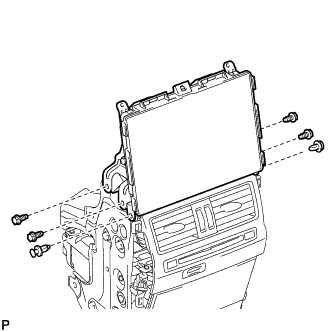
Install the 2 clips and 4 bolts.
- Torque:
- 8.5 N*m { 87 kgf*cm, 75 in.*lbf }
-
Connect each connector.
-
-
INSTALL REAR NO. 1 CONSOLE END PANEL GARNISH
-
Attach the 2 clips and 4 guides to install the rear No. 1 console end panel garnish.
-
Install the 2 screws.
-
-
INSTALL REAR NO. 2 CONSOLE END PANEL GARNISH
Tech Tips
Use the same procedure described for the rear No. 1 console end panel garnish.
-
INSTALL UPPER NO. 1 CONSOLE PANEL GARNISH
-
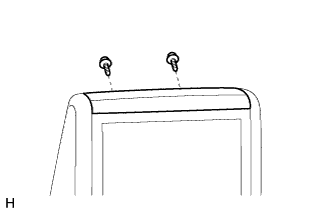
Install the upper No. 1 console panel garnish with the 2 screws.
-
-
INSTALL REAR CONSOLE BOX GARNISH
-
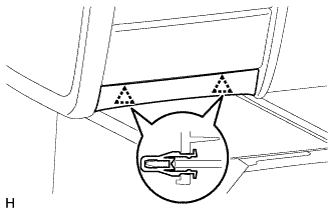
Attach the 2 clips to install the rear console box garnish.
-
-
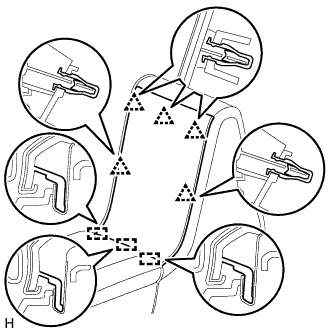
INSTALL UPPER REAR CONSOLE PANEL GARNISH
-
Attach the 5 clips and 3 guides to install the upper rear console panel garnish.
-