TELEVISION DISPLAY (for Roof) INSTALLATION

Tech Tips
A bolt without a torque specification is shown in the standard bolt chart Click here.
-
INSTALL TELEVISION DISPLAY ASSEMBLY
-
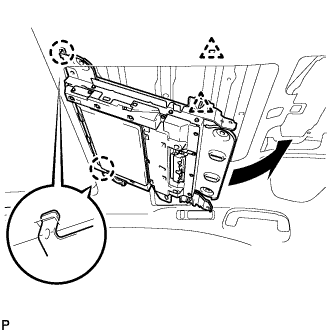
Attach the 2 claws on the front side of the television display by moving it in the direction of the arrow in the illustration, and then attach the 2 clips to temporarily install the television display.
-
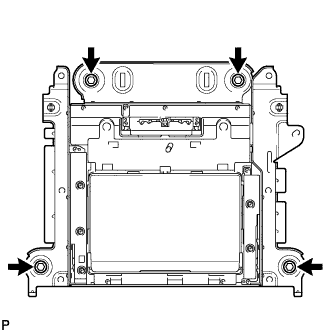
Install the television display with the 4 bolts.
-
Connect the connectors.
-
-
INSTALL ROOF CONSOLE BOX ASSEMBLY (for Long Body)
-
w/o Infrared Ray Sensor:
Connect the connector.
-
w/ Infrared Ray Sensor:
Connect the 2 connectors.
-
Attach the 6 clips and 2 claws to install the roof console box assembly.
-
Install the 2 screws.
-
-
INSTALL ROOF CONSOLE BOX ASSEMBLY (for Standard Body)
-
w/o Sliding Roof:
-
Connect the connector.
-
Attach the 2 hooks, 6 clips and 2 claws to install the roof console box assembly.
-
Install the 2 screws.
-
-
w/ Sliding Roof:
-
Connect the connector.
-
Attach the 2 hooks and 6 clips to install the roof console box assembly.
-
Install the 2 screws.
-
-
-
INSTALL SPOT LIGHT LENS
-
Attach the 4 claws to install the spot light lens.
-