| DTC Code | DTC Name |
|---|---|
| Sound from Wireless Headphones is Difficult to Hear, cannot be Heard, or Quality is Poor |
INSPECTION PROCEDURE
Check that the frequency setting of the wireless headphones is within the usable range for the rear seat entertainment system.
PROCEDURE
- Click here
CHECK WIRELESS HEADPHONES (DRY-CELL BATTERY)
-
Check that the dry-cell battery of the wireless headphones is not depleted.
OK Dry-cell battery is not depleted.
- OKClick here
- NGClick here
-
- Click here
CHECK WIRELESS HEADPHONE SETTING
-
Check the wireless headphone settings.
-
Check that the volume is not set to "0".
-
Check that "MUTE" is off.
OK The volume is not set to "0" and "MUTE" is off.
-
- OKClick here
- NGClick here
-
- Click here
CLEAN INFRARED RAY RECEIVING PORTION
-
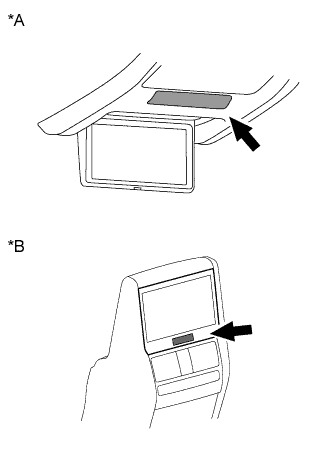
Clean the infrared ray receiving portion on the television display assembly.
-
Check whether the same malfunction occurs.
OK The function returns to normal. Table 1. Text in Illustration *A for Roof *B for Center Console Side
- OKClick here
- NGClick here
-
- Click here
CHECK WIRELESS HEADPHONES
-
Replace the wireless headphone with a new or known good pair of headphones and check if the same problem occurs again.
OK Same problem does not occur.
- OKClick here
- NGClick here
-
- Click here
REPLACE WIRELESS HEADPHONE (DRY-CELL BATTERY)
- Click here
SET VOLUME TO HIGH AND TURN MUTE OFF
- Click here
END (WIRELESS HEADPHONES ARE DEFECTIVE)
- Click here
PROCEED TO NEXT SUSPECTED AREA SHOWN IN PROBLEM SYMPTOMS TABLEClick here
- Click here
END