AUDIO AND VISUAL SYSTEM Switch Lights of Remote Touch do not Illuminate
DESCRIPTION
Power is supplied to the remote touch illumination when the light control switch is in the tail or head position.
Tech Tips
Only the "MAP/VOICE" and "MENU" switches and indirect illumination on the remote touch illuminate.
WIRING DIAGRAM
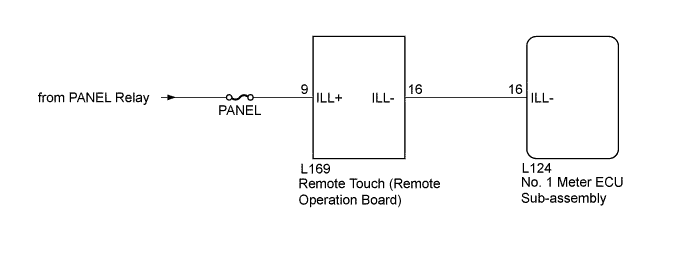
INSPECTION PROCEDURE
Note
Inspect the fuse for circuits related to this system before performing the following inspection procedure.
PROCEDURE
-
CONFIRM SYMPTOMS
-
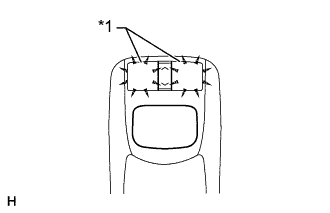
Text in Illustration *1 Switch Illumination Perform the following settings and check the switch illumination again.
-
When the vehicle is in a bright area, move to a dark area.
Tech Tips
When the vehicle is in a bright area, the switch illumination may not turn on due to the automatic dimmer function.
-
Set the rheostat to the maximum brightness.
Tech Tips
If the brightness of the rheostat is set to low, switch illumination may not be recognized even when the switch illumination turns on.
-
If the light control switch is in the AUTO position, turn the switch to the tail or head position.
Tech Tips
If the light control switch is in the AUTO position, the switch illumination will not turn on unless the surrounding area is dark.
OK Switch illumination turns on.
-
NG 
REMOTE TOUCH SELF CHECK (SWITCH ILLUMINATION CHECK) Click here
OK 
END
-
-
REMOTE TOUCH SELF CHECK (SWITCH ILLUMINATION CHECK)
-
Activate self check mode Click here.
-
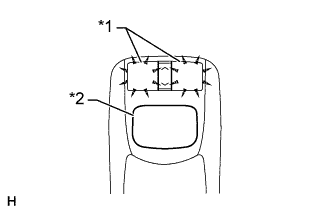
Text in Illustration *1 Switch Illumination *2 Switch Knob Check switch illumination.
-
Move the remote operation switch knob from the lower left to the upper right to check that the brightness of the switch illumination changes.
OK The switch illumination brightness changes according to the remote operation switch knob operation.
-
NG
CHECK REMOTE TOUCH (REMOTE OPERATION SWITCH) Click here
OK 
-
-
CHECK HARNESS AND CONNECTOR (ILLUMINATION SIGNAL)
-
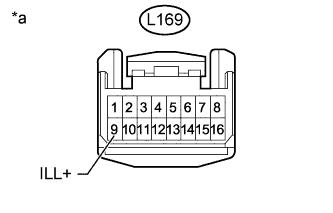
Text in Illustration *a Front view of wire harness connector
(to Remote Touch [Remote Operation Board])
Disconnect the remote touch connector.
-
Measure the voltage according to the value(s) in the table below.
Standard Voltage Tester Connection Switch Condition Specified Condition L169-9 (ILL+) - Body ground Light control switch in the tail or head position 11 to 14 V
NG 
REPAIR OR REPLACE HARNESS OR CONNECTOR
OK
-
-
CHECK HARNESS AND CONNECTOR (REMOTE TOUCH - NO. 1 METER ECU SUB-ASSEMBLY)
-
Disconnect the L169 remote touch connector.
-
Disconnect the L124 No. 1 meter ECU sub-assembly connector.
-
Measure the resistance according to the value(s) in the table below.
Standard Resistance Tester Connection Condition Specified Condition L169-16 (ILL-) - L124-16 (ILL-) Always Below 1 Ω L169-16 (ILL-) - Body ground Always 10 kΩ or higher
NG
REPAIR OR REPLACE HARNESS OR CONNECTOR
OK
-
-
CHECK REMOTE TOUCH (REMOTE OPERATION BOARD)
-
Temporarily replace the remote operation board Click here.
-
Check if the switch illumination turns on.
OK The switch illumination turns on when the light control switch is in the tail or head position.
NG
GO TO METER / GAUGE SYSTEM Click here
OK
END (REMOTE TOUCH [REMOTE OPERATION BOARD] IS DEFECTIVE)
-
-
CHECK REMOTE TOUCH (REMOTE OPERATION SWITCH)
-
Temporarily replace the remote operation switch Click here.
-
Check if the switch illumination turns on.
OK The switch illumination turns on when the light control switch is in the tail or head position.
NG
REPLACE REMOTE TOUCH (REMOTE OPERATION BOARD) Click here
OK
END (REMOTE TOUCH [REMOTE OPERATION SWITCH] IS DEFECTIVE)
-