AUDIO AND VISUAL SYSTEM, Diagnostic DTC:B15C3

| DTC Code | DTC Name |
|---|---|
| B15C3 | Speaker Output Short |
DESCRIPTION
| DTC Code | DTC Detection Condition | Trouble Area |
|---|---|---|
| B15C3 | A short is detected in the speaker output circuit. |
|
-
*: w/ Emergency Call Switch
WIRING DIAGRAM
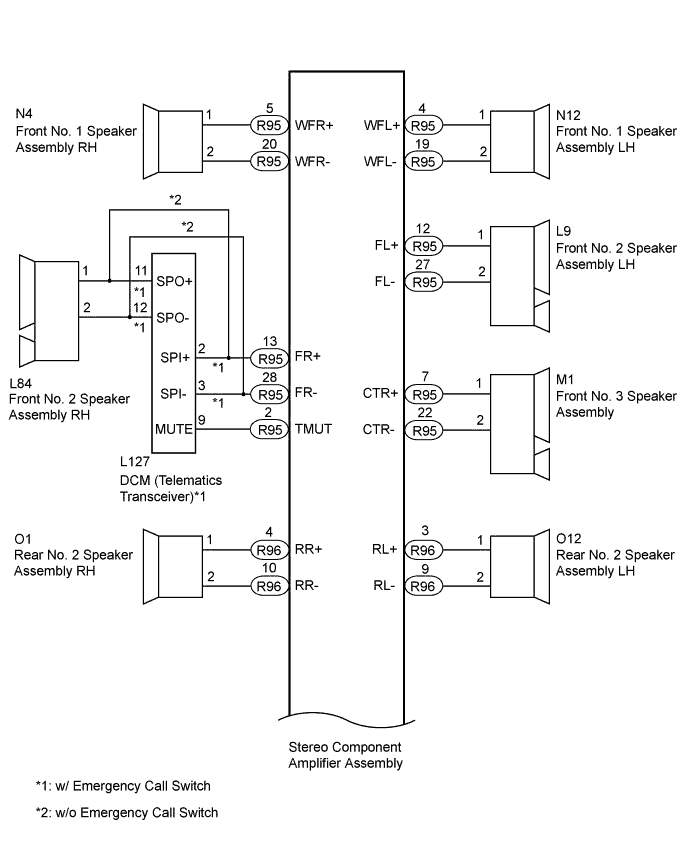
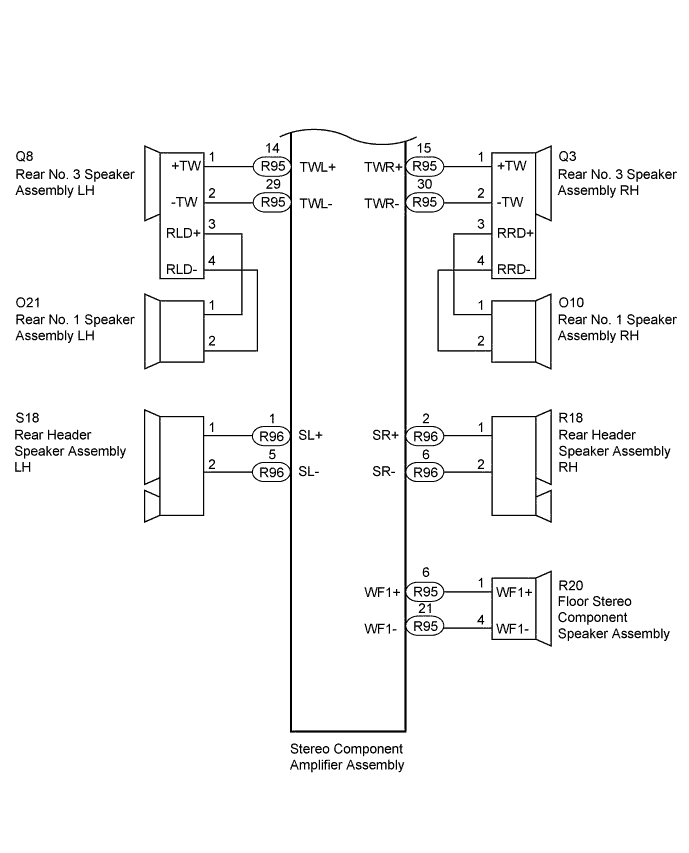
INSPECTION PROCEDURE
Tech Tips
After the inspection is completed, clear the DTCs.
PROCEDURE
-
CLEAR DTC
-
Clear the DTC Click here.
NEXT 
-
-
CHECK FOR DTC
-
Recheck for DTCs and check if the same DTC is output again Click here.
OK No DTC is output.
NG 
CHECK HARNESS AND CONNECTOR (STEREO COMPONENT AMPLIFIER ASSEMBLY - SPEAKERS AND DCM [TELEMATICS TRANSCEIVER]) Click here
OK 
USE SIMULATION METHOD TO CHECK Click here
-
-
CHECK HARNESS AND CONNECTOR (STEREO COMPONENT AMPLIFIER ASSEMBLY - SPEAKERS AND DCM [TELEMATICS TRANSCEIVER])
-
*1: for RH Side
-
*2: for LH Side
-
*3: w/ Emergency Call Switch
-
*4: w/o Emergency Call Switch
-
Disconnect the R96 and R95 stereo component amplifier assembly connectors.
-
Disconnect the N4*1 and/or N12*2 front No. 1 speaker assembly connector.
-
Disconnect the L84*1 and/or L9*2 front No. 2 speaker assembly connector.
-
Disconnect the M1 front No. 3 speaker assembly connector.
-
Disconnect the O1*1 and/or O12*2 rear No. 2 speaker assembly connector.
-
Disconnect the Q3*1 and/or Q8*2 rear No. 3 speaker assembly connector.
-
Disconnect the R20 floor stereo component speaker assembly connector.
-
Disconnect the R18*1 and/or S18*2 rear header speaker assembly connector.
-
Disconnect the L127 DCM (telematics transceiver) connector.*3
-
Measure the resistance according to the value(s) in the table below.
Standard Resistance Tester Connection Condition Specified Condition R95-2 (TMUT) - L127-9 (MUTE)*3 Always Below 1 Ω R95-5 (WFR+) - N4-1 Always Below 1 Ω R95-20 (WFR-) - N4-2 Always Below 1 Ω R95-4 (WFL+) - N12-1 Always Below 1 Ω R95-19 (WFL-) - N12-2 Always Below 1 Ω R95-13 (FR+) - L127-2 (SPI+)*3 Always Below 1 Ω R95-28 (FR-) - L127-3 (SPI-)*3 Always Below 1 Ω R95-13 (FR+) - L84-1*4 Always Below 1 Ω R95-28 (FR-) - L84-2*4 Always Below 1 Ω R95-12 (FL+) - L9-1 Always Below 1 Ω R95-27 (FL-) - L9-2 Always Below 1 Ω R95-7 (CTR+) - M1-1 Always Below 1 Ω R95-22 (CTR-) - M1-2 Always Below 1 Ω R96-4 (RR+) - O1-1 Always Below 1 Ω R96-10 (RR-) - O1-2 Always Below 1 Ω R96-3 (RL+) - O12-1 Always Below 1 Ω R96-9 (RL-) - O12-2 Always Below 1 Ω R95-15 (TWR+) - Q3-1 (+TW) Always Below 1 Ω R95-30 (TWR-) - Q3-2 (-TW) Always Below 1 Ω R95-14 (TWL+) - Q8-1 (+TW) Always Below 1 Ω R95-29 (TWL-) - Q8-2 (-TW) Always Below 1 Ω R95-6 (WF1+) - R20-1 (WF1+) Always Below 1 Ω R95-21 (WF1-) - R20-4 (WF1-) Always Below 1 Ω R96-2 (SR+) - R18-1 Always Below 1 Ω R96-6 (SR-) - R18-2 Always Below 1 Ω R96-1 (SL+) - S18-1 Always Below 1 Ω R96-5 (SL-) - S18-2 Always Below 1 Ω R95-2 (TMUT) - Body ground*3 Always 10 kΩ or higher R95-5 (WFR+) - Body ground Always 10 kΩ or higher R95-20 (WFR-) - Body ground Always 10 kΩ or higher R95-4 (WFL+) - Body ground Always 10 kΩ or higher R95-19 (WFL-) - Body ground Always 10 kΩ or higher R95-13 (FR+) - Body ground Always 10 kΩ or higher R95-28 (FR-) - Body ground Always 10 kΩ or higher R95-12 (FL+) - Body ground Always 10 kΩ or higher R95-27 (FL-) - Body ground Always 10 kΩ or higher R95-7 (CTR+) - Body ground Always 10 kΩ or higher R95-22 (CTR-) - Body ground Always 10 kΩ or higher R95-15 (TWR+) - Body ground Always 10 kΩ or higher R95-30 (TWR-) - Body ground Always 10 kΩ or higher R95-14 (TWL+) - Body ground Always 10 kΩ or higher R95-29 (TWL-) - Body ground Always 10 kΩ or higher R95-6 (WF1+) - Body ground Always 10 kΩ or higher R95-21 (WF1-) - Body ground Always 10 kΩ or higher R96-4 (RR+) - Body ground Always 10 kΩ or higher R96-10 (RR-) - Body ground Always 10 kΩ or higher R96-3 (RL+) - Body ground Always 10 kΩ or higher R96-9 (RL-) - Body ground Always 10 kΩ or higher R96-2 (SR+) - Body ground Always 10 kΩ or higher R96-6 (SR-) - Body ground Always 10 kΩ or higher R96-1 (SL+) - Body ground Always 10 kΩ or higher R96-5 (SL-) - Body ground Always 10 kΩ or higher Result Result Proceed to OK (w/ Emergency Call Switch) A OK (w/o Emergency Call Switch) B NG C
B
INSPECT FRONT NO. 2 SPEAKER ASSEMBLY Click here
C 
REPAIR OR REPLACE HARNESS OR CONNECTOR
A
-
-
CHECK HARNESS AND CONNECTOR (DCM [TELEMATICS TRANSCEIVER] - FRONT NO. 2 SPEAKER RH)
-
Disconnect the L127 DCM (telematics transceiver) connector.
-
Disconnect the L84 front No. 2 speaker assembly RH connector.
-
Measure the resistance according to the value(s) in the table below.
Standard Resistance Tester Connection Condition Specified Condition L127-11 (SPO+) - L84-1 Always Below 1 Ω L127-12 (SPO-) - L84-2 Always Below 1 Ω L127-11 (SPO+) - Body ground Always 10 kΩ or higher L127-12 (SPO-) - Body ground Always 10 kΩ or higher
NG
REPAIR OR REPLACE HARNESS OR CONNECTOR
OK
-
-
INSPECT DCM (TELEMATICS TRANSCEIVER)
-
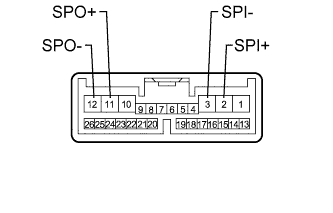
Remove the DCM (telematics transceiver) Click here.
-
Measure the resistance according to the value(s) in the table below.
Standard Resistance Tester Connection Condition Specified Condition 2 (SPI+) - 11 (SPO+) Always Below 1 Ω 3 (SPI-) - 12 (SPO-) Always Below 1 Ω 2 (SPI+) - Body ground Always 10 kΩ or higher 3 (SPI-) - Body ground Always 10 kΩ or higher
NG
REPLACE DCM (TELEMATICS TRANSCEIVER) Click here
OK
-
-
INSPECT FRONT NO. 2 SPEAKER ASSEMBLY
-
Remove the front No. 2 speaker assembly Click here.
-
Inspect the front No. 2 speaker assembly Click here.
NG
REPLACE FRONT NO. 2 SPEAKER ASSEMBLY Click here
OK
-
-
INSPECT FRONT NO. 1 SPEAKER ASSEMBLY
-
Remove the front No. 1 speaker assembly Click here.
-
Inspect the front No. 1 speaker assembly Click here.
NG
REPLACE FRONT NO. 1 SPEAKER ASSEMBLY Click here
OK
-
-
INSPECT FRONT NO. 3 SPEAKER ASSEMBLY
-
Remove the front No. 3 speaker assembly Click here.
-
Inspect the front No. 3 speaker assembly Click here.
NG
REPLACE FRONT NO. 3 SPEAKER ASSEMBLY Click here
OK
-
-
INSPECT FLOOR STEREO COMPONENT SPEAKER ASSEMBLY
-
Remove the floor stereo component speaker assembly Click here.
-
Inspect the floor stereo component speaker assembly Click here.
NG
REPLACE FLOOR STEREO COMPONENT SPEAKER ASSEMBLY Click here
OK
-
-
INSPECT REAR NO. 2 SPEAKER ASSEMBLY
-
Remove the rear No. 2 speaker assembly.
-
for Standard Body: Click here.
-
for Long Body: Click here.
-
-
Inspect the rear No. 2 speaker assembly.
-
for Standard Body: Click here.
-
for Long Body: Click here.
Result Result Proceed to OK A NG (for Standard Body) B NG (for Long Body) C -
B
REPLACE REAR NO. 2 SPEAKER ASSEMBLY Click here
C
REPLACE REAR NO. 2 SPEAKER ASSEMBLY Click here
A
-
-
INSPECT REAR NO. 1 SPEAKER ASSEMBLY
-
Remove the rear No. 1 speaker assembly.
-
for Standard Body: Click here.
-
for Long Body: Click here.
-
-
Inspect the rear No. 1 speaker assembly.
-
for Standard Body: Click here.
-
for Long Body: Click here.
Result Result Proceed to OK A NG (for Standard Body) B NG (for Long Body) C -
B
REPLACE REAR NO. 1 SPEAKER ASSEMBLY Click here
C
REPLACE REAR NO. 1 SPEAKER ASSEMBLY Click here
A
-
-
CHECK HARNESS AND CONNECTOR (REAR NO. 3 SPEAKER ASSEMBLY - REAR NO. 1 SPEAKER ASSEMBLY)
-
*1: for LH Side
-
*2: for RH Side
-
Disconnect the Q8*1 or Q3*2 rear No. 3 speaker assembly connector.
-
Disconnect the O21*1 or O10*2 rear No. 1 speaker assembly connector.
-
Measure the resistance according to the value(s) in the table below.
Standard Resistance for LH Side Tester Connection Condition Specified Condition Q8-3 (RLD+) - O21-1 Always Below 1 Ω Q8-4 (RLD-) - O21-2 Always Below 1 Ω Q8-3 (RLD+) - Body ground Always 10 kΩ or higher Q8-4 (RLD-) - Body ground Always 10 kΩ or higher for RH Side Tester Connection Condition Specified Condition Q3-3 (RRD+) - O10-1 Always Below 1 Ω Q3-4 (RRD-) - O10-2 Always Below 1 Ω Q3-3 (RRD+) - Body ground Always 10 kΩ or higher Q3-4 (RRD-) - Body ground Always 10 kΩ or higher
NG
REPLACE DCM (TELEMATICS TRANSCEIVER) Click here
OK
-
-
CHECK REAR NO. 3 SPEAKER ASSEMBLY
-
Temporarily replace the rear No. 3 speaker assembly LH and/or RH with a new or normally functioning one.
-
for Standard Body: Click here.
-
for Long Body: Click here.
-
NEXT
-
-
CLEAR DTC
-
Clear the DTCs Click here.
NEXT
-
-
CHECK FOR DTC
-
Recheck for DTCs and check if the same DTC is output again Click here.
OK No DTCs are output.
NG
INSPECT REAR HEADER SPEAKER ASSEMBLY Click here
OK
END (REAR NO. 3 SPEAKER ASSEMBLY IS DEFECTIVE)
-
-
INSPECT REAR HEADER SPEAKER ASSEMBLY
-
Remove the rear header speaker assembly Click here.
-
Inspect the rear header speaker assembly Click here.
NG
REPLACE REAR HEADER SPEAKER ASSEMBLY Click here
OK
REPLACE STEREO COMPONENT AMPLIFIER ASSEMBLY Click here
-