Click here
-
CHECK DTC
-
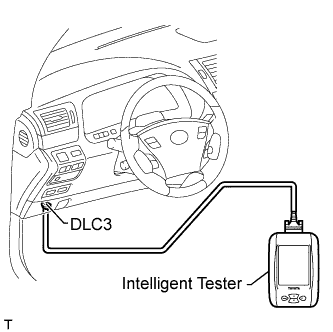
Connect the intelligent tester to the DLC3.
-
Turn the power switch ON (IG).
-
Turn the tester on.
-
Enter the following menus: Body / (desired system) / DTC.
-
Read the DTCs by following the directions on the tester's screen.
Tip:
-
When using the intelligent tester with the power switch OFF to troubleshoot: Connect the intelligent tester to the vehicle, and turn a courtesy light switch on and off at 1.5 second intervals until communication between the tester and vehicle begins.
-
Refer to the intelligent tester operator's manual for further details.
-
-
-
CLEAR DTC
-
Connect the intelligent tester to the DLC3.
-
Turn the power switch ON (IG).
-
Turn the tester on.
-
Enter the following menus: Body / (desired system) / DTC.
-
Erase the DTCs by following the directions on the tester's screen.
Tip:
-
When using the intelligent tester with the power switch OFF to troubleshoot: Connect the intelligent tester to the vehicle, and turn a courtesy light switch on and off at 1.5 second intervals until communication between the tester and vehicle begins.
-
Refer to the intelligent tester operator's manual for further details.
-
-