ELECTRIC PARKING BRAKE SYSTEM INITIALIZATION

Note
-
If the electric parking brake ECU or parking brake with bracket actuator assembly is replaced, perform the "RESET MEMORY" and "ACQUIRE TENSION SENSOR ZERO POINT" procedures.
-
Even after the power switch is turned OFF, the electric parking brake ECU may store a DTC as a result of removing a connector or fuse, as the ECU is still operating. Therefore, during inspection or replacement, turn the power switch OFF and wait for 20 seconds before removing the following: 1) connectors of the electric parking brake ECU, and 2) fuses of the electric parking brake system circuit.
-
RESET MEMORY (with GTS)
-
Turn the power switch OFF.
-
Connect the GTS to the DLC3.
-
Turn the power switch ON (IG) and the GTS on.
-
Enter the following menus: Chassis / Electric Parking Brake / Utility / Reset Memory.
-
Follow the GTS display and perform reset memory.
Tech Tips
When the reset memory is completed, the parking brake indicator light (RED) will blink at 0.5 seconds intervals.
-
-
RESET MEMORY (without GTS)
-
Turn the power switch OFF.
-
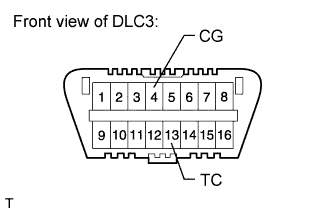
Using SST, connect terminals 13 (TC) and 4 (CG) of the DLC3.
- SST
- 09843-18040
Note
Do not connect the wrong terminals, as this will cause parts to be damaged.
-
Turn the power switch ON (IG).
Tech Tips
The parking brake indicator light (RED) will blink at 0.25 seconds intervals.
-
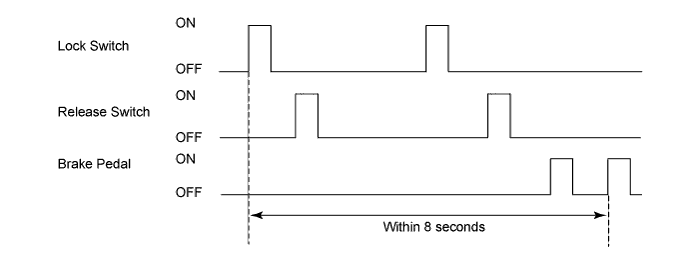
Perform both of the following procedures within 8 seconds:
-
Perform the following with the electric parking brake switch twice: lock condition → off → release condition → off.
-
Perform the following with the brake pedal: depress → release → depress → release.
-
-
With the power switch ON (IG), disconnect the connection of terminals 13 (TC) and 4 (CG) of the DLC3.
-
Check that the parking brake indicator light (RED) blinks at 0.5 seconds intervals.
Note
If terminals 13 (TC) and 4 (CG) of the DLC3 are not disconnected, the blinking pattern (0.5 seconds intervals) cannot be checked.
Tech Tips
If the parking brake indicator light (RED) blinking pattern (0.5 seconds intervals) is confirmed, the clear procedure is completed. If not confirmed, repeat the procedures above.
-
-
ACQUIRE TENSION SENSOR ZERO POINT
-
After performing reset memory, perform the release control. Check that the parking brake indicator light (RED) turns off.
-
-
PARKING BRAKE BEDDING (with GTS)
CAUTION:
Performing parking brake bedding forms the friction surfaces of the parking brake shoe and rear disc, which creates the basic braking force of the parking brake. If bedding is not performed, the parking brake performance may not be normal.
Note
If one of the following is performed, perform parking brake bedding.
-
Rear disc is replaced or removed and installed
-
Parking brake shoe is replaced or removed and installed
-
Parking brake with bracket actuator assembly is replaced or removed and installed
-
Turn the power switch OFF.
-
Connect the GTS to the DLC3.
-
Turn the power switch ON (IG) and the GTS on.
-
Enter the following menus: Chassis / Electric Parking Brake / Utility / Check Mode.
-
Select "Next".
Note
In some cases, it may be necessary to select the "Enter Check Mode and Clear DTCs" item and then select "Next".
-
Check that the system is in test mode.
Tech Tips
The multi-information display shows "EPB TEST". EPB stands for electric parking brake.
-
Perform parking brake bedding.
-
Drive the vehicle at 30 km/h (19 mph).
-
Push the parking brake switch to the lock side for 5 seconds.
Note
-
The braking power is generated from the parking brake while driving the vehicle. This will cause the vehicle speed to decrease. Depress the acceleration pedal to maintain the speed at 30 km/h (19 mph).
-
This procedure must be performed while driving the vehicle. If performed on a speed tester, etc., the front wheels do not rotate and the vehicle will determine that the vehicle is stopped.
Tech Tips
-
The parking brake indicator light (RED) stops blinking at 0.125 second intervals, and illuminates.
-
The buzzer turns ON (peeping sound).
-
The tension is automatically adjusted.
-
-
After 5 seconds, check that the buzzer and the parking brake indicator light (RED) turn off.
Tech Tips
The brake force decreases.
-
Release the parking brake lock switch.
-
Stop the vehicle.
-
Turn the power switch OFF.
Note
In some cases, it may be necessary to maintain the power switch OFF condition for 20 seconds.
-
Check that "EPB TEST" (*) is not displayed in the multi-information display when the power switch is turned ON (IG).
Tech Tips
*: EPB stands for electric parking brake.
-
-
PARKING BRAKE BEDDING (without GTS)
CAUTION:
Performing parking brake bedding forms the friction surfaces of the parking brake shoe and rear disc, which creates the basic braking force of the parking brake. If bedding is not performed, the parking brake performance may not be normal.
Note
If one of the following is performed, perform parking brake bedding.
-
Rear disc is replaced or removed and installed
-
Parking brake shoe is replaced or removed and installed
-
Parking brake with bracket actuator assembly is replaced or removed and installed
-
Turn the power switch OFF.
-
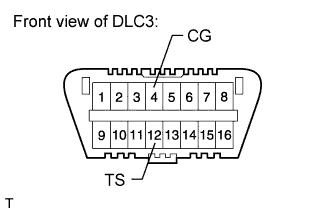
Using SST, connect terminals 12 (TS) and 4 (CG) of the DLC3.
- SST
- 09843-18040
Note
Do not connect the wrong terminals, as this will cause parts to be damaged.
-
Turn the power switch ON (IG).
-
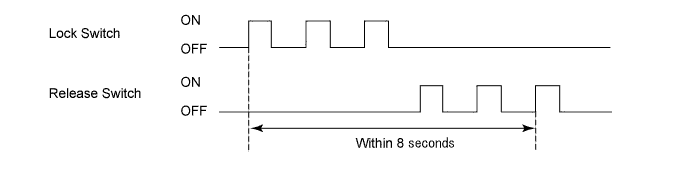
Perform the following procedures with the electric parking brake switch within 8 seconds:
-
Turning the lock switch ON and OFF 3 times.
-
Turn the release switch ON and OFF 3 times.
-
-
Check that the system is in test mode.
Tech Tips
-
When the system enters test mode, the parking brake indicator light (RED) starts blinking.
-
The multi-information display shows "EPB TEST" (*). If it is not displayed, repeat the procedures above.
-
*: EPB stands for electric parking brake.
-
-
Perform parking brake bedding.
-
Drive the vehicle at 30 km/h (19 mph).
-
Push the parking brake switch to the lock side for 5 seconds.
Note
The braking power is generated from the parking brake while driving the vehicle. This will cause the vehicle speed to decrease. Depress the acceleration pedal to maintain the speed at 30 km/h (19 mph).
Tech Tips
-
The parking brake indicator light (RED) stops blinking at 0.125 seconds intervals, and illuminates.
-
The buzzer turns ON (beeping sound).
-
The tension is automatically adjusted.
-
-
After 5 seconds, check that the buzzer and the parking brake indicator light (RED) turn off.
Tech Tips
The brake force decreases.
-
Release the parking brake lock switch.
-
-