TIRE PRESSURE WARNING SYSTEM DTC CHECK / CLEAR

-
CHECK DTC (for TIRE PRESSURE WARNING ECU AND RECEIVER) (USING THE GTS)
-
Turn the power switch off.
-
Connect the GTS to the DLC3.
-
Turn the power switch on (IG).
-
Turn the GTS on.
-
Enter the following menus: Chassis / Tire Pressure Monitor / Trouble Codes.
-
Read the DTCs.
-
-
CHECK DTC (for TIRE PRESSURE WARNING ECU AND RECEIVER) (USING SST CHECK WIRE)
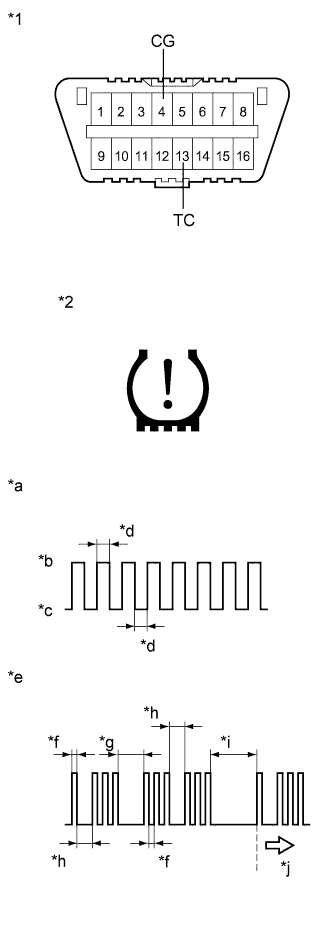
Text in Illustration *1 DLC3 *2 Tire Pressure Warning Light *a Normal System Code *b ON *c OFF *d 0.25 sec. *e Code 13 and 33 *f 0.5 sec. *g 2.5 sec. *h 1.5 sec. *i 4.5 sec. *j Repeat
-
Turn the power switch off.
-
Using SST, connect terminals 13 (TC) and 4 (CG) of the DLC3.
- SST
- 09843-18040
-
Turn the power switch on (IG).
-
Read and record any DTCs from the tire pressure warning light on the combination meter. Refer to the illustration for examples of a normal system code and codes 13 and 33.
Tech Tips
-
If the tire pressure warning light does not indicate any DTCs or the normal system code, inspect the tire pressure warning light circuit or TC and CG terminal circuit.
Trouble Area See page Tire pressure warning light circuit TC and CG terminal circuit -
If 2 or more malfunctions are indicated at the same time, the lowest numbered DTC is displayed first.
-
-
Refer to the Diagnostic Trouble Code Chart Click here for DTC information.
-
After completing the check, turn the power switch off and remove SST from the DLC3.
-
-
CLEAR DTC
Tech Tips
After repairing the malfunctions, clear the DTCs.
-
Turn the power switch off.
-
Connect the GTS to the DLC3.
-
Turn the power switch on (IG).
-
Turn the GTS on.
-
Enter the following menus: Chassis / Tire Pressure Monitor / Trouble Codes.
-
Clear DTCs following the prompts on the GTS screen.
Tech Tips
Refer to the GTS operator's manual for further details.
-