SUSPENSION CONTROL ECU (for LHD) REMOVAL

Note
After turning the power switch off, waiting time may be required before disconnecting the cable from the auxiliary battery terminal. Therefore, make sure to read the disconnecting the cable from the auxiliary battery terminal notice before proceeding with work Click here.
-
REMOVE LUGGAGE COMPARTMENT MAT SUB-ASSEMBLY
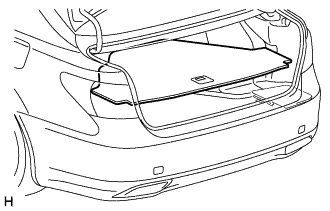
-
REMOVE BATTERY SERVICE HOLE COVER LH
-
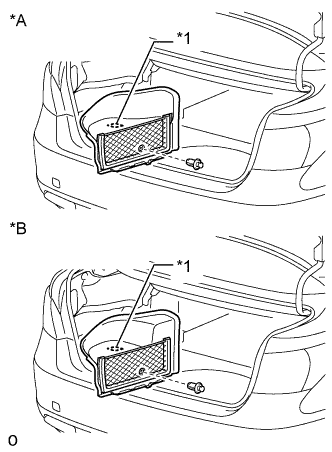
Text in Illustration *A for Standard *B for Ottoman *1 Fastening Tape Detach the clip, fastening tape and remove the battery service hole cover LH.
-
-
DISCONNECT CABLE FROM AUXILIARY BATTERY NEGATIVE TERMINAL
CAUTION:
Wait at least 90 seconds after disconnecting the cable from the negative (-) battery terminal to prevent airbag and seat belt pretensioner activation.
Note
When disconnecting the cable, some systems need to be initialized after the cable is reconnected Click here.
-
REMOVE GLOVE COMPARTMENT DOOR ASSEMBLY
-
REMOVE SUSPENSION CONTROL ECU WITH BRACKET
-
w/ Driver Monitor Camera:
Disconnect the network gateway ECU connector.
-
w/ Parking Assist Monitor System or Intelligent Parking Assist System:
Disconnect the parking assist ECU connectors.
-
w/o Parking Assist Monitor System or Intelligent Parking Assist System:
Disconnect the clearance warning ECU connector.
-
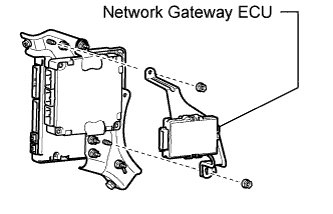
w/ Driver Monitor Camera:
Remove the 2 nuts and ECU.
-
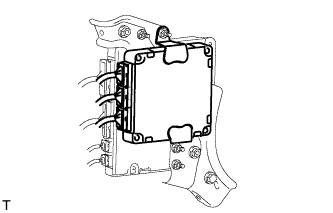
Disconnect the suspension control ECU connectors.
Tech Tips
Do not apply excessive force to the wire harnesses.
-
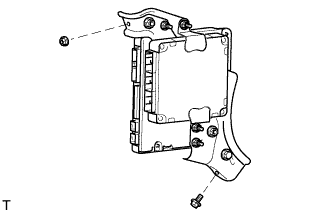
Remove the bolt, nut and bracket.
-
-
REMOVE SUSPENSION CONTROL ECU
-
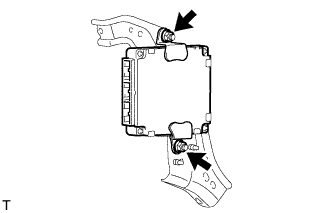
Remove the 2 nuts and suspension control ECU from the bracket.
Note
-
Avoid any impact to the suspension control ECU.
-
Do not drop the ECU. If it is dropped, replace it with a new one.
-
-