REAR AXLE HUB BOLT REPLACEMENT

-
REMOVE REAR WHEEL
-
REMOVE REAR DISC BRAKE CALIPER ASSEMBLY LH
-
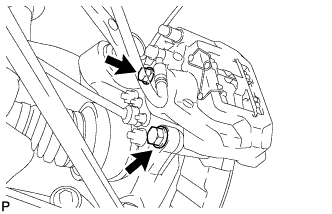
Remove the 2 bolts and disconnect the rear disc brake caliper assembly.
Note
-
Hang the caliper with wire or equivalent.
-
Do not damage the brake hose.
-
-
-
REMOVE REAR DISC
-
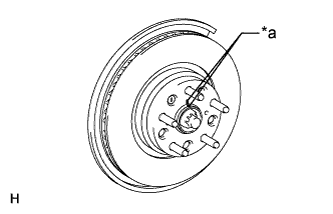
Text in Illustration *a Matchmark Put matchmarks on the rear disc and axle hub if planning to reuse the disc.
-
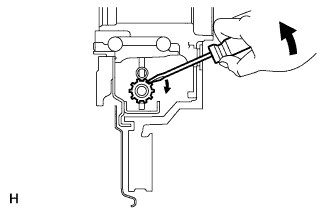
Turn the shoe adjuster until the disc turns freely, and then remove the disc.
-
-
REMOVE REAR AXLE HUB BOLT LH
-
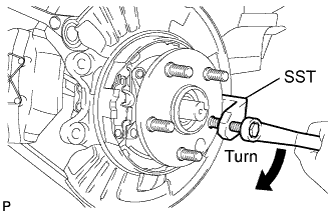
Using SST, remove the rear axle hub bolt.
- SST
- 09650-17011
-
-
INSTALL REAR AXLE HUB BOLT LH
-
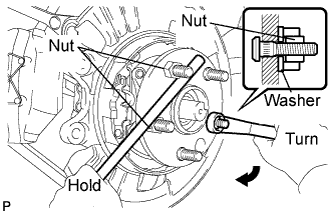
Install a washer and nut to a new bolt as shown in the illustration.
-
Using a screwdriver or equivalent to hold the hub and bearing, install the rear axle hub bolt by tightening the nut.
Note
Do not damage the threads of the hub bolts.
-
-
INSTALL REAR DISC
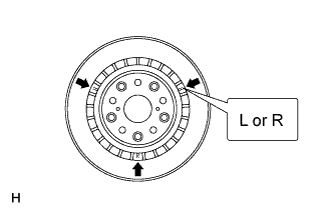
Note
The disc has an identification mark. Make sure of the identification mark when installing the disc.
Item Identification Mark LH L RH R
-
Text in Illustration *a Matchmark While aligning the matchmarks, install the rear disc.
Tech Tips
When replacing the rear disc with a new one, select the installation position where the rear disc has the minimum runout.
-
-
ADJUST PARKING BRAKE SHOE CLEARANCE
Note
If the parking brake shoe clearance is not adjusted, the cable end may be damaged.
-
INSTALL REAR DISC BRAKE CALIPER ASSEMBLY LH
-
Connect the rear disc brake caliper assembly LH with new 2 bolts.
- Torque:
- 86 N*m { 877 kgf*cm, 63 ft.*lbf }
Note
-
Do not twist the flexible hose.
-
Make sure the screw parts are free from foreign matter and are not damaged.
-
Be careful not to overtighten the bolts, as the rear axle carrier is made of aluminum.
-
-
INSTALL REAR WHEEL
- Torque:
- 140 N*m { 1428 kgf*cm, 103 ft.*lbf }