DIFFERENTIAL MOUNT CUSHION REMOVAL

-
REMOVE REAR AXLE ASSEMBLY
-
Remove the rear axle assembly LH and RH Click here.
-
-
REMOVE REAR DIFFERENTIAL CARRIER ASSEMBLY WITH DRIVE SHAFT
-
Support the rear differential carrier assembly (with drive shaft) with a transmission jack.
CAUTION:
-
As the rear differential carrier assembly (with drive shaft) is very heavy, securely support it with a transmission jack.
-
Perform this procedure with several people supporting the rear differential carrier assembly (with drive shaft) so that it does not tilt or fall.
-
-
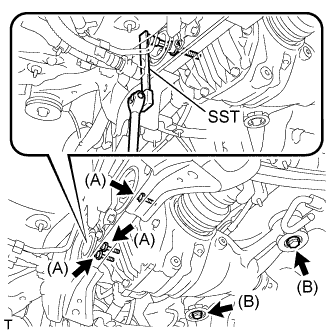
Using SST or a 12 mm socket hexagon wrench, remove the 3 bolts (A) from the rear No. 1 and No. 2 differential mount cushions.
- SST
- 09961-00950
-
Remove the 2 bolts (B).
-
Slowly lower the transmission jack. Then remove the rear differential mount stopper upper and lower, and rear differential carrier assembly from the rear suspension member.
Note
-
Do not drop the rear differential carrier assembly (with drive shaft).
-
When removing the rear differential carrier assembly (with drive shaft), do not damage the installation surface.
-
-
-
REMOVE REAR SUSPENSION MEMBER SUB-ASSEMBLY
-
REMOVE REAR SUSPENSION MEMBER DAMPER
-
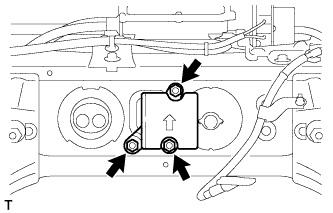
Remove the 3 bolts, and the rear suspension member damper.
-
-
REMOVE REAR NO. 1 DIFFERENTIAL MOUNT CUSHION
-
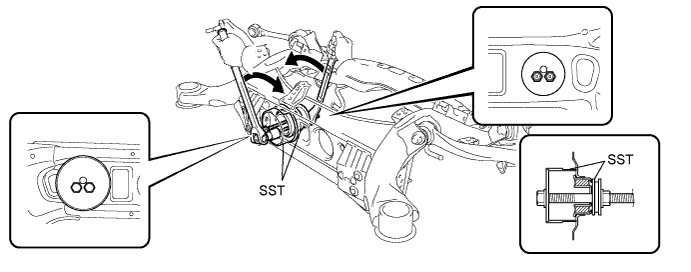
Pass SST bolts through the area shown in the illustration, and remove the No. 1 mount cushion.
- SST
- 09316-12010
- 09570-24011
Note
-
When removing the No. 1 mount cushion, do not allow the rear suspension member to contact SST (09316-12010).
-
Before using SST bolts, apply hypoid gear oil to their threads.
-
Be sure to combine SST properly.
-
Do not install SST bolts at an angle.
-
Make sure SST bolts are tightened equally.
-
-
REMOVE REAR NO. 2 DIFFERENTIAL MOUNT CUSHION
-
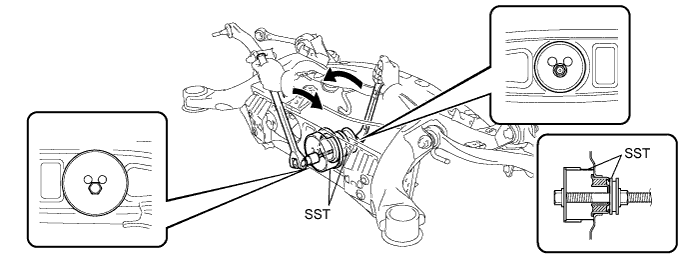
Pass SST bolt through the area shown in the illustration, and remove the No. 2 mount cushion.
- SST
- 09316-12010
- 09570-24011
Note
-
When removing the No. 2 mount cushion, do not allow the rear suspension member to contact SST (09316-12010).
-
Before using SST bolt, apply hypoid gear oil to its threads.
-
Be sure to combine SST properly.
-
Do not install SST bolts at an angle.
-