SERVICE PLUG GRIP REMOVAL

-
REMOVE LUGGAGE COMPARTMENT MAT SUB-ASSEMBLY (w/ Spare Tire)
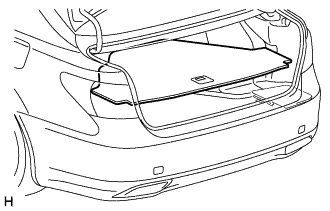
-
REMOVE DECK BOARD ASSEMBLY (w/o Spare Tire)
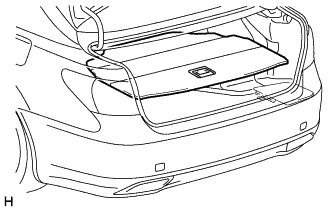
-
REMOVE DECK TRIM SIDE BOARD LH (w/o Spare Tire)
-
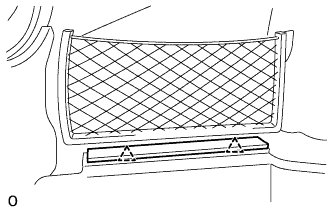
Detach the 2 clips and remove the deck trim side board LH.
-
-
PRECAUTION
Note
After turning the power switch off, waiting time may be required before disconnecting the cable from the auxiliary battery negative (-) terminal. Therefore, make sure to read the disconnecting the cable from the auxiliary battery negative (-) terminal notices before proceeding with work Click here.
-
REMOVE BATTERY SERVICE HOLE COVER LH
-
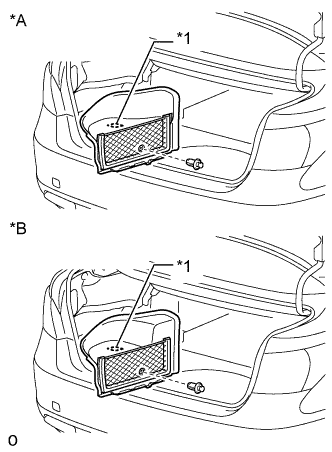
Text in Illustration *A for Standard *B for Ottoman *1 Fastening Tape Detach the clip, fastening tape and remove the battery service hole cover LH.
-
-
DISCONNECT CABLE FROM AUXILIARY BATTERY NEGATIVE TERMINAL
Note
When disconnecting the cable, some systems need to be initialized after the cable is reconnected Click here.
-
REMOVE REAR SEAT LOWER CONSOLE BOX COVER (for 4-Passenger with Ottoman)
-
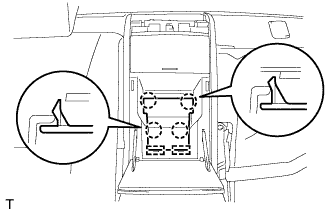
Using a screwdriver, detach the 4 claws, then detach the 2 hooks and remove the rear seat lower console box cover.
Tech Tips
Tape the screwdriver tip before use.
-
-
REMOVE ARMREST DOOR CAP (except 4-Passenger with Ottoman)
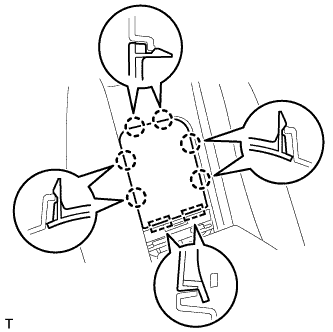
-
Using a thin-bladed screwdriver, detach the 6 claws.
Tech Tips
Tape the screwdriver tip before use.
-
Detach the 2 hooks and remove the armrest door cap.
-
-
REMOVE SERVICE PLUG COVER
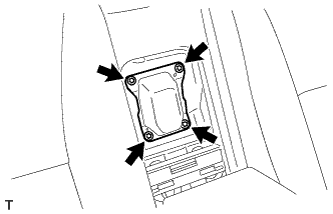
-
Remove the 4 bolts and service plug cover.
-
-
REMOVE SERVICE PLUG GRIP
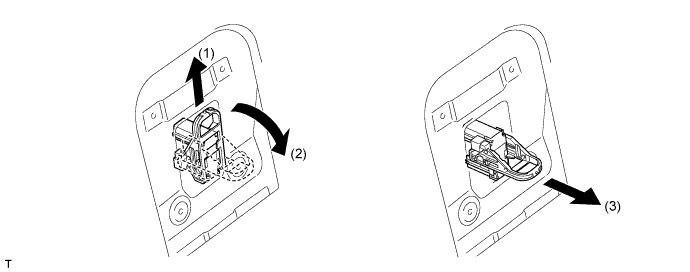
CAUTION:
-
Remove the service plug grip to interrupt a high voltage circuit at the time of the check.
-
Keep the removed service plug grip in your pocket to prevent other technicians from accidentally reconnecting it while you are servicing the vehicle.
-
All the high voltage wiring connectors are orange colored.
-
Wear insulated gloves. Slide the service plug grip upward, turn the lever downward, and then remove the service plug grip.
CAUTION:
After disconnecting the service plug grip, wait for at least 10 minutes before touching any of the high-voltage connectors or terminals.
Note
Never turn the power switch on (READY) with the service plug grip removed as malfunctions may occur.
Tech Tips
Waiting for at least 10 minutes is required to discharge the high-voltage capacitor inside the inverter with converter assembly.
-