HYBRID BATTERY SYSTEM, Diagnostic DTC:P3085-188

| DTC Code | DTC Name |
|---|---|
| P3085-188 | Hybrid Battery Cooling System |
DESCRIPTION
Some of the cool air for the rear cooling unit is used to cool the HV battery. There are two cooling passages for the HV battery. One takes in air from the interior and the other takes in cool air through the rear cooling unit.
By switching the HV battery cool down servo motor built into the rear cooling unit, the cooling systems are switched.
The hybrid vehicle control ECU calculates the blower speed and intake air temperature that are necessary for cooling based on information sent from the battery temperature sensor. Based on the calculation, the ECU determines that cool air from the rear conditioning should be used to cool the HV battery.
The battery cooling blower assembly (for upper and lower side) is controlled by the hybrid vehicle control ECU and battery smart unit. The damper is controlled by the air conditioning amplifier.
| DTC Code | DTC Detection Condition | Trouble Area |
|---|---|---|
| P3085-188 | When the HV battery cool down servo motor is at the A/C intake air position, the temperature of the cooling air in the HV battery remains high for more than about 10 to 20 hours in total. |
|
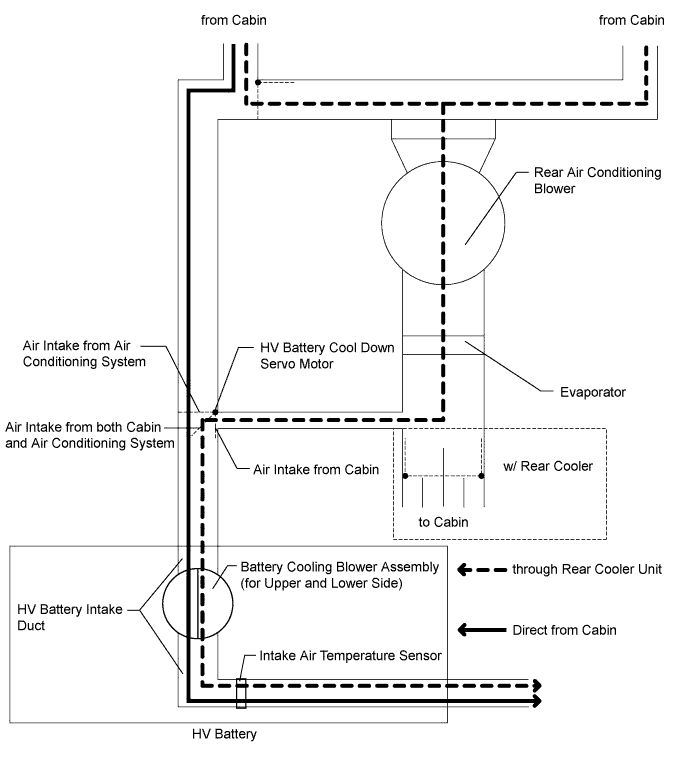
WIRING DIAGRAM
Refer to the wiring diagram for DTC P0A9D-123 Click here and DTC P0AAE-123 Click here.
INSPECTION PROCEDURE
CAUTION:
-
Before inspecting the high-voltage system, take safety precautions such as wearing insulated gloves and removing the service plug grip to prevent electrical shocks. After removing the service plug grip, put it in your pocket to prevent other technicians from accidentally reconnecting it while you are working on the high-voltage system.
-
After disconnecting the service plug grip, wait for at least 10 minutes before touching any of the high-voltage connectors or terminals. After waiting for 10 minutes, check the voltage at the terminals in the inspection point in the inverter with converter assembly. The voltage should be 0 V before beginning work.
Tech Tips
Waiting for at least 10 minutes is required to discharge the high-voltage capacitor inside the inverter with converter assembly.
PROCEDURE
-
CHECK FOR DTCS (DTC P0AFC-123 IS OUTPUT)
-
Connect the intelligent tester to the DLC3.
-
Turn the power switch on (IG).
-
Select the following menu items: Powertrain / Hybrid Control / Trouble Codes.
-
Check if DTCs are output.
Result Result Proceed to P0AFC-123 is not output. A P0AFC-123 is output. B
B 
GO TO DTC (P0AFC-123) Click here
A 
-
-
CHECK REAR COOLING UNIT (COOL AIR CONFIRMATION)
-
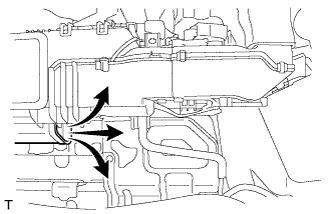
Inspect rear air conditioning blower operation. (w/ Rear Cooler)
-
Remove the air duct RH.
Tech Tips
For the removal and installation procedures related to the air duct RH, Click here.
-
Check if cool air comes out from the hole shown in the illustration when the rear air conditioning blower is operated using the rear air conditioning control panel.
OK Cool air comes out.
-
-
Inspect rear air conditioning blower operation. (w/o Rear Cooler)
-
Connect the intelligent tester to the DLC3.
-
Turn the power switch on (IG).
-
Select the following menu items: Body / Air conditioner / Utility / Rear Cooling Unit Check / Next.
-
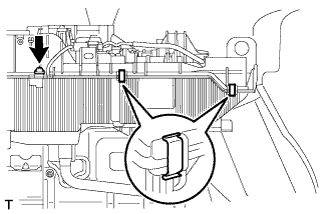
Remove the screw and 2 clips.
-
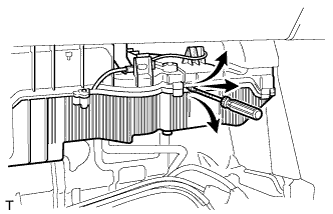
Insert a screwdriver at the position shown in the illustration and make a gap between the parts.
Tech Tips
Do not widen the gap excessively to avoid damaging the rear cooling unit.
-
Check if cool air comes out from the gap shown in the illustration when the rear air conditioning is operated using the "Rear Cooling Unit Check" function of the intelligent tester.
OK Cool air comes out.
-
NG
GO TO AIR CONDITIONING SYSTEM Click here
OK
-
-
PERFORM ACTIVE TEST USING INTELLIGENT TESTER
-
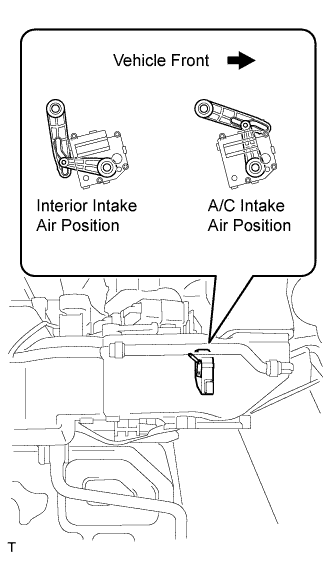
Connect the intelligent tester to the DLC3.
-
Turn the power switch on (IG).
-
Select the following menu items: Body / Air Conditioner / Active Test / Batt Cool Down Servo Targ Pls.
-
Activate the HV battery cool down servo motor.
OK The HV battery cool down servo motor moves to the interior intake air position or A/C intake air position as commanded.
NG
GO TO AIR CONDITIONING SYSTEM Click here
OK
-
-
CHECK DUCT AND BLOWER
CAUTION:
Be sure to wear insulated gloves.
-
Remove the HV battery Click here.
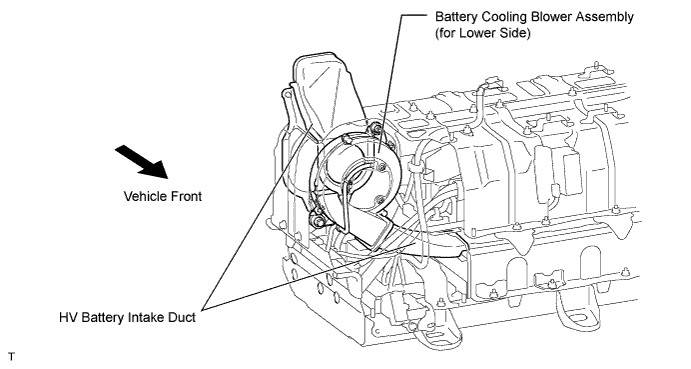
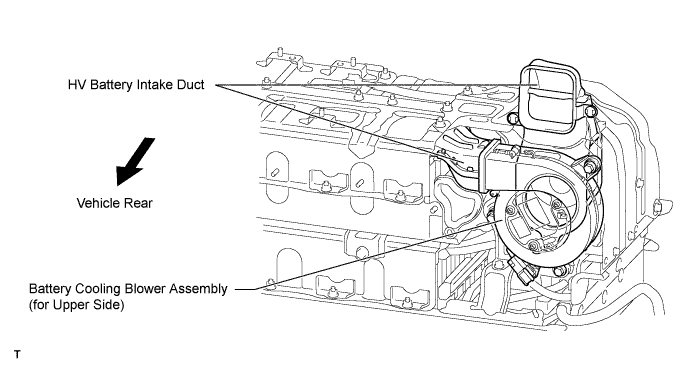
-
Check if the HV battery intake ducts and battery cooling blower assembly (for upper and lower side) are disconnected, damaged, or clogged with foreign objects.
Tech Tips
For the removal and installation procedures related to the HV battery intake duct and battery cooling blower assembly (for upper and lower side), Click here.
OK The ducts and blower are not disconnected, damaged, or clogged with foreign objects.
NG
REPAIR OR REPLACE DUCT AND BLOWER Click here
OK
-
-
CHECK CONNECTING CONDITION (INTAKE AIR TEMPERATURE SENSOR)
CAUTION:
Be sure to wear insulated gloves.
-
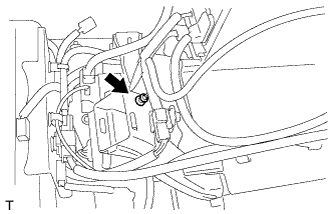
Check if the intake air temperature sensor is installed in the correct position.
OK The intake air temperature sensor is installed in the correct position.
NG
CONNECT SECURELY
OK
-
-
CHECK HV BATTERY (INTAKE AIR TEMPERATURE SENSOR)
CAUTION:
Be sure to wear insulated gloves.
-
Disconnect the z87 battery smart unit connector.
Tech Tips
For the removal and installation procedures related to the battery smart unit connector inspection, Click here.
-
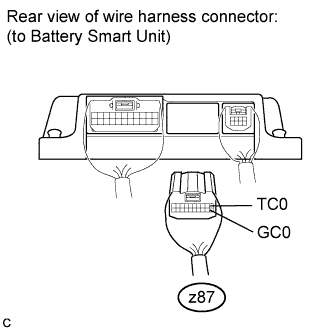
Measure the resistance according to the value(s) in the table below.
Standard Resistance Tester Connection Condition Specified Condition z87-1 (TC0) - z87-11 (GC0) Thermistor temperature: 0°C (32°F) 27.3 to 28.4 kΩ z87-1 (TC0) - z87-11 (GC0) Thermistor temperature: 25°C (77°F) 9.9 to 10.1 kΩ z87-1 (TC0) - z87-11 (GC0) Thermistor temperature: 40°C (104°F) 5.72 to 5.90 kΩ -
Disconnect the z36 battery smart unit connector.
-
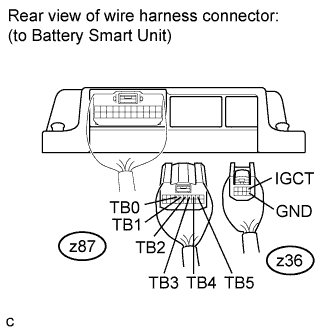
Measure the resistance according to the value(s) in the table below.
Standard Resistance Tester Connection Condition Specified Condition z87-7 (TB0) - z36-1 (IGCT) Always 10 kΩ or higher z87-7 (TB0) - z36-5 (GND) Always 10 kΩ or higher z87-6 (TB1) - z36-1 (IGCT) Always 10 kΩ or higher z87-6 (TB1) - z36-5 (GND) Always 10 kΩ or higher z87-5 (TB2) - z36-1 (IGCT) Always 10 kΩ or higher z87-5 (TB2) - z36-5 (GND) Always 10 kΩ or higher z87-4 (TB3) - z36-1 (IGCT) Always 10 kΩ or higher z87-4 (TB3) - z36-5 (GND) Always 10 kΩ or higher z87-3 (TB4) - z36-1 (IGCT) Always 10 kΩ or higher z87-3 (TB4) - z36-5 (GND) Always 10 kΩ or higher z87-2 (TB5) - z36-1 (IGCT) Always 10 kΩ or higher z87-2 (TB5) - z36-5 (GND) Always 10 kΩ or higher -
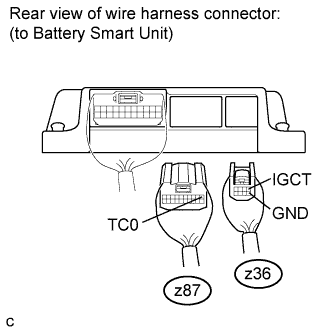
Measure the resistance according to the value(s) in the table below.
Standard Resistance Tester Connection Condition Specified Condition z87-1 (TC0) - z36-1 (IGCT) Always 10 kΩ or higher z87-1 (TC0) - z36-5 (GND) Always 10 kΩ or higher
NG 
CHECK HARNESS AND CONNECTOR (BATTERY SMART UNIT - BATTERY TEMPERATURE SENSOR) Click here
OK 
REPLACE BATTERY SMART UNIT Click here
-
-
CHECK HARNESS AND CONNECTOR (BATTERY SMART UNIT - BATTERY TEMPERATURE SENSOR)
-
Disconnect the A battery temperature sensor connector (intermediate connector).
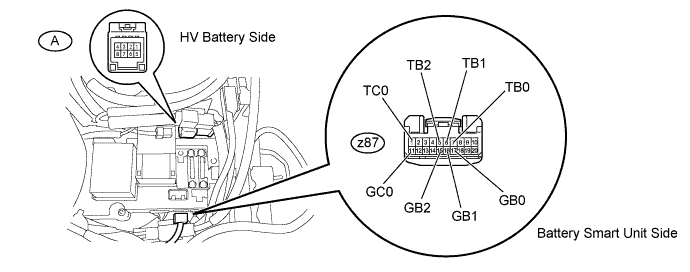
-
Measure the resistance according to the value(s) in the table below.
Standard Resistance (Check for open) Tester Connection Condition Specified Condition z87-7 (TB0) - A-2 Always Below 1 Ω z87-6 (TB1) - A-3 Always Below 1 Ω z87-5 (TB2) - A-4 Always Below 1 Ω z87-1 (TC0) - A-1 Always Below 1 Ω z87-17 (GB0) - A-6 Always Below 1 Ω z87-16 (GB1) - A-7 Always Below 1 Ω z87-15 (GB2) - A-8 Always Below 1 Ω z87-11 (GC0) - A-5 Always Below 1 Ω Standard Resistance (Check for short) Tester Connection Condition Specified Condition z87-7 (TB0) - Body ground and other terminals Always 10 kΩ or higher z87-6 (TB1) - Body ground and other terminals Always 10 kΩ or higher z87-5 (TB2) - Body ground and other terminals Always 10 kΩ or higher z87-1 (TC0) - Body ground and other terminals Always 10 kΩ or higher
NG
REPAIR OR REPLACE HARNESS OR CONNECTOR
OK
REPLACE HV BATTERY Click here
-