HYBRID CONTROL SYSTEM, Diagnostic DTC:P0A90-251

| DTC Code | DTC Name |
|---|---|
| P0A90-251 | Drive Motor "A" Performance |
DESCRIPTION
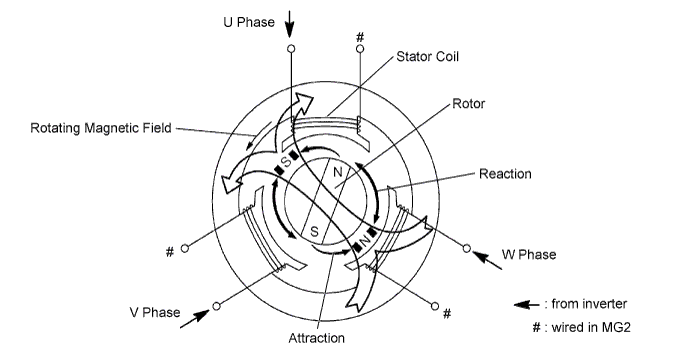
When three-phase alternating current flows through the three-phase windings of the stator coil, a rotating magnetic field is generated in MG2. The system controls the rotation of the magnetic field in accordance with the rotating position and speed of the rotor. As a result, the permanent magnets provided in the rotor are pulled in the direction of rotation, generating torque. The generated torque is almost proportional to the amount of current. The system controls MG2 speed by regulating the frequency of the alternating current. Furthermore, the system properly controls the rotating magnetic field and the angle of the rotor magnets in order to generate high torque in an efficient manner, even at high speeds.
| DTC No. | INF Code | DTC Detection Condition | Trouble Area |
|---|---|---|---|
| P0A90 | 251 | Motor magnetic force deterioration or same phase short circuit |
|
INSPECTION PROCEDURE
CAUTION:
-
Before inspecting the high-voltage system, take safety precautions such as wearing insulated gloves and removing the service plug grip to prevent electrical shocks. After removing the service plug grip, put it in your pocket to prevent other technicians from accidentally reconnecting it while you are working on the high-voltage system.
-
After disconnecting the service plug grip, wait for at least 10 minutes before touching any of the high-voltage connectors or terminals. After waiting for 10 minutes, check the voltage at the terminals in the inspection point in the inverter with converter assembly. The voltage should be 0 V before beginning work.
Tech Tips
Waiting for at least 10 minutes is required to discharge the high-voltage capacitor inside the inverter with converter assembly.
PROCEDURE
-
CHECK DTC OUTPUT (HV)
-
Connect the intelligent tester to the DLC3.
-
Turn the power switch on (IG).
-
Select the following menu items: Powertrain / Hybrid Control / Trouble Codes.
-
Check if DTCs are output.
Result Result Proceed to P0A90-251 only is output. A Any of the following DTCs are also output. B DTC No. Relevant Diagnosis P0A1A (all INF codes) *1 Generator Control Module P0A1B (all INF codes) *1 Drive Motor "A" Control Module P0A1D (all INF codes) *1 Hybrid Powertrain Control Module P0A3F-243 Drive Motor "A" Position Sensor Circuit P0A40-500 Drive Motor "A" Position Sensor Circuit Range / Performance P0A41-245 Drive Motor "A" Position Sensor Circuit Low P0A4B-253 Generator Position Sensor Circuit P0A4C-513 Generator Position Sensor Circuit Range / Performance P0A4D-255 Generator Position Sensor Circuit Low P0A60 (all INF codes) *1 Drive Motor "A" Phase V Current P0A63 (all INF codes) *1 Drive Motor "A" Phase W Current P0A72 (all INF codes) *1 Generator Phase V Current P0A75 (all INF codes) *1 Generator Phase W Current P0A78-266, 267, 306, 586 Drive Motor "A" Inverter Performance P0A7A-344 Generator Inverter Performance P0A90-509 Drive Motor "A" Performance P0A92-521 Hybrid Generator Performance P0A94-585, 587, 589, 590 DC / DC Converter Performance P0AA6 (all INF codes) *1 Hybrid Battery Voltage System Isolation Fault P0C76-523 Hybrid Battery System Discharge Time Too Long P3004-132 Power Cable Malfunction P3233-750 Short to B+ in Blocking of HV Gate Connection Tech Tips
-
*1: If any INF codes are output for this DTC, refer to the corresponding diagnostic flowchart.
-
P0A90-251 may be set due to a malfunction which also causes DTCs in the preceding table to be set. In this case, first troubleshoot the output DTCs in the preceding table. Then, perform a test to attempt to reproduce the problems, and check that no DTCs are output.
-
B 
GO TO DTC CHART Click here
A 
-
-
SIMULATION TEST
-
Test-drive the vehicle at a speed of 40 km/h (25 mph) for approximately 1 minute.
-
Select the following menu items: Powertrain / Hybrid Control / Trouble Codes.
-
Check if DTCs are output.
Result Result Proceed to P0A90-251 is output or no DTC is output. A P0A78-306 or P0A90-509 is output. B
B
GO TO DTC CHART Click here
A
-
-
CHECK CONNECTOR CONNECTION CONDITION (INVERTER WITH CONVERTER ASSEMBLY CONNECTOR)
CAUTION:
Be sure to wear insulated gloves.
-
Turn the power switch off.
-
Remove the service plug grip. Click here
Note
-
After removing the service plug grip, do not turn the power switch on (READY) unless instructed by the repair manual because this may cause a malfunction.
-
Before disconnecting the connector, confirm that it is properly connected by checking that the locking claws are engaged and that the connector cannot be pulled out.
-
-
Check the connection of the low voltage connector of the inverter with converter assembly.
OK The connector is connected securely and there are no contact problems. Tech Tips
When connecting the connector, insert it with the locking lever in the raised position. Rotate the lever downward and make sure that the connector is pulled into its socket. When the locking lever is in its fully closed position, a click will be heard as its locking claws engage. After the click is heard, pull up on the connector to confirm that it is properly connected.
NG
CONNECT SECURELY
OK
-
-
CHECK INVERTER WITH CONVERTER ASSEMBLY (MOTOR CABLE CONNECTION CONDITION)
CAUTION:
Be sure to wear insulated gloves.
-
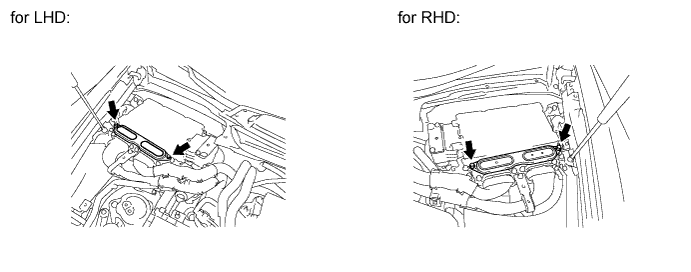
Remove the inverter terminal cover from the inverter with converter assembly.
-
For LHD vehicles, use the following procedures Click here.
-
For RHD vehicles, use the following procedures Click here.
Note
Lift the inverter terminal cover horizontally so that it does not tilt. Failure to do so may break the inverter cover guide pins.
-
-
Check that the bolts for the motor cable are tightened to the specified torque, the motor cable is connected securely, and there are no contact problems.
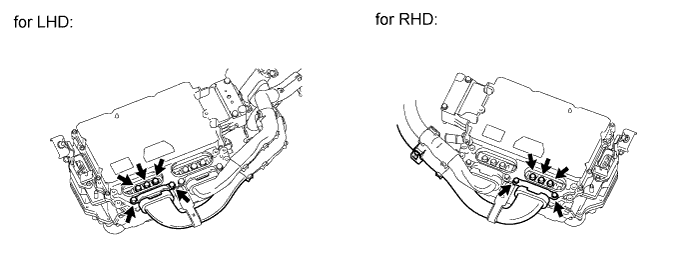
Specified Condition T=8.0 N*m {82 kgf*cm, 71 in.*lbf} Note
Make sure that the tightening torque of the bolts is between 6.4 and 9.6 N*m (65 and 98 kgf*cm, 57 and 85 in.*lbf).
-
Check for arc marks at the bolts for the motor cable.
Result Result Proceed to The terminals are connected securely and there are no contact problems. There are no arc marks. A The terminals are not connected securely and there is a contact problem. There are arc marks. B The terminals are not connected securely and there is a contact problem. There are no arc marks. C The terminals are connected securely and there are no contact problems. There are arc marks. B
B
REPLACE MALFUNCTIONING PARTS
C
CONNECT SECURELY
A
-
-
CHECK HYBRID VEHICLE TRANSMISSION ASSEMBLY (MOTOR CABLE CONNECTION CONDITION)
-
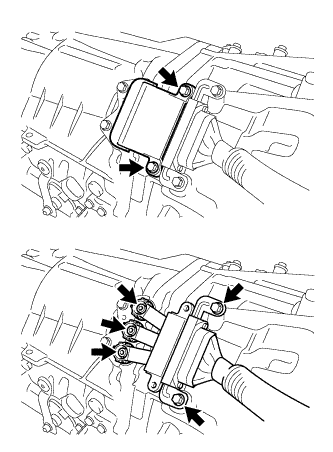
Remove the hybrid vehicle transmission assembly. Click here
-
Check that the bolts for the motor cable are tightened to the specified torque, the motor cable is connected securely, and there are no contact problems.
Specified Condition T=8.0 N*m {82 kgf*cm, 71 in.*lbf} Note
Make sure that the tightening torque of the bolts is between 6.4 and 9.6 N*m (65 and 98 kgf*cm, 57 and 85 in.*lbf).
-
Check for arc marks at the bolts for the motor cable.
Result Result Proceed to The terminals are connected securely and there are no contact problems. There are no arc marks. A The terminals are not connected securely and there is a contact problem. There are arc marks. B The terminals are not connected securely and there is a contact problem. There are no arc marks. C The terminals are connected securely and there are no contact problems. There are arc marks. B
B
REPLACE MALFUNCTIONING PARTS
C
CONNECT SECURELY
A 
REPLACE HYBRID VEHICLE TRANSMISSION ASSEMBLY Click here
-