COOLING FAN MOTOR ON-VEHICLE INSPECTION

-
CHECK COOLING FAN MOTOR
-
Disconnect the cooling fan motor connector.
-
Confirm the indication mark Click here.
-
Check that the fan rotates smoothly by hand.
Note
When the cooling fan motor (for Indication Mark L) does not operate and must be replaced, be sure to replace the cooling fan motor together with the cooling fan ECU.
-
Check that the cooling fan motor turns smoothly when the battery is connected to the cooling fan motor connector.
-
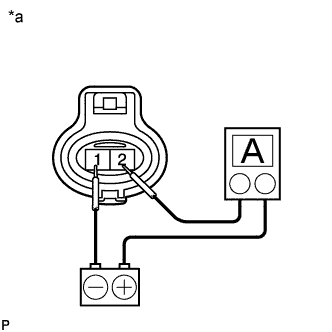
Text in Illustration *a Component without harness connected
(Cooling Fan Motor)
for Indication Mark M:
-
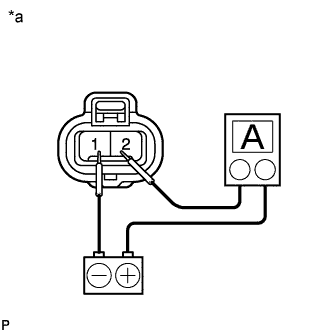
Text in Illustration *a Component without harness connected
(Cooling Fan Motor)
for Indication Mark L:
-
-
Measure the current according to the value(s) in the table below.
Standard Current for Indication Mark M: Tester Connection Condition Specified Condition 2 (+) 20°C (68°F) 14 to 18 A for Indication Mark L: Tester Connection Condition Specified Condition 2 (+) 20°C (68°F) 14.2 to 18.2 A If the result is not as specified, replace the cooling fan motor.
-
-
CHECK NO. 2 COOLING FAN MOTOR
-
Disconnect the No. 2 cooling fan motor connector.
-
Confirm the indication mark Click here.
-
Check that the fan rotates smoothly by hand.
Note
When the No. 2 cooling fan motor (for Indication Mark L) does not operate and must be replaced, be sure to replace the No. 2 cooling fan motor together with the cooling fan ECU.
-
Check that the No. 2 cooling fan motor turns smoothly when the battery is connected to the No. 2 cooling fan motor connector.
-
Text in Illustration *a Component without harness connected
(No. 2 Cooling Fan Motor)
for Indication Mark M:
-
Text in Illustration *a Component without harness connected
(No. 2 Cooling Fan Motor)
for Indication Mark L:
-
-
Measure the current according to the value(s) in the table below.
Standard Current for Indication Mark M: Tester Connection Condition Specified Condition 2 (+) 20°C (68°F) 14 to 18 A for Indication Mark L: Tester Connection Condition Specified Condition 2 (+) 20°C (68°F) 14.2 to 18.2 A If the result is not as specified, replace the No. 2 cooling fan motor.
-