While the auxiliary battery is connected, even if the power switch is off, the brake control system activates when the brake pedal is depressed or the door courtesy switch turns on. Therefore during servicing of the brake system components, do not operate the brake pedal and open/close the doors while the auxiliary battery is connected.
-
Click here
REMOVE LUGGAGE COMPARTMENT MAT SUB-ASSEMBLY (w/ Spare Tire)
-
Click here
REMOVE DECK BOARD ASSEMBLY (w/o Spare Tire)
- Click here
REMOVE DECK TRIM SIDE BOARD LH (w/o Spare Tire)
-
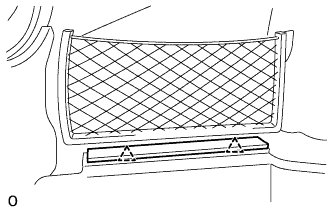
Detach the 2 clips and remove the deck trim side board LH.
-
- Click here
REMOVE BATTERY SERVICE HOLE COVER LH
-
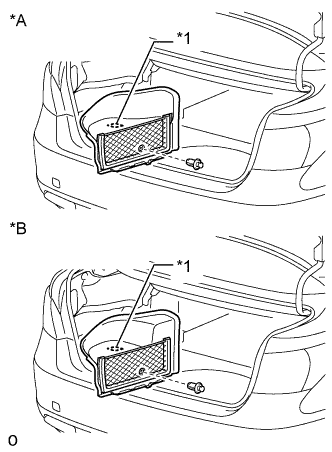
Detach the clip, fastening tape and remove the battery service hole cover LH.
Table 1. Text in Illustration *A for Standard *B for Ottoman *1 Fastening Tape
-
- Click here
PRECAUTION
Note:After turning the power switch off, waiting time may be required before disconnecting the cable from the auxiliary battery terminal. Therefore, make sure to read the disconnecting the cable from the auxiliary battery terminal notice before proceeding with work (Click here).
- Click here
DISCONNECT CABLE FROM AUXILIARY BATTERY NEGATIVE TERMINAL
Note:When disconnecting the cable, some systems need to be initialized after the cable is reconnected (Click here).
- Click here
REMOVE SERVICE PLUG GRIP
- Click here
REMOVE V-BANK COVER SUB-ASSEMBLY
-
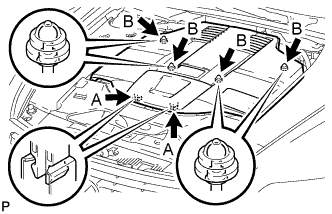
While using both hands, lift the rear side of the V-bank cover sub-assembly upwards to detach the 4 clips labeled B. Slide the V-bank cover sub-assembly towards the front of the vehicle to detach the 2 clips labeled A, and remove the V-bank cover sub-assembly.
Note:The V-bank cover sub-assembly may be damaged if its front and rear are lifted at the same time.
-
- Click here
REMOVE AIR CLEANER INLET COVER SUB-ASSEMBLY
-
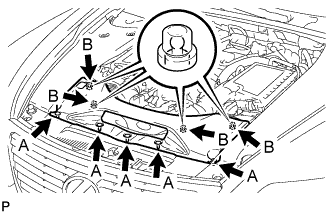
Remove the 5 clips labeled A.
-
Lift up the air cleaner inlet cover sub-assembly to detach the 4 clips labeled B, and remove the air cleaner inlet cover sub-assembly.
-
- Click here
REMOVE ENGINE ROOM SIDE COVER RH
-
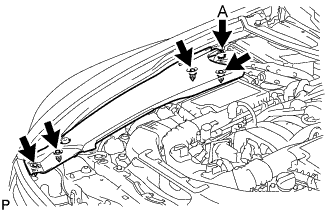
for LHD:
Remove the 5 clips and engine room side cover RH.
Note:Remove the clip labeled A by turning it to prevent the engine room side cover RH and bracket from being damaged.
Tip:The clip labeled A cannot be removed from the engine room side cover RH.
-
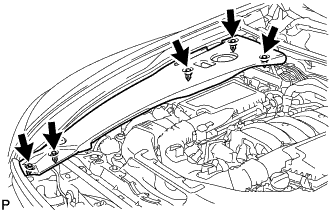
for RHD:
Remove the 5 clips and engine room side cover RH.
-
- Click here
REMOVE ENGINE ROOM SIDE COVER LH
-
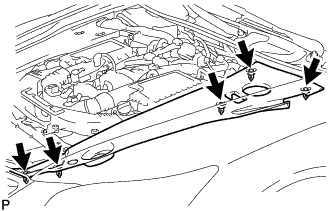
for LHD:
Remove the 5 clips and engine room side cover LH.
-
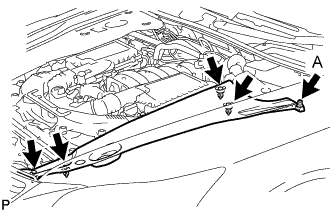
for RHD:
Remove the 5 clips and engine room side cover LH.
Note:Remove the clip labeled A by turning it to prevent the engine room side cover LH and bracket from being damaged.
Tip:The clip labeled A cannot be removed from the engine room side cover LH.
-
- Click here
REMOVE NO. 1 AIR CLEANER INLET
-
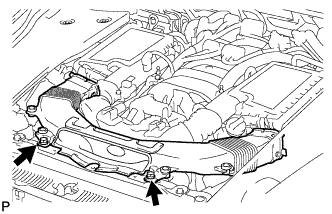
Remove the 2 bolts.
-
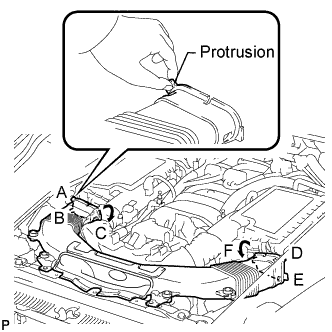
Hold the No. 1 air cleaner inlet by the protrusions labeled A and B, and detach the connections.
-
Rotate the No. 1 air cleaner inlet as shown in the illustration to detach the protrusion labeled C.
-
Hold the No. 1 air cleaner inlet by the protrusions labeled D and E, and detach the connections.
-
Rotate the No. 1 air cleaner inlet as shown in the illustration to detach the protrusion labeled F.
-
-
Click here
REMOVE INTAKE AIR CONNECTOR PIPE
-
Disconnect the No. 1 ventilation hose and No. 2 ventilation hose from the intake air connector pipe.
-
Using a clip remover, detach the 2 wire harness clamps.
-
Loosen the 3 hose clamps, and remove the intake air connector pipe.
-
- Click here
REMOVE AIR CLEANER ASSEMBLY LH
-
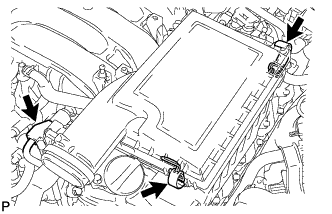
Disconnect the mass air flow meter connector.
-
Release the 2 clamps and remove the air cleaner cap LH.
-
Remove the air cleaner filter element from the air cleaner case LH.
-
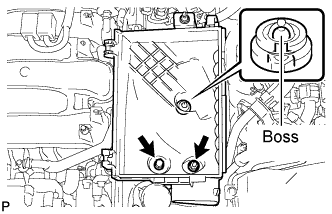
Remove the 2 nuts and detach the air cleaner case LH from the boss.
-
- Click here
REMOVE AIR CLEANER ASSEMBLY RH
-
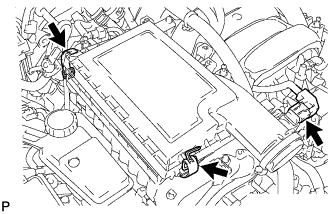
Disconnect the mass air flow meter connector.
-
Release the 2 clamps and remove the air cleaner cap RH.
-
Remove the air cleaner filter element from the air cleaner case RH.
-
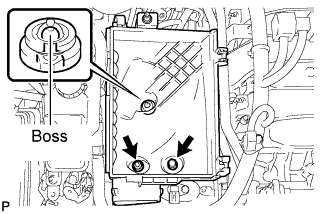
Remove the 2 nuts and detach the air cleaner case RH from the boss.
-
- Click here
REMOVE COWL TOP VENTILATOR LOUVER RH (for LHD)
-
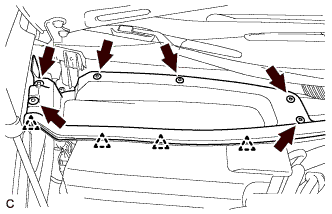
Remove the 4 clips and hood to cowl top seal.
-
Remove the 6 clips and cowl top ventilator louver RH.
-
- Click here
REMOVE COWL TOP VENTILATOR LOUVER LH (for RHD)
-
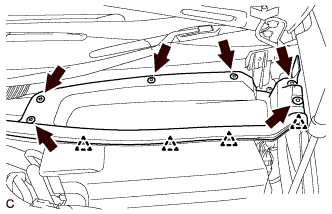
Remove the 4 clips and hood to cowl top seal.
-
Remove the 6 clips and cowl top ventilator louver LH.
-
- Click here
REMOVE MOTOR CABLE COVER RH (for LHD)
-
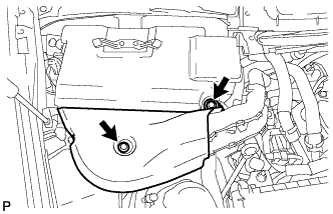
Remove the 2 clips and motor cable cover RH.
-
- Click here
REMOVE MOTOR CABLE COVER LH (for RHD)
-
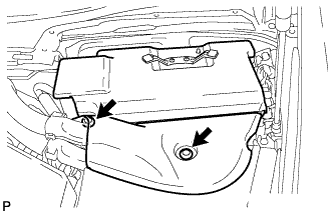
Remove the 2 clips and motor cable cover LH.
-
- Click here
REMOVE INVERTER COVER ASSEMBLY RH (for LHD)
-
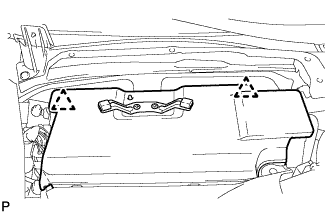
Detach the 2 clips and remove the inverter cover assembly RH.
-
- Click here
REMOVE INVERTER COVER ASSEMBLY LH (for RHD)
-
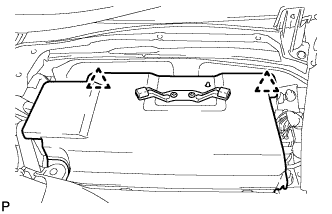
Detach the 2 clips and remove the inverter cover assembly LH.
-
- Click here
REMOVE CONNECTOR COVER ASSEMBLY (for LHD)
CAUTION:Wear insulating gloves.
-
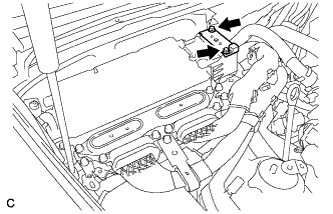
Using an insulated tool, remove the 2 bolts and connector cover assembly.
Note:
-
Cover the hole where the cable was connected with tape or equivalent (non-residue type) to prevent entry of foreign matter.
-
Do not touch the high voltage connectors or terminals for 10 minutes after the service plug grip is removed.
-
-
- Click here
REMOVE CONNECTOR COVER ASSEMBLY (for RHD)
CAUTION:Wear insulating gloves.
-
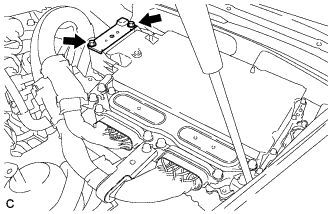
Using an insulated tool, remove the 2 bolts and connector cover assembly.
Note:
-
Cover the hole where the cable was connected with tape or equivalent (non-residue type) to prevent entry of foreign matter.
-
Do not touch the high voltage connectors or terminals for 10 minutes after the service plug grip is removed.
-
-
- Click here
CHECK TERMINAL VOLTAGE (for LHD)
CAUTION:Wear insulating gloves.
-
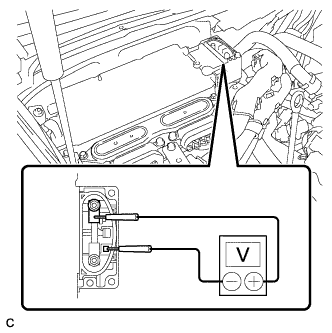
Using the voltmeter, measure the voltage between the terminals of the 2 phase connectors.
Standard voltage 0 V Tip:Use measuring range of DC 750 V or more on the voltmeter.
-
- Click here
CHECK TERMINAL VOLTAGE (for RHD)
CAUTION:Wear insulating gloves.
-
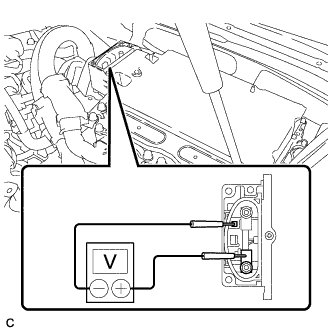
Using the voltmeter, measure the voltage between the terminals of the 2 phase connectors.
Standard voltage 0 V Tip:Use measuring range of DC 750 V or more on the voltmeter.
-
- Click here
INSTALL CONNECTOR COVER ASSEMBLY (for LHD)
CAUTION:Wear insulating gloves.
-
Using an insulated tool, install the connector cover assembly with the 2 bolts.
8.0 N*m 82 kgf*cm 71 in.*lbf
-
- Click here
INSTALL CONNECTOR COVER ASSEMBLY (for RHD)
CAUTION:Wear insulating gloves.
-
Using an insulated tool, install the connector cover assembly with the 2 bolts.
8.0 N*m 82 kgf*cm 71 in.*lbf
-
- Click here
REMOVE INVERTER TERMINAL COVER (for LHD)
CAUTION:Wear insulating gloves.
Note:Lift the inverter terminal cover horizontally so that it will not tilt. Failure to do so may break the inverter cover guide pins.
-
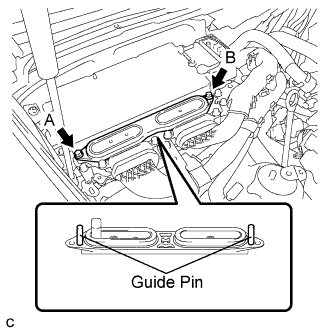
Using an insulated tool, remove the 2 bolts.
-
Insert and gradually rotate a screwdriver between the inverter terminal cover and inverter case near bolt hole A to raise the terminal cover by approximately 2 mm (0.08 in.). (*1)
Note:Tape the screwdriver tip before use.
-
Insert and gradually rotate a screwdriver between the inverter terminal cover and inverter case near bolt hole B to raise the terminal cover by approximately 2 mm (0.08 in.). (*2)
Note:Tape the screwdriver tip before use.
Tip:Repeat the preceding steps (*1) and (*2) until the inverter cover can be easily removed by hand.
-
Remove the inverter terminal cover by hand.
Note:
-
Do not allow any foreign objects to enter the waterproofed parts of the removed inverter terminal cover.
-
Do not touch the waterproofed parts.
-
When removing the inverter terminal cover, do not bend the connector terminals around the interlock part.
-
Cover the hole where the cable was connected with tape or equivalent (non-residue type) to prevent entry of foreign matter.
-
-
- Click here
REMOVE INVERTER TERMINAL COVER (for RHD)
CAUTION:Wear insulating gloves.
Note:Lift the inverter terminal cover horizontally so that it will not tilt. Failure to do so may break the inverter cover guide pins.
-
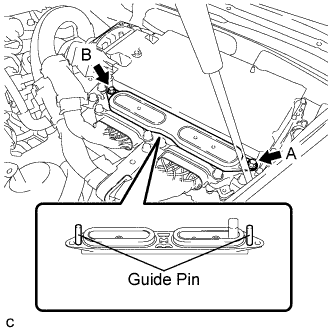
Using an insulated tool, remove the 2 bolts.
-
Insert and gradually rotate a screwdriver between the inverter terminal cover and inverter case near bolt hole A to raise the terminal cover by approximately 2 mm (0.08 in.). (*1)
Note:Tape the screwdriver tip before use.
-
Insert and gradually rotate a screwdriver between the inverter terminal cover and inverter case near bolt hole B to raise the terminal cover by approximately 2 mm (0.08 in.). (*2)
Note:Tape the screwdriver tip before use.
Tip:Repeat the preceding steps (*1) and (*2) until the inverter cover can be easily removed by hand.
-
Remove the inverter terminal cover by hand.
Note:
-
Do not allow any foreign objects to enter the waterproofed parts of the removed inverter terminal cover.
-
Do not touch the waterproofed parts.
-
When removing the inverter terminal cover, do not bend the connector terminals around the interlock part.
-
Cover the hole where the cable was connected with tape or equivalent (non-residue type) to prevent entry of foreign matter.
-
-
- Click here
DISCONNECT MOTOR CABLE (for LHD)
CAUTION:Wear insulating gloves.
-
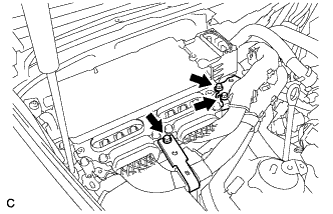
Remove the 3 bolts and separate the motor cable bracket.
-
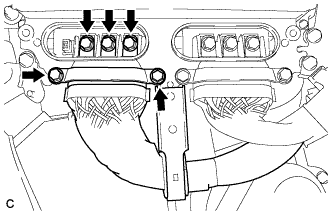
Using an insulated tool, remove the 5 bolts and pull out the motor cable from the inverter with converter assembly.
Note:
-
Cover the hole where the cable was connected with tape or equivalent (non-residue type) to prevent entry of foreign matter.
-
When removing the bolts that secure the cable, do not damage anything inside the inverter with converter assembly.
-
-
- Click here
DISCONNECT MOTOR CABLE (for RHD)
CAUTION:Wear insulating gloves.
-
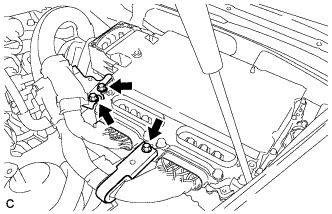
Remove the 3 bolts and separate the motor cable bracket.
-
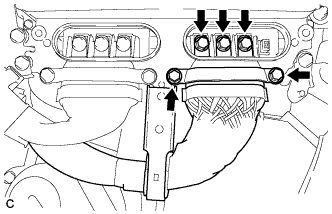
Using an insulated tool, remove the 5 bolts and pull out the motor cable from the inverter with converter assembly.
Note:
-
Cover the hole where the cable was connected with tape or equivalent (non-residue type) to prevent entry of foreign matter.
-
When removing the bolts that secure the cable, do not damage anything inside the inverter with converter assembly.
-
-
- Click here
DISCONNECT GENERATOR CABLE (for LHD)
CAUTION:Wear insulating gloves.
-
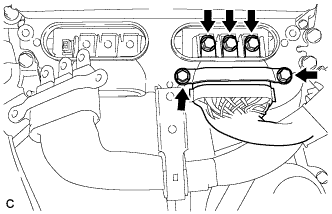
Using an insulated tool, remove the 5 bolts and pull out the generator cable from the inverter with converter assembly.
Note:
-
Cover the hole where the cable was connected with tape or equivalent (non-residue type) to prevent entry of foreign matter.
-
When removing the bolts that secure the cable, do not damage anything inside the inverter with converter assembly.
-
-
- Click here
DISCONNECT GENERATOR CABLE (for RHD)
CAUTION:Wear insulating gloves.
-
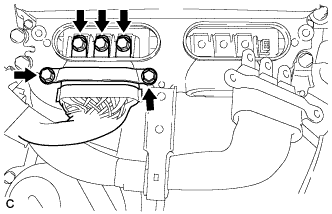
Using an insulated tool, remove the 5 bolts and pull out the generator cable from the inverter with converter assembly.
Note:
-
Cover the hole where the cable was connected with tape or equivalent (non-residue type) to prevent entry of foreign matter.
-
When removing the bolts that secure the cable, do not damage anything inside the inverter with converter assembly.
-
-
- Click here
DISCONNECT INLET INVERTER COOLING PIPE (for LHD)
-
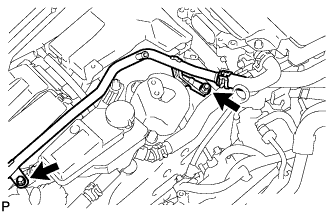
Remove the 2 bolts and disconnect the inlet inverter cooling pipe.
-
- Click here
DISCONNECT FRAME WIRE
-
Remove the No. 1 relay block cover.
-
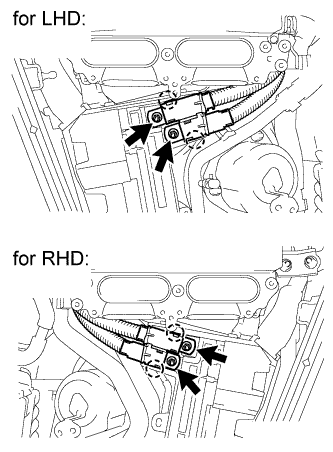
Remove the 2 nuts from the No. 1 relay block.
-
Detach the 2 claws to disconnect the frame wire from the No. 1 relay block.
-
- Click here
REMOVE INVERTER COOLING PIPE BRACKET (for RHD)
-
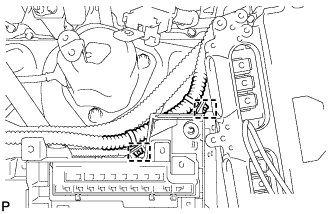
Detach the 2 clamps to disconnect the air conditioning harness from the No. 1 relay block.
-
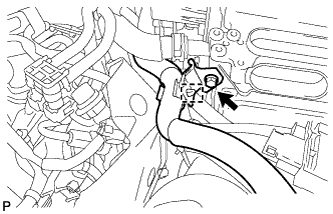
Detach the clamp of the No. 2 inlet inverter cooling hose from the inverter cooling pipe bracket.
-
Remove the bolt, and then remove the inverter cooling pipe bracket from the inverter with converter assembly.
-
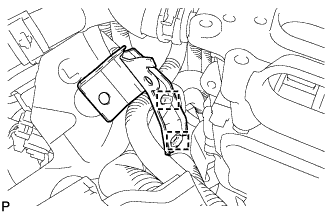
Detach the clamp of the frame wire and the clamp of the air conditioning harness. Then remove the inverter cooling pipe bracket.
-
- Click here
REMOVE SKID CONTROL ECU BRACKET (for LHD)
- Click here
REMOVE SKID CONTROL ECU BRACKET (for RHD)
- Click here
REMOVE ENGINE OIL LEVEL DIPSTICK GUIDE
-
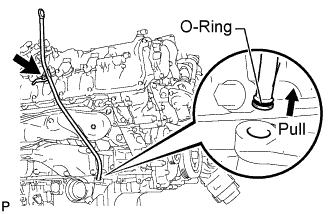
Remove the engine oil level dipstick.
-
Remove the bolt and engine oil level dipstick guide.
-
Remove the O-ring from the engine oil level dipstick guide.
-
- Click here
REMOVE ENGINE COVER SUB-ASSEMBLY RH
-
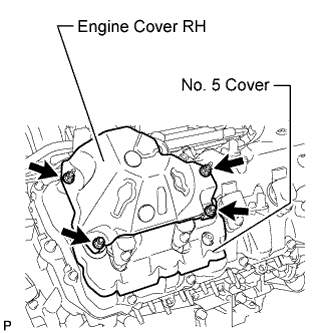
Remove the 4 nuts and engine cover RH.
-
- Click here
REMOVE NO. 5 COVER SUB-ASSEMBLY
- Click here
REMOVE ENGINE COVER SUB-ASSEMBLY LH
-
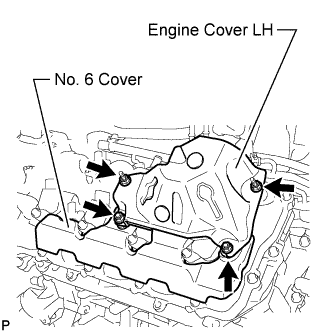
Remove the 4 nuts and engine cover LH.
-
- Click here
REMOVE NO. 6 COVER SUB-ASSEMBLY
- Click here
REMOVE IGNITION COIL ASSEMBLY
-
Disconnect the 8 ignition coil assembly connectors.
-
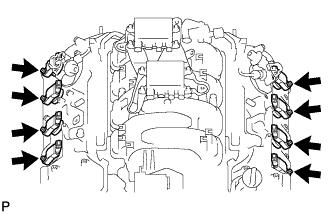
Remove the 8 bolts.
-
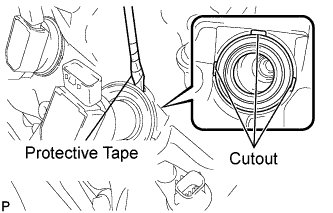
Using a screwdriver, pry at the cutouts to remove the 8 ignition coil assemblies together with the 8 spark plug tube gaskets.
Note:Do not damage the cylinder head cover when removing the spark plug tube gasket.
Tip:Tape the screwdriver tip before use.
-
- Click here
REMOVE SPARK PLUG
-
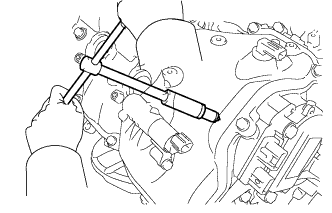
Using a 16 mm plug wrench, remove the 8 spark plugs.
-