RAIN SENSOR INSTALLATION

-
INSTALL RAIN SENSOR TAPE
-
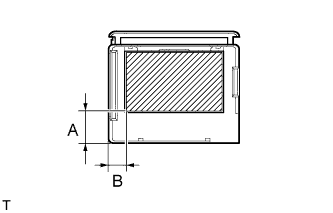
If reusing the rain sensor:
Install new rain sensor tape.
-
Remove the used rain sensor tape from the windshield glass or rain sensor.
-
Apply new rain sensor tape on the rain sensor lens surface in the area indicated by the hatched area.
Note
-
Keep the tape's exposed adhesive free from dust and fingerprints.
-
Apply the tape exactly according to the specifications below.
Specification Area Measurement A 15.0 mm (0.591 in.) B 8.0 mm (0.315 in.)
-
-
-
-
INSTALL RAIN SENSOR
Note
-
Make sure the adhesive between the bracket and windshield glass is normal.
-
If there is any residue left from the rain sensor tape on the windshield, remove it.
-
Clean the glass surface with cloth or similar material.
-
Make sure there are no air bubbles between the rain sensor and windshield.
-
Peel the peeling paper from the rain sensor tape.
-
Securely attach the rain sensor to the bracket.
-
Push in the stopper.
-
Connect the connector.
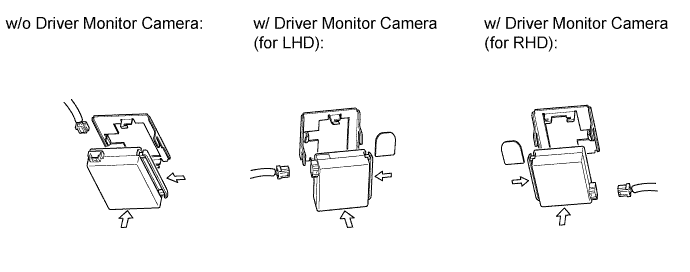
-
-
INSTALL INNER REAR VIEW MIRROR ASSEMBLY
-
w/o Automatic High Beam System, Adaptive High Beam System:
Install the inner rear view mirror assembly Click here.
-
w/ Automatic High Beam System, Adaptive High Beam System:
Install the inner rear view mirror assembly Click here.
-
-
INSTALL RAIN SENSOR COVER (w/o Driver Monitor Camera)
-
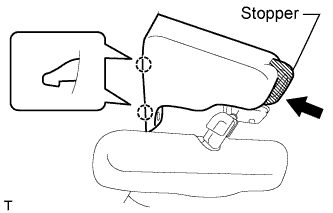
Attach the 2 claws to install the rain sensor cover.
-
Push the stopper as shown in the illustration to fix the cover in place.
-
-
INSTALL RAIN SENSOR COVER (w/ Driver Monitor Camera)
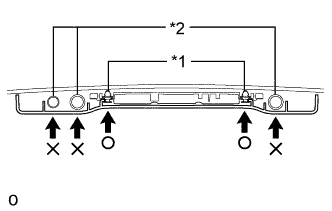
Note
-
When installing the rain sensor cover, do not apply force to the object recognition camera areas labeled "X".
-
When installing the rain sensor cover, apply force to the areas labeled "○" to attach the clips.
Text in Illustration *1 Clip *2 Camera
-
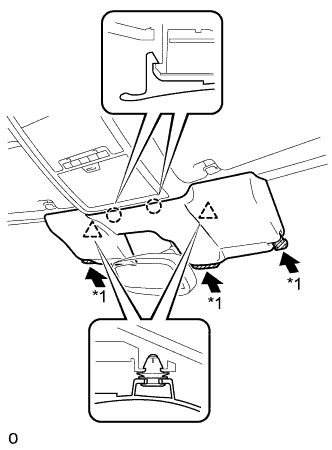
While being careful not to apply force to the camera areas, attach the 2 claws and 2 clips to install the rain sensor cover.
-
Push the stopper as shown in the illustration to fix the cover in place.
-
-
CONNECT CABLE TO AUXILIARY BATTERY NEGATIVE TERMINAL
Note
When disconnecting the cable, some systems need to be initialized after the cable is reconnected Click here.
-
INSTALL BATTERY SERVICE HOLE COVER LH
-
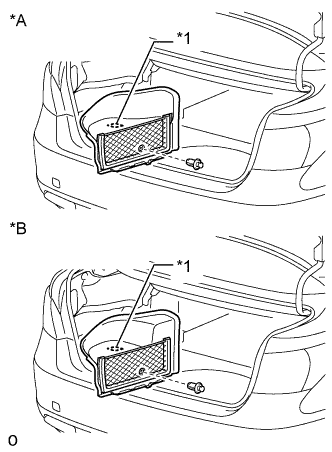
Text in Illustration *A for Standard *B for Ottoman Attach the battery service hole cover LH with the clip and fastening tape.
-
-
INSTALL DECK TRIM SIDE BOARD LH (w/o Spare Tire)
-
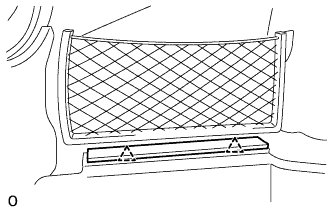
Attach the 2 clips to install the deck trim side board LH.
-
-
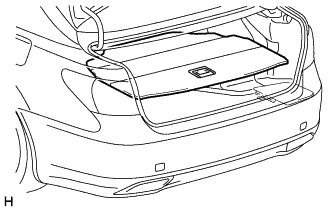
INSTALL DECK BOARD ASSEMBLY (w/o Spare Tire)
-
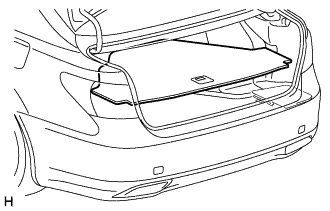
INSTALL LUGGAGE COMPARTMENT MAT SUB-ASSEMBLY (w/ Spare Tire)
-
ADJUST ADAPTIVE HIGH BEAM CAMERA BEAM AXIS (w/ Adaptive High Beam System)