LIGHTING SYSTEM HI-beam Headlight does not Illuminate
WIRING DIAGRAM
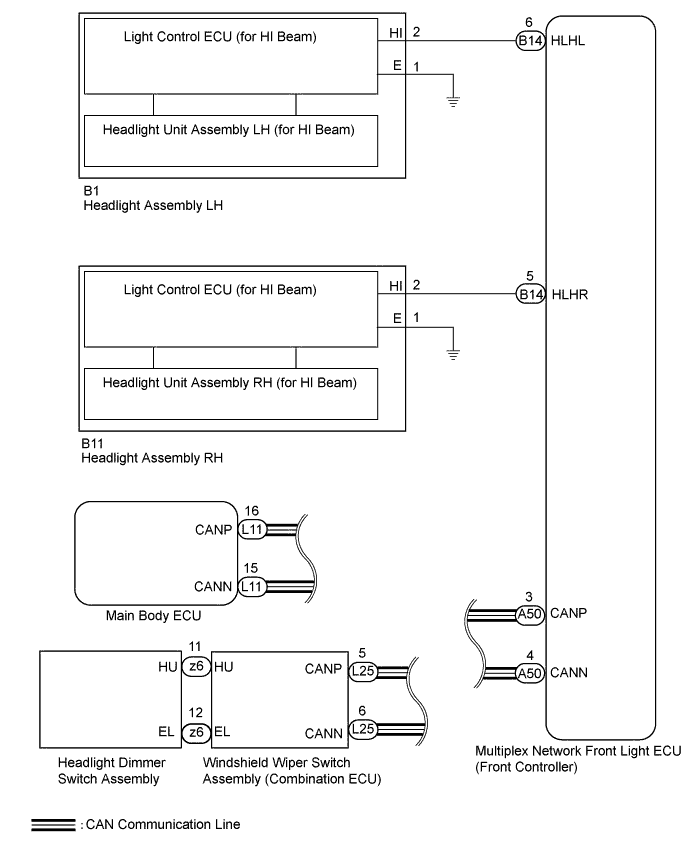
INSPECTION PROCEDURE
Note
First perform the communication function inspections in HOW TO PROCEED WITH TROUBLESHOOTING to confirm that there are no CAN communication malfunctions before troubleshooting this symptom.
PROCEDURE
-
PERFORM ACTIVE TEST USING GTS (HEADLIGHT HIGH)
-
Using the GTS, perform the Active Test Click here.
Body No. 5 Tester Display Test Part Control Range Head Light High Headlight high beam illumination OFF - ON OK Headlight high condition is switched by Active Test.
NG 
REPLACE MULTIPLEX NETWORK FRONT LIGHT ECU
OK 
-
-
READ VALUE USING GTS (HEADLIGHT DIMMER SWITCH)
-
Using the GTS, read the Data List Click here.
Combination Switch Tester Display Measurement Item/Display Normal Condition Diagnostic Note Dimmer Hi Switch Headlight dimmer switch signal (high position)/ON or OFF ON: Headlight dimmer switch high position
OFF: Headlight dimmer switch OFF
- OK Condition sign can be displayed.
NG 
INSPECT HEADLIGHT DIMMER SWITCH ASSEMBLY Click here
OK
-
-
CHECK WINDSHIELD WIPER SWITCH
-
Temporarily replace the windshield wiper switch with a new or normally functioning one Click here.
-
Check the high beam headlight operation.
OK High beam headlight operation is normal.
NG
CHECK MULTIPLEX NETWORK FRONT LIGHT ECU Click here
OK 
END (WINDSHIELD WIPER SWITCH WAS DEFECTIVE)
-
-
CHECK MULTIPLEX NETWORK FRONT LIGHT ECU
-
Temporarily replace the multiplex network front light ECU with a new or normally functioning one.
-
Check the high beam headlight operation.
OK High beam headlight operation is normal.
NG
REPLACE MAIN BODY ECU (DRIVER SIDE JUNCTION BLOCK ASSEMBLY)
OK
END (MULTIPLEX NETWORK FRONT LIGHT ECU WAS DEFECTIVE)
-
-
INSPECT HEADLIGHT DIMMER SWITCH ASSEMBLY
-
Remove the headlight dimmer switch Click here.
-
Inspect the headlight dimmer switch Click here.
NG
REPLACE HEADLIGHT DIMMER SWITCH ASSEMBLY Click here
OK
REPLACE WINDSHIELD WIPER SWITCH Click here
-