LANE-KEEPING ASSIST SYSTEM, Diagnostic DTC:C1A6A

| DTC Code | DTC Name |
|---|---|
| C1A6A | Infrared Signal Circuit |
DESCRIPTION
In order to increase the ability to detect obstacles at night, the object recognition ECU receives information about the headlight assembly illumination, exterior vehicle brightness and vehicle speed from the driving support ECU to automatically control the near infrared ray illumination.
If a headlight assembly illumination malfunction or automatic light sensor signal malfunction is detected, low beam or near infrared light signal input from the headlight assembly indicate an open circuit, a signal is sent to the driving support ECU and DTC C1A6A is output.
| DTC Code | DTC Detection Condition | Trouble Area |
|---|---|---|
| C1A6A | When one of the following conditions is met while the power switch is on (IG):
|
|
Note
After replacing the object recognition ECU, if the headlight assembly is not connected when the power switch is turned on (IG), the ECU records the wrong headlight type and outputs DTC C1A6A.
WIRING DIAGRAM
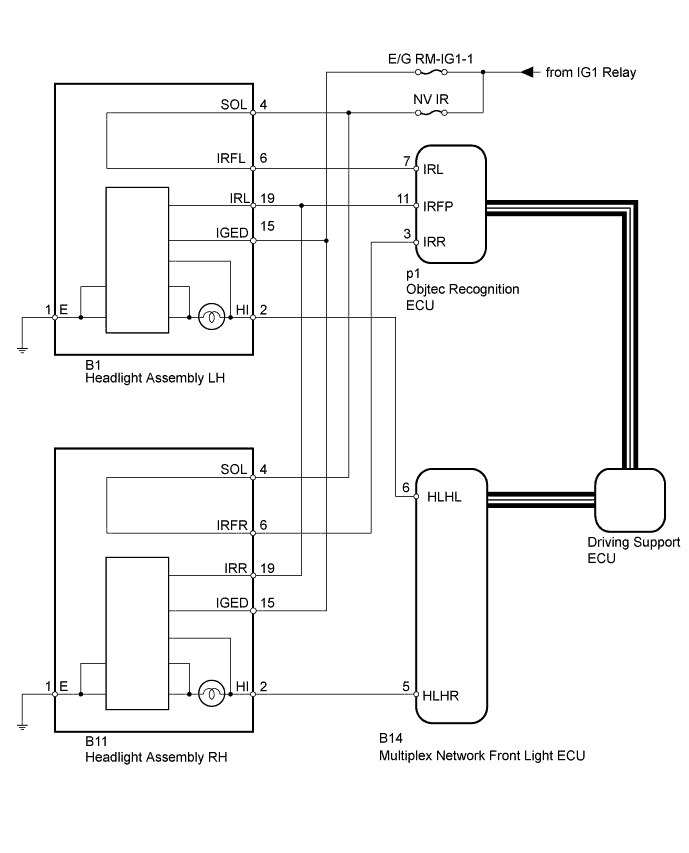
INSPECTION PROCEDURE
Note
Inspect the fuses and bulbs for circuits related to this system before performing the following inspection procedure.
PROCEDURE
-
CHECK LIGHTING SYSTEM
-
Check if the lighting system is malfunctioning Click here.
OK No malfunctions are present in the lighting system.
NG 
GO TO LIGHTING SYSTEM Click here
OK 
-
-
CHECK CAN COMMUNICATION SYSTEM
-
Use the intelligent tester to check if the CAN communication system is functioning normally.
-
for LHD: Click here
-
for RHD: Click here
Result Result Proceed to CAN communication DTCs are not output. A CAN communication DTCs are output. (for LHD) B CAN communication DTCs are output. (for RHD) C -
B
GO TO CAN COMMUNICATION SYSTEM Click here
C
GO TO CAN COMMUNICATION SYSTEM Click here
A
-
-
PERFORM ACTIVE TEST USING INTELLIGENT TESTER
-
Select the Active Test, use the intelligent tester to generate a control command, and then check that the near infrared ray emitter operates Click here.
Pre-Crash 2 Tester Display Test Part Control Range Diagnostic Note Infrared Signal Status Near infrared ray emitter operates ON/OFF - OK A blurred light is emitted.
NG 
CHECK HARNESS AND CONNECTOR (HEADLIGHT ASSEMBLY - MULTIPLEX NETWORK FRONT LIGHT ECU AND BODY GROUND) Click here
OK
-
-
CHECK OBJECT RECOGNITION ECU
-
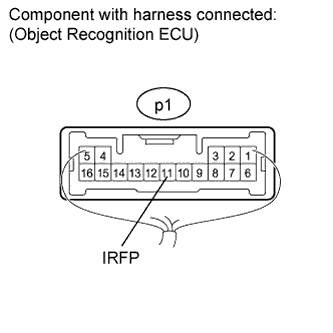
Using the intelligent tester, enter the following menus: Body Electrical / Pre-Crash 2 / Active Test. Click here
-
Select "Infrared Signal Status", and perform the Active Test.
-
Measure the voltage according to the value(s) in the table below.
Standard Voltage Tester Connection Condition Specified Condition p1-11 (IRFP) - Body ground
-
Power switch on (IG)
-
Active Test is performed
Auxiliary battery voltage x 0.3 to Auxiliary battery x 0.6 V -
NG
CHECK HARNESS AND CONNECTOR (HEADLIGHT ASSEMBLY - AUXILIARY BATTERY AND BODY GROUND) Click here
OK
-
-
CHECK OBJECT RECOGNITION ECU
-
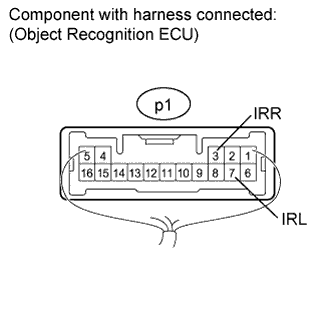
Measure the voltage according to the value(s) in the table below.
Standard Voltage for LH Tester Connection Switch Condition Specified Condition p1-7 (IRL) - Body ground Power switch on (IG) 11 to 14 V for RH Tester Connection Switch Condition Specified Condition p1-3 (IRR) - Body ground Power switch on (IG) 11 to 14 V
NG
CHECK HARNESS AND CONNECTOR (HEADLIGHT ASSEMBLY - OBJECT RECOGNITION ECU AND AUXILIARY BATTERY) Click here
OK 
REPLACE OBJECT RECOGNITION ECU Click here
-
-
CHECK HARNESS AND CONNECTOR (HEADLIGHT ASSEMBLY - OBJECT RECOGNITION ECU AND AUXILIARY BATTERY)
-
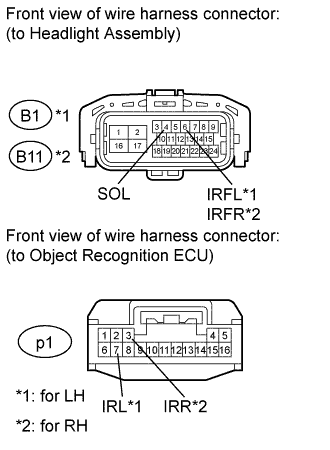
Disconnect the B1*1 and/or B11*2 headlight connector.
-
*1: for LH
-
*2: for RH
-
-
Disconnect the p1 object recognition ECU connector.
-
Measure the voltage according to the value(s) in the table below.
Standard Voltage for LH Tester Connection Switch Condition Specified Condition B1-4 (SOL) - Body ground Power switch on (IG) 11 to 14 V for RH Tester Connection Switch Condition Specified Condition B11-4 (SOL) - Body ground Power switch on (IG) 11 to 14 V -
Measure the resistance according to the value(s) in the table below.
Standard Resistance for LH Tester Connection Condition Specified Condition B1-6 (IRFL) - p1-7 (IRL) Always Below 1 Ω B1-6 (IRFL) or p1-7 (IRL) - Body ground Always 10 kΩ or higher for RH Tester Connection Condition Specified Condition B11-6 (IRFR) - p1-3 (IRR) Always Below 1 Ω B11-6 (IRFR) or p1-3 (IRR) - Body ground Always 10 kΩ or higher Result Result Proceed to OK (for LH) A OK (for RH) B NG C
B
REPLACE HEADLIGHT UNIT RH Click here
C
REPAIR OR REPLACE HARNESS OR CONNECTOR
A
REPLACE HEADLIGHT UNIT LH Click here
-
-
CHECK HARNESS AND CONNECTOR (HEADLIGHT ASSEMBLY - AUXILIARY BATTERY AND BODY GROUND)
-
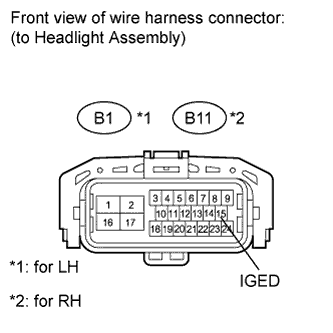
Disconnect the B1*1 and/or B11*2 headlight connector.
-
*1: for LH
-
*2: for RH
-
-
Measure the voltage according to the value(s) in the table below.
Standard Voltage for LH Tester Connection Switch Condition Specified Condition B1-15 (IGED) - Body ground Power switch on (IG) 11 to 14 V for RH Tester Connection Switch Condition Specified Condition B11-15 (IGED) - Body ground Power switch on (IG) 11 to 14 V
NG
REPAIR OR REPLACE HARNESS OR CONNECTOR
OK
-
-
CHECK HARNESS AND CONNECTOR (HEADLIGHT ASSEMBLY - OBJECT RECOGNITION ECU)
-
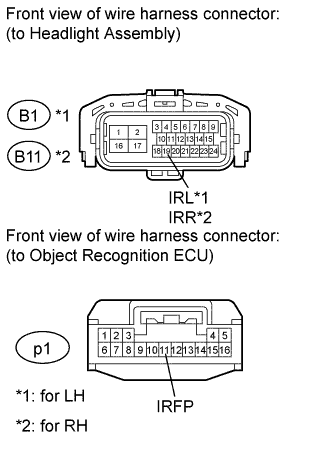
Disconnect the B1*1 and/or B11*2 headlight connector.
-
*1: for LH
-
*2: for RH
-
-
Disconnect the p1 object recognition ECU connector.
-
Measure the resistance according to the value(s) in the table below.
Standard Resistance for LH Tester Connection Condition Specified Condition B1-19 (IRL) - p1-11 (IRFP) Always Below 1 Ω B1-19 (IRL) or p1-11 (IRFP) - Body ground Always 10 kΩ or higher for RH Tester Connection Condition Specified Condition B11-19 (IRR) - p1-11 (IRFP) Always Below 1 Ω B11-19 (IRR) or p1-11 (IRFP) - Body ground Always 10 kΩ or higher Result Result Proceed to OK (for LH) A OK (for RH) B NG C
B
REPLACE HEADLIGHT UNIT RH Click here
C
REPAIR OR REPLACE HARNESS OR CONNECTOR
A
REPLACE HEADLIGHT UNIT LH Click here
-
-
CHECK HARNESS AND CONNECTOR (HEADLIGHT ASSEMBLY - MULTIPLEX NETWORK FRONT LIGHT ECU AND BODY GROUND)
-
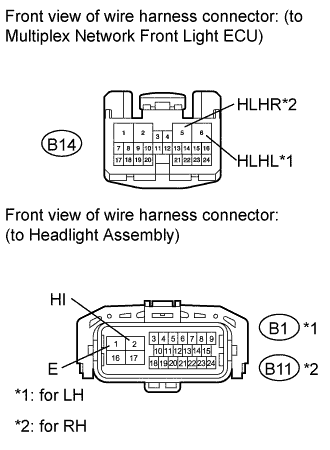
Disconnect the B1*1 and/or B11*2 headlight connector.
-
*1: for LH
-
*2: for RH
-
-
Disconnect the B14 multiplex network front light ECU connector.
-
Measure the resistance according to the value(s) in the table below.
Standard Resistance for LH Tester Connection Condition Specified Condition B1-2 (HI) - B14-6 (HLHL) Always Below 1 Ω B1-1 (E) - Body ground Always Below 1 Ω B1-2 (HI) or B14-6 (HLHL) - Body ground Always 10 kΩ or higher for RH Tester Connection Condition Specified Condition B11-2 (HI) - B14-5 (HLHR) Always Below 1 Ω B11-1 (E) - Body ground Always Below 1 Ω B11-2 (HI) or B14-5 (HLHR) - Body ground Always 10 kΩ or higher
NG
REPAIR OR REPLACE HARNESS OR CONNECTOR
OK
-
-
CHECK MULTIPLEX NETWORK FRONT LIGHT ECU
-
Temporarily replace the multiplex network front light ECU with a new or normally functioning one.
-
Clear the DTCs Click here.
-
Recheck for DTC Click here.
Result Result Proceed to DTC C1A6A is not output A DTC C1A6A is output (for LH) B DTC C1A6A is output (for RH) C
B
REPLACE HEADLIGHT UNIT LH Click here
C
REPLACE HEADLIGHT UNIT RH Click here
A
END (MULTIPLEX NETWORK FRONT LIGHT ECU IS DEFECTIVE)
-