-
Use the same procedure for RHD and LHD vehicles.
-
The procedure listed below is for LHD vehicles.
- Click here
DISABLE AUTOAWAY/RETURN FUNCTION (for Power Tilt and Power Telescopic Steering Column)
-
Disable the Autoaway/Return function by changing the customize parameter (Click here).
Note:Record the current customize parameter setting (whether the Autoaway/Return function is enabled or disabled) in order to restore the current setting after finishing the operation.
Tip:Performing the above operation causes the Autoaway/Return function to be disabled when the ignition switch is turned off.
-
Turn the ignition switch to ON. Operate the tilt and telescopic switch to fully extend and lower the steering column.
-
Turn the ignition switch off.
-
-
Click here
REMOVE INSTRUMENT CLUSTER FINISH PANEL ORNAMENT (for LHD)
-
Put protective tape around the instrument cluster finish panel ornament.
Table 1. Text in Illustration *1 Protective Tape -
Using a moulding remover, detach the 3 clips and remove the instrument cluster finish panel ornament.
-
-
Click here
REMOVE INSTRUMENT PANEL FINISH PLATE GARNISH (for RHD)
-
Detach the 4 clips.
-
Disconnect each connector and remove the instrument panel finish plate garnish.
-
-
Click here
REMOVE LOWER INSTRUMENT PANEL FINISH PANEL ASSEMBLY
-
Detach the 4 clips.
-
Disconnect each connector and remove the instrument panel finish panel.
-
-
Click here
REMOVE INSTRUMENT CLUSTER FINISH PANEL SUB-ASSEMBLY
-
Detach the 4 claws, 2 clips and 2 guides and remove the instrument cluster finish panel.
-
- Click here
REMOVE TRIP SWITCH
-
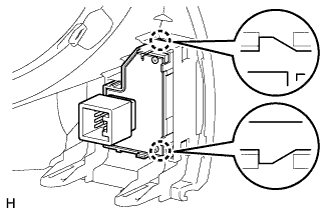
Detach the 2 claws and remove the trip switch.
-