METER / GAUGE SYSTEM INITIALIZATION

-
OIL MAINTENANCE INFORMATION MODE RESET OPERATION (for 1KD-FTV, for Optitron Meter)
Note
-
When "Oil Maintenance Required Soon" is displayed, change the engine oil and perform this procedure.
-
After the engine oil is changed, perform this procedure so that "Oil Maintenance Required Soon" does not display.
Tech Tips
-
The oil change maintenance system displays "Oil Maintenance Required Soon" in the multi-information display to inform the driver that it is time to change the oil based on the distance driven
-
The ODO/TRIP switch is in the light control rheostat.
-
Turn the ignition switch to ON, and use the ODO/TRIP switch to change the screen display to TRIP A.
-
Turn the ignition switch to off.
-
While holding in the ODO/TRIP switch, turn the ignition switch to on.
-
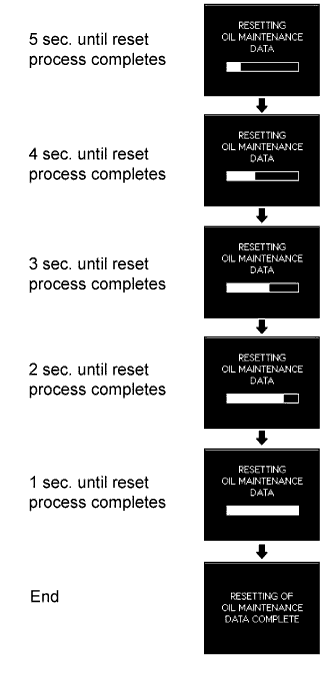
After a 5 second count, reset will end
Note
-
If the ignition switch is turned off during the reset operation, reset mode will be canceled.
-
If the ODO/TRIP switch is turned off during the reset operation, reset mode will be canceled.
-
-
-
OIL MAINTENANCE INFORMATION MODE RESET OPERATION (for 1KD-FTV, for Analog Meter)
Note
-
When the oil maintenance warning light is illuminated, change the engine oil and perform this procedure.
-
After the engine oil is changed, perform this procedure so that the oil maintenance warning light does not turn on.
-
Turn the ignition switch to ON, and use the ODO/TRIP switch to change the screen display to TRIP A.
-
Turn the ignition switch to off.
-
While holding in the ODO/TRIP switch, turn the ignition switch to ON.
-
After a 5 second count, reset will end
Note
-
If the ignition switch is turned off during the reset operation, reset mode will be canceled.
-
If the ODO/TRIP switch is turned off during the reset operation, reset mode will be canceled.
-
-
TIMING BELT INFORMATION MODE RESET OPERATION (for 1KD-FTV, for Optitron Meter)
Note
-
When "T-BELT Maintenance Required" is displayed, replace the timing belt and perform this procedure.
-
After the timing belt is replaced, perform this procedure so that "T-BELT Maintenance Required" does not display.
Tech Tips
-
The timing belt maintenance system displays "Maintenance Required" in the multi-information display to inform the driver that it is time to replace the timing belt based on the distance driven.
-
The ODO/TRIP switch is in the light control rheostat.
-
Turn the ignition switch to ON, and use the ODO/TRIP switch to change the screen display to TRIP B.
-
Turn the ignition switch to off.
-
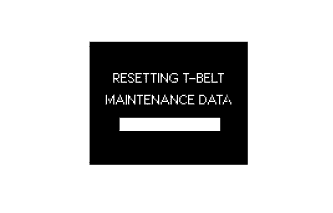
While holding in the ODO/TRIP switch, turn the ignition switch to ON.
Tech Tips
"RESETTING T-BELT MAINTENANCE DATA" will be displayed.
-
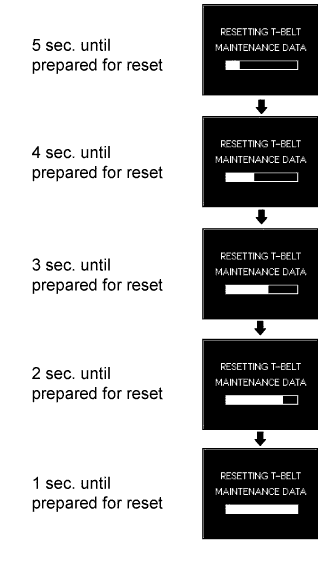
Press and hold the ODO/TRIP switch for 5 seconds or more.
Tech Tips
A 5 second count will begin on the display.
-
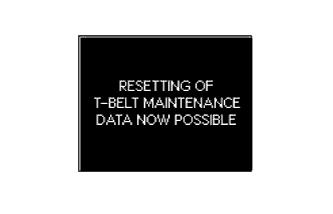
After the 5 second count finishes, "RESETTING OF T-BELT MAINTENANCE DATA NOW POSSIBLE" is displayed and T-BELT reset mode is complete.
-
While "RESETTING OF T-BELT MAINTENANCE DATA NOW POSSIBLE" is displayed, turn the ODO/TRIP switch from off to on.
Tech Tips
While "RESETTING OF T-BELT MAINTENANCE DATA NOW POSSIBLE" is displayed, if the ODO/TRIP switch is not turned from off to on, the normal display will return.
-
After the ODO/TRIP switch is turned on, enter the setting mode and change to T-BELT display mode.
Tech Tips
The T-BELT display mode will display the previously set value (the interval until the next time the timing belt needs to be replaced). However, the first time this is performed, the default setting from when the vehicle is delivered (150,000 km or 90,000 miles) is displayed.
-
Change the set value by repeatedly turning the ODO/TRIP switch on and off (the value must be changed within 5 seconds). (procedure A)
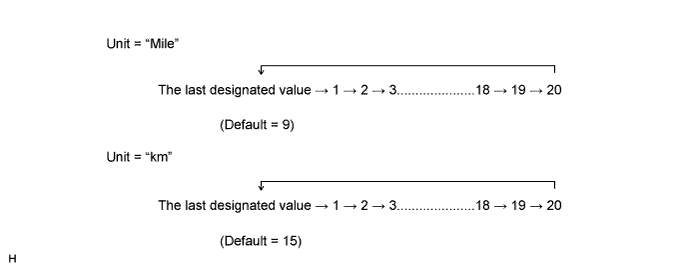
Tech Tips
Perform this procedure only when changing the previously set value.
Note
If the ODO/TRIP switch is not turned from on to off for 30 seconds or more during this step, the previously set value will be maintained and the TRIP B display will return (reset will not complete).
-
When the display changes to the desired setting, press the ODO/TRIP switch for 5 seconds or more to finish setting mode. (procedure B)
-
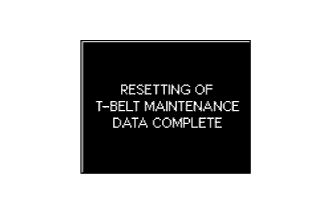
The set value is stored in the EEPROM, "RESETTING OF T-BELT MAINTENANCE DATA COMPLETE" is displayed (for 1 second), and reset mode is completed. (procedure C)
Tech Tips
If the set value is not stored in the EEPROM, "RESETTING OF T-BELT MAINTENANCE DATA COMPLETE" is not displayed and the normal display returns.
Note
-
When not changing the previously set value, do not perform the operations in procedure A above, only perform procedures B and C.
-
If the starter signal is received during the reset operation, reset mode is canceled and cannot be resumed until the ignition switch is turned off and on (IG) again.
-
-
-
TIMING BELT INFORMATION MODE RESET OPERATION (for 5L-E, 1KD-FTV, for Analog Meter)
Note
-
When the T-BELT indicator light is illuminated, replace the timing belt and perform this procedure.
-
After the timing belt is replaced, perform this procedure so that the T-BELT indicator light does not turn on.
Tech Tips
-
The timing belt maintenance system turns on the T-BELT indicator light to inform the driver that it is time to replace the timing belt based on the distance driven.
-
Turn the ignition switch to ON, and use the ODO/TRIP switch to change the screen display to TRIP B.
-
Turn the ignition switch to off.
-
While holding in the ODO/TRIP switch, turn the ignition switch to ON and check that the T-BELT indicator light blinks.
-
Press and hold the ODO/TRIP switch for 5 seconds or more.
Tech Tips
If the ODO/TRIP switch is released (off is detected) within 5 seconds, the ODO/TRIP display, indicator display, and the integrated value will return to the state before the reset operation began.
-
After the ODO/TRIP switch is turned off, turn the ODO/TRIP switch on again within 5 seconds.
-
After the ODO/TRIP switch is turned on, enter the setting mode and change to T-BELT display mode.
-
Change the set value in increments by turning the ODO/TRIP switch (the value must be changed within 5 seconds). (procedure A)
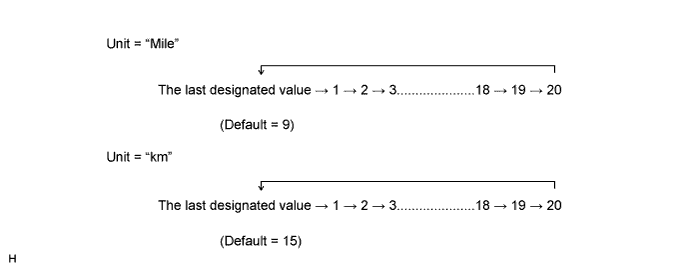
Tech Tips
Perform this procedure only when changing the previously set value.
Note
If the ODO/TRIP switch is not turned from on to off for 30 seconds or more during this step, the previously set value will be maintained and the TRIP B display will return (reset will not complete).
-
When the display changes to the desired setting, press the ODO/TRIP switch for 5 seconds or more to finish setting mode. (procedure B)
-
The ODO display area changes to the TRIP B display, the warning indicator turns off simultaneously and reset mode is completed. (procedure C)
Note
When not changing the previously set value, do not perform the operations in procedure A above, only perform procedures B and C.
-
-
METHOD TO DISABLE ECO DRIVING INDICATOR LIGHT (for Analog Meter)
Tech Tips
-
The eco driving indicator light can be disabled through the customize function.
-
When the eco driving indicator light is disabled, the initial check for the eco driving indicator light is not performed by the system.
-
Press the ODO/TRIP switch to display the eco driving indicator user customize screen.
-
Press the ODO/TRIP switch and select "Eco OFF".
Tech Tips
-
The initial setting is "Eco On".
-
The eco driving indicator light can be enabled by selecting "Eco On".
-
-
-
METHOD TO DISABLE ECO DRIVING INDICATOR LIGHT (for Optitron Meter)
Tech Tips
-
The eco driving indicator light can be disabled through the customize function.
-
When the eco driving indicator light is disabled, the initial check for the eco driving indicator light is not performed by the system.
-
With the vehicle stationary or at a vehicle speed of less than 8 km/h (4.9 mph), press and hold the menu switch on the steering pad switch to display the meter customize mode screen.
-
Press the ENTER switch on the steering pad switch up or down to display the "ECO ON/OFF SET" screen, and then press the ENTER switch.
-
Press the ENTER switch on the steering pad switch up or down to select "ECO.OFF", and then press the ENTER switch.
Tech Tips
The eco driving indicator light can be enabled by selecting "ECO.ON".
-
Press the menu switch on the steering pad switch to end meter customize mode.
-
-
FUEL FILTER WARNING LIGHT RESET OPERATION (for 1KD-FTV)
Tech Tips
-
When the fuel system warning light blinks, drain accumulated water from the fuel filter assembly.
-
When the fuel system warning light illuminates, follow the procedures below to reset the combination meter assembly.
-
Replace the fuel filter assembly Click here.
-
Disconnect the A76 filter warning switch connector.
-
Turn the ignition switch to ON
-
Wait 3 seconds.
-
Reconnect the A76 filter warning switch connector within 57 seconds.
-
Make sure that the fuel system warning light turns off 3 seconds after the connector is reconnected.
-