DESCRIPTION
-
When the intrusion sensor OFF switch on the map light assembly is pressed, the sensor off signal is sent to the main body ECU which causes the theft warning radar sensor (intrusion sensor) to stop operating.
INSPECTION PROCEDURE
PROCEDURE
- Click here
READ VALUE USING INTELLIGENT TESTER (INTRUSION SENSOR OFF SWITCH)
-
Using the intelligent tester, read the Data List (Click here).
Table 1. Main Body Tester Display Measurement Item/Range Normal Condition Diagnostic Note Intrusion Sens OFF SW Intrusion sensor OFF switch /
ON or OFF
ON: Intrusion sensor OFF switch pushed
OFF: Intrusion sensor OFF switch not pushed
- OK ON (intrusion sensor OFF switch pushed) and OFF (intrusion sensor OFF switch not pushed) appear on screen according to switch condition.
- OKClick here
- NGClick here
-
- Click here
INSPECT MAP LIGHT ASSEMBLY (INTRUSION SENSOR OFF SWITCH)
-
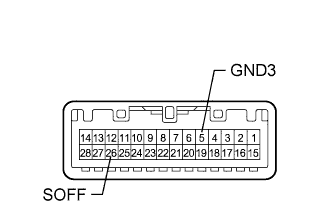
Remove the map light (Click here).
-
Measure the resistance according to the value(s) in the table below.
Standard Resistance Tester Connection Switch Condition Specified Condition 5 (GND3) - 26 (SOFF) Intrusion sensor OFF switch pushed Below 1 Ω 5 (GND3) - 26 (SOFF) Intrusion sensor OFF switch not pushed 10 kΩ or higher
- OKClick here
- NGClick here
-
- Click here
CHECK HARNESS AND CONNECTOR (MAP LIGHT - MAIN BODY ECU AND BODY GROUND)
-
Disconnect the W7 light connector.
-
Disconnect the G64 ECU connector.
-
Measure the resistance according to the value(s) in the table below.
Standard Resistance Tester Connection Condition Specified Condition W7-26 (SOFF) - G64-23 (SSW1) Always Below 1 Ω W7-26 (SOFF) or G64-23 (SSW1) - Body ground Always 10 kΩ or higher W7-5 (GND3) - Body ground Always Below 1 Ω
- OKClick here
- NGClick here
-
- Click here
REPLACE MAIN BODY ECU (MULTIPLEX NETWORK BODY ECU)Click here
- Click here
REPLACE MAP LIGHT ASSEMBLY (INTRUSION SENSOR OFF SWITCH)Click here
- Click here
REPAIR OR REPLACE HARNESS OR CONNECTOR
- Click here
PROCEED TO NEXT SUSPECTED AREA SHOWN IN PROBLEM SYMPTOMS TABLEClick here