MULTI-TERRAIN SELECT SWITCH REMOVAL

-
REMOVE INTEGRATION CONTROL AND PANEL ASSEMBLY
-
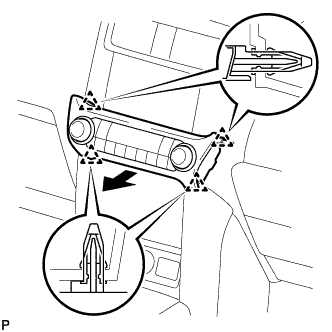
Detach the 4 clips.
-
Disconnect the connector and remove the integration control and panel assembly.
-
-
REMOVE INSTRUMENT PANEL FINISH PANEL END LH
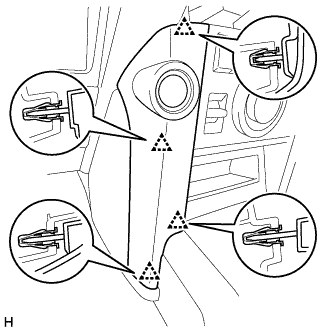
-
Detach the 4 clips and remove the instrument panel finish panel end LH.
-
-
REMOVE INSTRUMENT PANEL FINISH PANEL END RH
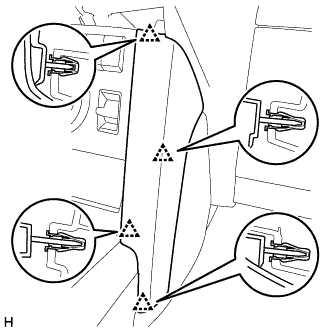
-
Detach the 4 clips and remove the instrument panel finish panel end RH.
-
-
REMOVE FRONT CONSOLE UPPER PANEL GARNISH
-
w/o Seat Heater System:
-
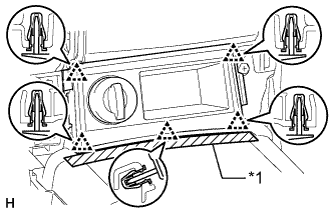
Text in Illustration *1 Protective Tape Put protective tape around the front console upper panel garnish.
-
Detach the 5 clips and remove the front console upper panel garnish.
-
Disconnect the connector.
-
-
w/o CRAWL:
-
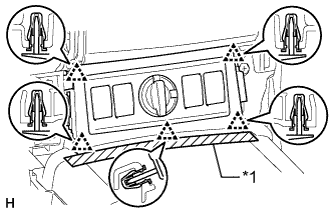
Text in Illustration *1 Protective Tape Put protective tape around the front console upper panel garnish.
-
Detach the 5 clips and remove the front console upper panel garnish.
-
Disconnect each connector.
-
-
w/ CRAWL:
-
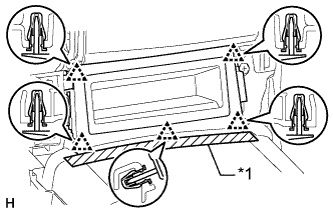
Text in Illustration *1 Protective Tape Put protective tape around the front console upper panel garnish.
-
Detach the 5 clips and remove the front console upper panel garnish.
-
-
-
REMOVE COMBINATION SWITCH
-
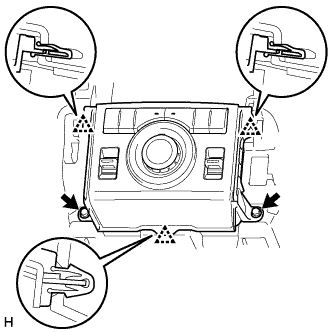
Remove the 2 bolts.
-
Detach the 3 clamps and remove the center cluster module switch.
-
Disconnect the connector.
-
-
REMOVE CENTER CLUSTER MODULE SWITCH (MULTI-TERRAIN SELECT SWITCH)
-
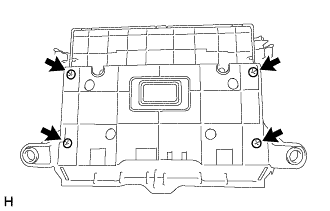
Remove the 4 screws and center cluster module panel from the center cluster module switch.
-