DESCRIPTION
When 2nd start mode is selected with the pattern select (2ND) switch, the ECM controls the solenoid valves and the transmission starts from 2nd gear.
The 2nd mode is the system that operates the throttle motor to control engine output to reduce skidding of the driving wheels, and guarantee takeoff acceleration, driving straightness and turning stability.
When the shift lever is in D, the transmission automatically shifts up through 2nd to 5th as usual.
-
The pattern select (2ND) switch is a momentary-type switch.
-
In order to cancel 2nd mode, push the pattern select (2ND) switch again or turn the ignition switch off.
INSPECTION PROCEDURE
PROCEDURE
- Click here
INSPECT PATTERN SELECT (2ND) SWITCH ASSEMBLY
-
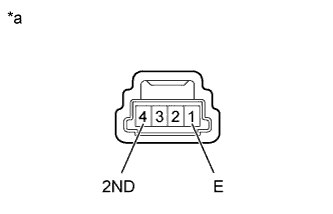
Remove the pattern select (2ND) switch assembly (Click here).
-
Measure the resistance according to the value(s) in the table below.
Standard Resistance Tester Connection Switch Condition Specified Condition 1 (E) - 4 (2ND) Pattern select (2ND) switch pushed Below 1 Ω 1 (E) - 4 (2ND) Pattern select (2ND) switch not pushed 10 kΩ or higher Table 1. Text in Illustration *a Component without harness connected
(Pattern Select (2ND) Switch Assembly)
- OKClick here
- NGClick here
-
- Click here
CHECK HARNESS AND CONNECTOR (PATTERN SELECT (2ND) SWITCH - BODY GROUND)
-
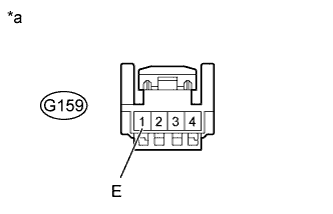
Disconnect the G159 pattern select (2ND) switch connector.
-
Measure the resistance according to the value(s) in the table below.
Standard Resistance Tester Connection Condition Specified Condition G159-1 (E) - Body ground Always Below 1 Ω Table 2. Text in Illustration *a Front view of wire harness connector
(Pattern Select (2ND) Switch Assembly)
- OKClick here
- NGClick here
-
- Click here
CHECK HARNESS AND CONNECTOR (PATTERN SELECT (2ND) SWITCH - ECM)
-
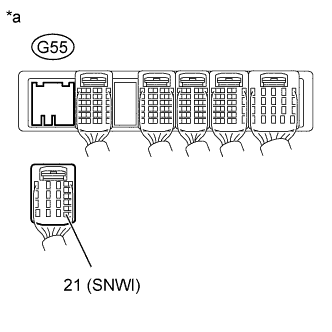
Disconnect the G55 ECM connector.
-
Measure the resistance according to the value(s) in the table below.
Standard Resistance Tester Connection Switch Condition Specified Condition G55-21 (SNWI) - Body ground Pattern select (2ND) switch pushed Below 1 Ω G55-21 (SNWI) - Body ground Pattern select (2ND) switch not pushed 10 kΩ or higher Table 3. Text in Illustration *a Rear view of wire harness connector
(to ECM)
- OKClick here
- NGClick here
-
- Click here
PROCEED TO NEXT SUSPECTED AREA SHOWN IN PROBLEM SYMPTOMS TABLEClick here
- Click here
REPLACE PATTERN SELECT (2ND) SWITCH ASSEMBLYClick here
- Click here
REPAIR OR REPLACE HARNESS OR CONNECTOR
- Click here
REPAIR OR REPLACE HARNESS OR CONNECTOR