REAR CRANKSHAFT OIL SEAL REMOVAL

-
REMOVE AUTOMATIC TRANSMISSION ASSEMBLY (for Automatic Transmission)
-
Remove the automatic transmission Click here.
-
-
REMOVE MANUAL TRANSMISSION ASSEMBLY (for Manual Transmission)
-
Remove the manual transmission Click here.
-
-
REMOVE DRIVE PLATE AND RING GEAR SUB-ASSEMBLY (for Automatic Transmission)
-
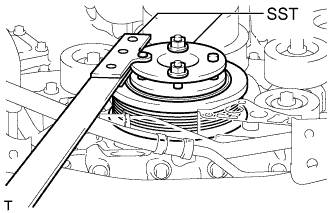
Using SST, hold the crankshaft.
- SST
- 09213-54015 ( 91651-60855 )
- 09330-00021
-
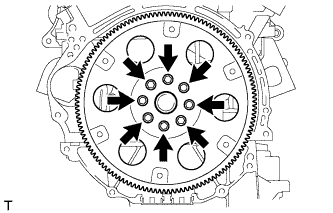
Remove the 8 bolts, rear spacer, drive plate and front spacer.
-
-
REMOVE CLUTCH COVER ASSEMBLY (for Manual Transmission)
-
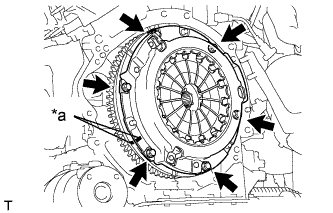
Text in Illustration *a Matchmark Put matchmarks on the clutch cover and flywheel.
-
Loosen each set bolt one turn at a time until spring tension is released.
-
Remove the 6 set bolts and pull off the clutch cover.
Note
Do not drop the clutch disc.
-
-
REMOVE CLUTCH DISC ASSEMBLY (for Manual Transmission)
Note
Keep the lining part of the clutch disc, the pressure plate and the surface of the flywheel away from oil and foreign matter.
-
REMOVE FLYWHEEL SUB-ASSEMBLY (for Manual Transmission)
-
Using SST, hold the crankshaft.
- SST
- 09213-54015 ( 91651-60855 )
- 09330-00021
-
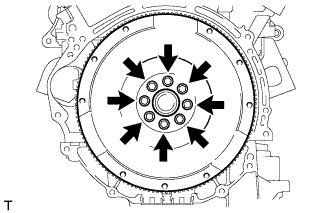
Remove the 8 bolts and flywheel.
Note
Do not reuse the bolts.
-
-
REMOVE REAR CRANKSHAFT OIL SEAL
-
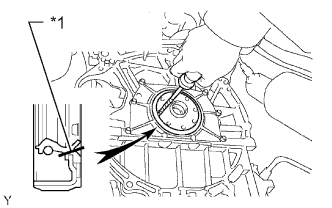
Text in Illustration *1 Cut Position Using a knife, cut off the lip of the oil seal.
-
Using a screwdriver, pry out the oil seal.
Tech Tips
Tape the screwdriver tip before use.
Note
Do not damage the surface of the oil seal press fit hole or crankshaft.
-