CYLINDER HEAD GASKET REMOVAL

-
REMOVE TIMING CHAIN COVER SUB-ASSEMBLY
-
Remove the timing chain cover Click here.
-
-
SET NO. 1 CYLINDER TO TDC / COMPRESSION
-
Temporarily install the pulley set bolt.
-
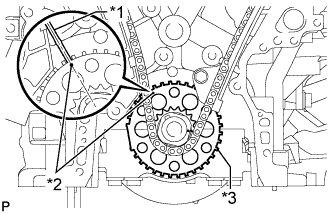
Text in Illustration *1 Center Line *2 Timing Mark *3 Sensor Plate Turn the crankshaft clockwise to align the timing mark on the crank angle sensor plate with the RH block bore center line (TDC/compression).
-
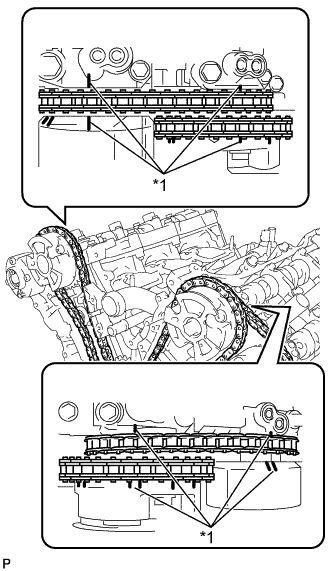
Text in Illustration *1 Timing Mark Check that the timing marks of the camshaft timing gears are aligned with the timing marks of the bearing caps as shown in the illustration.
If not, turn the crankshaft clockwise 1 revolution (360°) and align the timing marks as above.
-
-
REMOVE NO. 1 CHAIN TENSIONER ASSEMBLY
-
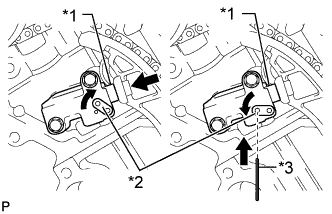
Text in Illustration *1 Plunger *2 Stopper Plate *3 Pin Move the stopper plate upward to release the lock, and push the plunger deep into the tensioner.
-
Move the stopper plate downward to set the lock, and insert a pin of φ1.27 mm (0.0500 in.) into the stopper plate hole.
-
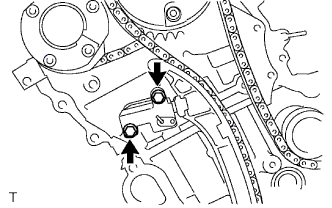
Remove the 2 bolts and No. 1 chain tensioner assembly.
-
-
REMOVE CHAIN TENSIONER SLIPPER
-
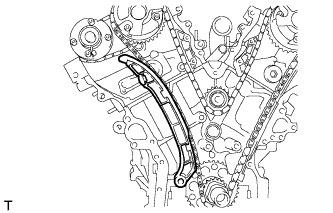
Remove the chain tensioner slipper.
-
-
REMOVE CHAIN SUB-ASSEMBLY
-
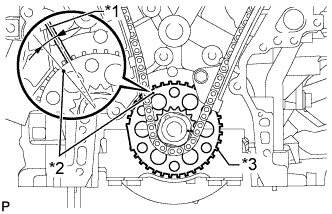
Text in Illustration *1 Center Line *2 Timing Mark *3 Sensor Plate Turn the crankshaft counterclockwise 10° to loosen the chain of the crankshaft timing sprocket.
-
Remove the pulley set bolt.
-
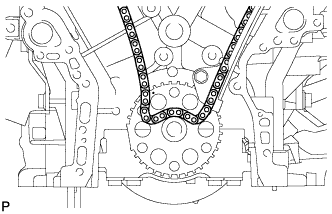
Remove the chain sub-assembly from the crankshaft timing sprocket and place it on the crankshaft.
-
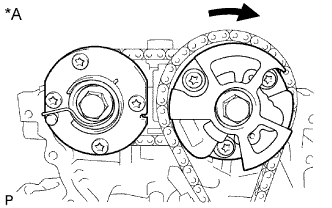
Turn the camshaft timing gear assembly on bank 1 clockwise approximately 60° so that it is as shown in the illustration. Be sure to loosen the chain sub-assembly between the banks.
-
Remove the chain sub-assembly.
Text in Illustration *A for Bank 1
-
-
REMOVE NO. 1 IDLE GEAR SHAFT
-
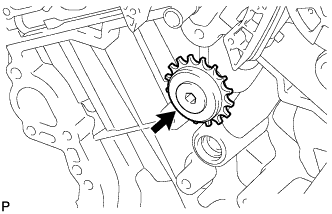
Using a 10 mm hexagon wrench, remove the No. 2 idle gear shaft, No. 1 idle gear and No. 1 idle gear shaft.
-
-
REMOVE NO. 1 CHAIN VIBRATION DAMPER
-
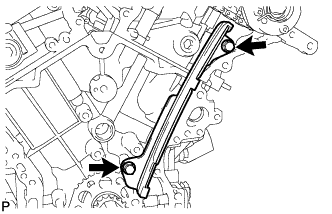
Remove the 2 bolts and No. 1 chain vibration damper.
-
-
REMOVE NO. 2 CHAIN VIBRATION DAMPER
-
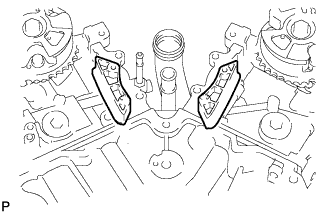
Remove the 2 No. 2 chain vibration dampers.
-
-
REMOVE CRANKSHAFT TIMING SPROCKET
-
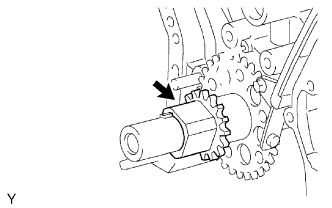
Remove the crankshaft timing sprocket.
-
-
REMOVE CAMSHAFT TIMING GEARS AND NO. 2 CHAIN (for Bank 1)
-
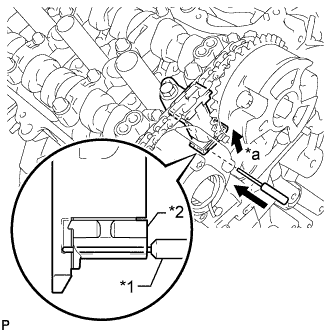
Text in Illustration *1 Pin *2 Plunger *a Push While raising the No. 2 chain tensioner assembly, insert a pin with a diameter of 1.0 mm (0.0394 in.) into the hole to hold the No. 2 chain tensioner assembly.
-
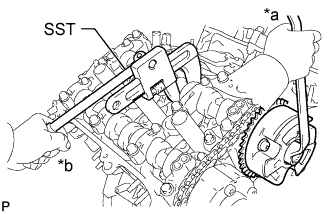
Text in Illustration *a Turn *b Hold Using SST to hold the hexagonal portion of each camshaft, loosen the bolts of the camshaft timing gear assembly and camshaft timing exhaust gear assembly.
- SST
- 09922-10010
Note
Do not loosen the other 4 bolts. If any of the 4 bolts is loosened, replace the camshaft timing gear assembly and/or camshaft timing exhaust gear assembly with a new one.
-
Remove the 2 bolts and camshaft timing gear assembly together with the No. 2 chain.
-
-
REMOVE NO. 2 CHAIN TENSIONER ASSEMBLY
-
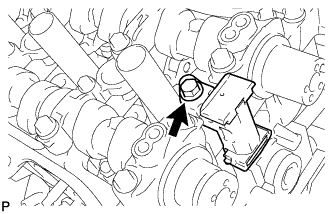
Remove the bolt and No. 2 chain tensioner assembly.
-
-
REMOVE CAMSHAFT BEARING CAP (for Bank 1)
-
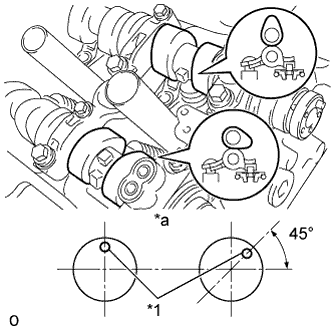
Text in Illustration *1 Knock Pin *a Front View Check that the camshafts are positioned as shown in the illustration.
-
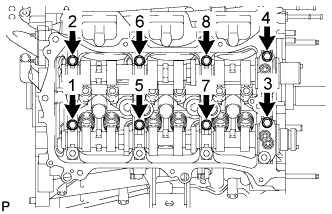
Uniformly loosen and remove the 8 bearing cap bolts in several steps in the sequence shown in the illustration.
-
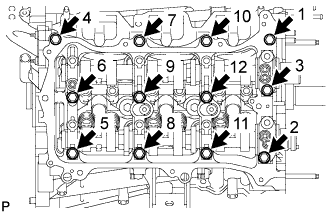
Uniformly loosen and remove the 12 bearing cap bolts in several steps in the sequence shown in the illustration.
Note
Uniformly loosen the bolts while keeping the camshaft level.
-
Remove the 5 camshaft bearing caps.
-
Remove the camshaft and No. 2 camshaft.
-
-
REMOVE CAMSHAFT HOUSING SUB-ASSEMBLY RH
-
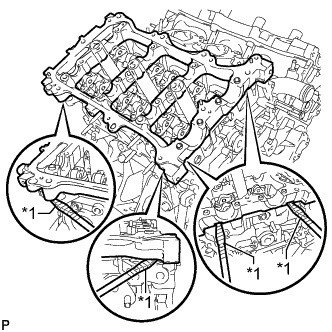
Text in Illustration *1 Protective Tape Remove the camshaft housing sub-assembly RH by prying between the cylinder head and camshaft housing sub-assembly RH with a screwdriver.
Tech Tips
Tape the screwdriver tip before use.
Note
Be careful not to damage the contact surfaces of the cylinder head and camshaft housing sub-assembly RH.
-
-
REMOVE CAMSHAFT TIMING GEARS AND NO. 2 CHAIN (for Bank 2)
-
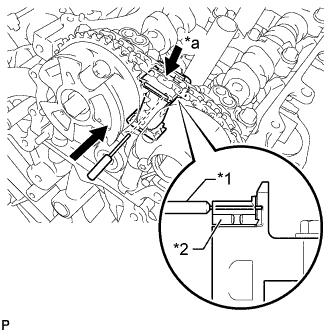
Text in Illustration *1 Pin *2 Plunger *a Push While pushing down the No. 3 chain tensioner assembly, insert a pin with a diameter of 1.0 mm (0.0394 in.) into the hole to hold the No. 3 chain tensioner assembly.
-
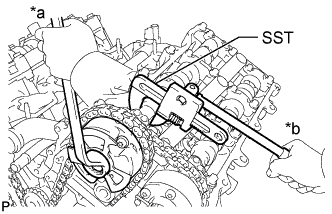
Text in Illustration *a Turn *b Hold Using SST to hold the hexagonal portion of each camshaft, loosen the bolts of the camshaft timing gear assembly and camshaft timing exhaust gear assembly.
- SST
- 09922-10010
Note
Do not loosen the other 4 bolts. If any of the 4 bolts is loosened, replace the camshaft timing gear assembly and/or camshaft timing exhaust gear assembly with a new one.
-
Remove the 2 bolts and camshaft timing gear together with the No. 2 chain.
-
-
REMOVE NO. 3 CHAIN TENSIONER ASSEMBLY
-
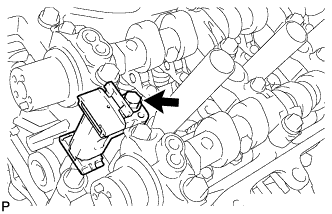
Remove the bolt and No. 3 chain tensioner assembly.
-
-
REMOVE CAMSHAFT BEARING CAP (for Bank 2)
-
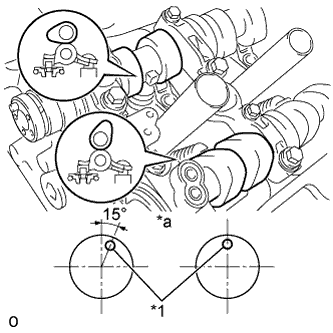
Text in Illustration *1 Knock Pin *a Front View Check that the camshafts are positioned as shown in the illustration.
-
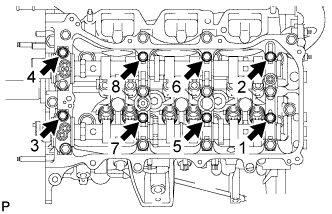
Uniformly loosen and remove the 8 bearing cap bolts in several steps in the sequence shown in the illustration.
-
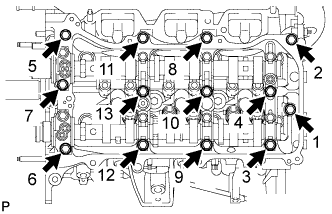
Uniformly loosen and remove the 13 bearing cap bolts in several steps in the sequence shown in the illustration.
Note
Uniformly loosen the bolts while keeping the camshaft level.
-
Remove the 5 camshaft bearing caps.
-
Remove the No. 3 camshaft and No. 4 camshaft.
-
-
REMOVE CAMSHAFT HOUSING SUB-ASSEMBLY LH
-
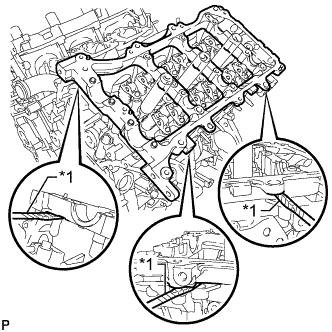
Text in Illustration *1 Protective Tape Remove the camshaft housing sub-assembly LH by prying between the cylinder head and camshaft housing sub-assembly LH with a screwdriver.
Tech Tips
Tape the screwdriver tip before use.
Note
Be careful not to damage the contact surfaces of the cylinder head and camshaft housing sub-assembly LH.
-
-
REMOVE NO. 1 VALVE ROCKER ARM SUB-ASSEMBLY
-
Remove the 24 valve rocker arms from the cylinder head.
Tech Tips
Arrange the removed parts in the correct order.
-
-
REMOVE VALVE LASH ADJUSTER ASSEMBLY
-
Remove the 24 valve lash adjusters from the cylinder head.
Tech Tips
Arrange the removed parts in the correct order.
-
-
REMOVE VALVE STEM CAP
-
Remove the 24 valve stem caps from the cylinder head.
Tech Tips
Arrange the removed parts in the correct order.
-
-
REMOVE REAR WATER BY-PASS JOINT
-
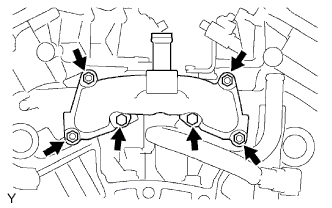
Remove the 2 bolts, 4 nuts, rear water by-pass joint and 2 gaskets.
-
Remove the O-ring from the No. 1 water outlet pipe.
-
-
REMOVE CYLINDER HEAD SUB-ASSEMBLY
-
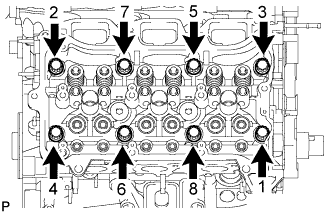
Using a 10 mm bi-hexagon wrench, uniformly loosen the 8 cylinder head bolts in the sequence shown in the illustration. Remove the 8 cylinder head bolts and plate washers.
Note
-
Be careful not to drop washers into the cylinder head sub-assembly.
-
Cylinder head warpage or cracking could result from removing bolts in an incorrect order.
Tech Tips
Arrange the removed parts in the correct order.
-
-
Remove the cylinder head sub-assembly.
-
-
REMOVE CYLINDER HEAD LH
-
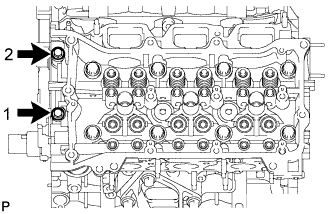
Uniformly loosen and remove the 2 cylinder head set bolts in several steps in the sequence shown in the illustration.
-
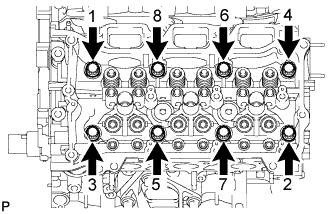
Using a 10 mm bi-hexagon wrench, uniformly loosen the 8 bolts in the sequence shown in the illustration. Remove the 8 cylinder head bolts and plate washers.
Note
-
Be careful not to drop washers into the cylinder head sub-assembly.
-
Cylinder head warpage or cracking could result from removing bolts in an incorrect order.
Tech Tips
Be sure to keep the removed parts for each installation position separate.
-
-
Remove the cylinder head LH.
-
-
REMOVE CYLINDER HEAD GASKET
-
REMOVE NO. 2 CYLINDER HEAD GASKET