-
Use the same procedure for RHD and LHD vehicles.
-
The procedure listed below is for LHD vehicles.
- Click here
INSTALL TELEPHONE ANTENNA CORD SUB-ASSEMBLY
-
Connect the connector to install the telephone antenna cord sub-assembly.
-
- Click here
INSTALL NAVIGATION ECU
-
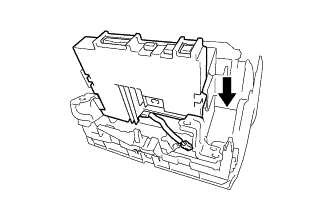
Insert the navigation ECU as shown in the illustration.
-
Install the navigation ECU with the 4 bolts.
3.0 N*m 31 kgf*cm 27 in.*lbf -
Attach the clamp.
-
Connect the connector.
-
- Click here
INSTALL NO. 1 NAVIGATION WIRE
-
Connect each connector to install the No. 1 navigation wire.
-
- Click here
INSTALL RADIO AND DISPLAY RECEIVER ASSEMBLY
-
Connect each connector.
-
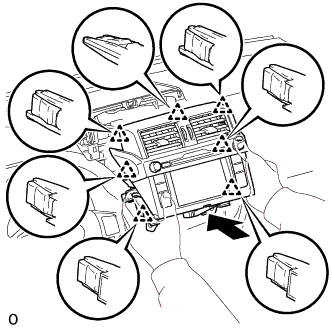
Insert the radio and display receiver assembly and attach the 7 clips on the backside of the radio and display receiver assembly.
Note:When inserting the receiver, do not press the knobs on it.
-
Install the radio and display receiver assembly with the 4 bolts.
12 N*m 122 kgf*cm 9 ft.*lbf
-
- Click here
INSTALL INTEGRATION CONTROL AND PANEL ASSEMBLY
-
Connect the connector.
-
Attach the 4 clips to install the integration control and panel assembly.
-
- Click here
CONNECT CABLE TO NEGATIVE BATTERY TERMINAL