INSPECTION PROCEDURE
When replacing the navigation receiver assembly, it is necessary to perform the vehicle contract setting for T-Connect (w/ T-Connect Function).
PROCEDURE
- Click here
CHECK MICROPHONE AND VOICE RECOGNITION (OPERATION CHECK)
-
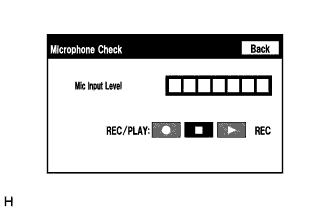
Enter the "Microphone Check" screen. [Refer to Check Mic&Voice Recognition in Operation Check (Click here)]
-
When voice is input into the microphone, check that the microphone input level meter changes according to the input voice.
-
Push the recording switch and perform voice recording.
-
Select the recording switch with the blower motor of the air conditioning system stopped. If an outlet of the air conditioning system is facing the microphone, noise may be recorded.
-
Voice can be recorded for up to 5 seconds.
-
-
Check that the recording indicator remains on while recording and that the recorded voice is played normally without noise or distortion.
OK All check results are normal.
- OKClick here
- NGClick here
-
- Click here
REPLACE NAVIGATION RECEIVER ASSEMBLYClick here
- Click here
PROCEED TO NEXT SUSPECTED AREA SHOWN IN PROBLEM SYMPTOMS TABLEClick here